Skip to content
  • Categories
  • Recent
  • Tags
  • Popular
Skins
  • Light
  • Brite
  • Cerulean
  • Cosmo
  • Flatly
  • Journal
  • Litera
  • Lumen
  • Lux
  • Materia
  • Minty
  • Morph
  • Pulse
  • Sandstone
  • Simplex
  • Sketchy
  • Spacelab
  • United
  • Yeti
  • Zephyr
  • Dark
  • Cyborg
  • Darkly
  • Quartz
  • Slate
  • Solar
  • Superhero
  • Vapor

  • Default (Zephyr)
  • No Skin
Collapse
RipperStore Logo
  1. Home
  2. Community
  3. General Questions
  4. Help with editing CryptiaCurves Ralsei

Help with editing CryptiaCurves Ralsei

Scheduled Pinned Locked Moved General Questions
helpavataredit
35 Posts 6 Posters 3.7k Views 2 Watching
  • Oldest to Newest
  • Newest to Oldest
  • Most Votes
Reply
  • Reply as topic
Log in to reply
This topic has been deleted. Only users with topic management privileges can see it.
  • cookiemonster655C
    cookiemonster655C
    cookiemonster655
    wrote on last edited by
    #10

    i may need to use the other fbx- im not sure i just didnt know what one i had to

    1 Reply Last reply
    0
    • cookiemonster655C
      cookiemonster655C
      cookiemonster655
      wrote on last edited by
      #11

      i also didnt mess with the size of the model (photo of transforms n stuff)
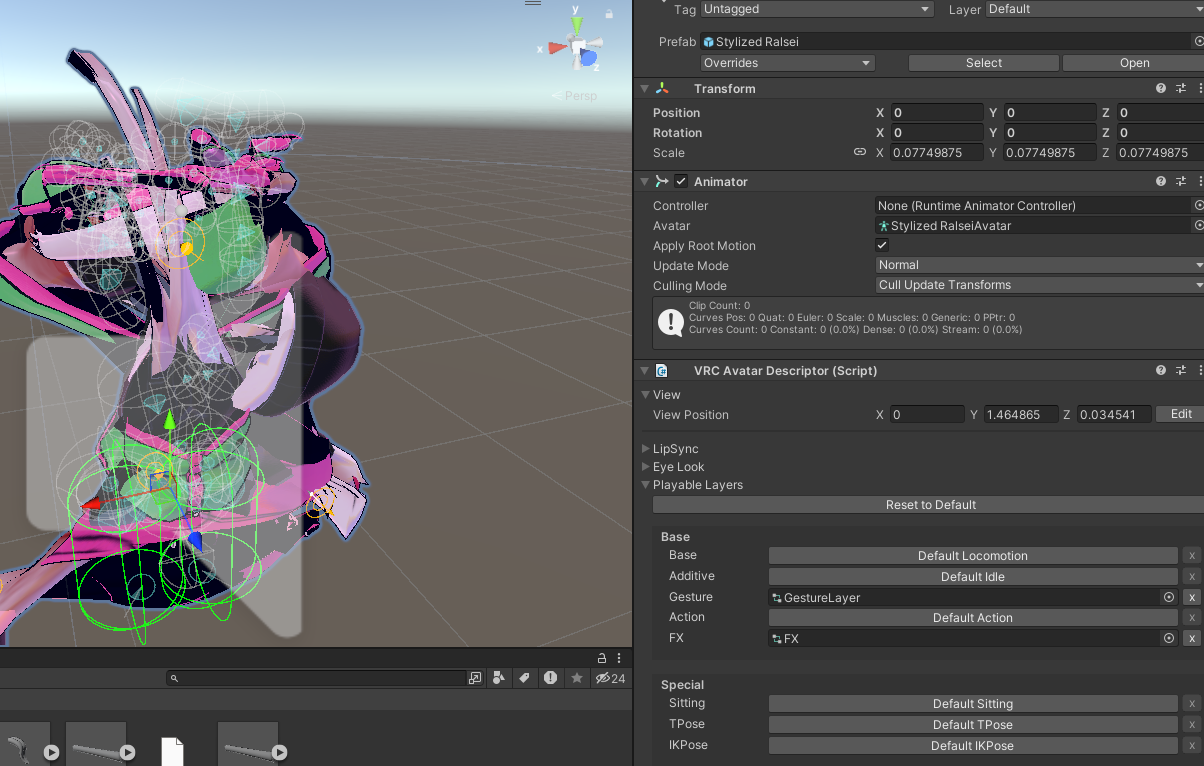
      image.png

      1 Reply Last reply
      0
      • missmycatM
        missmycatM
        missmycat
        wrote on last edited by
        #12

        @cookiemonster655

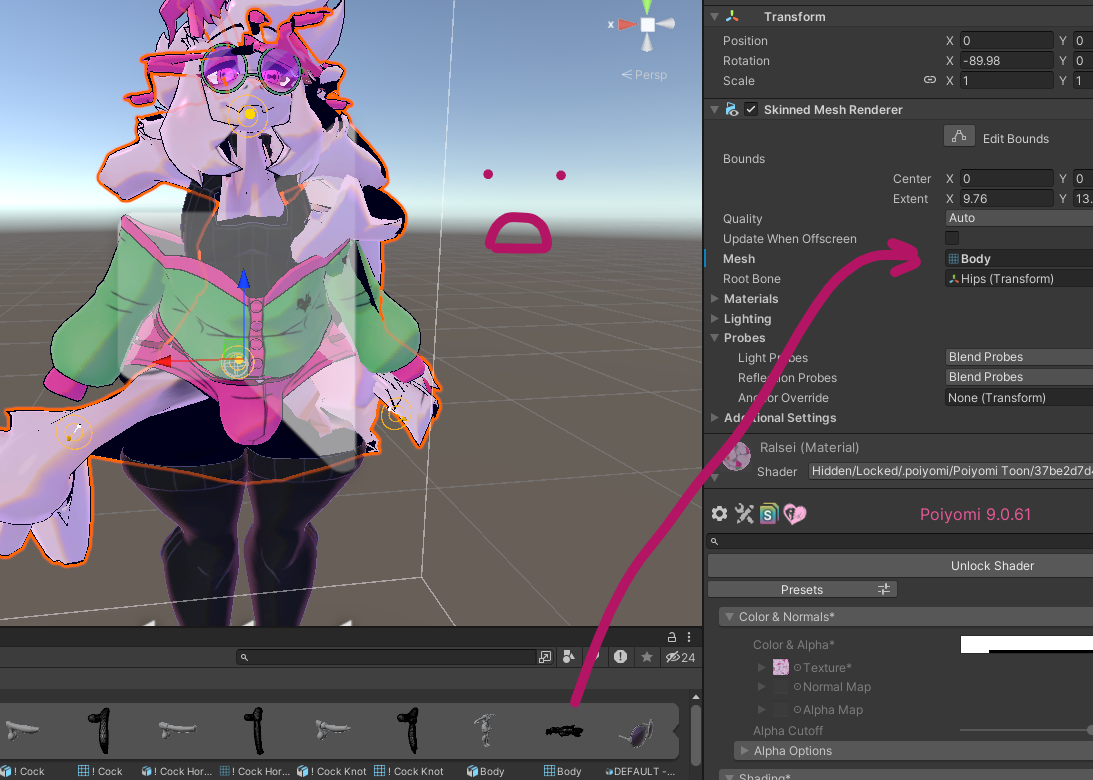
        this happened to me once even when rig was set to humanoid. i never figured it out so i put the new body mesh onto the old fbx and it worked. what happens if you do that?

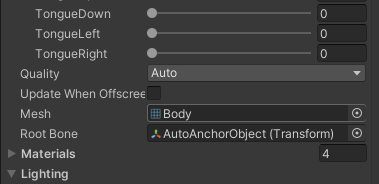
        select body, it's below the blendshapes
        alt text

        confirm in blender that your transforms are all 0,0,0 and scale is 1
        use either fbx all or fbx units scale
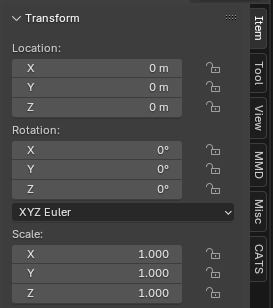
        alt text

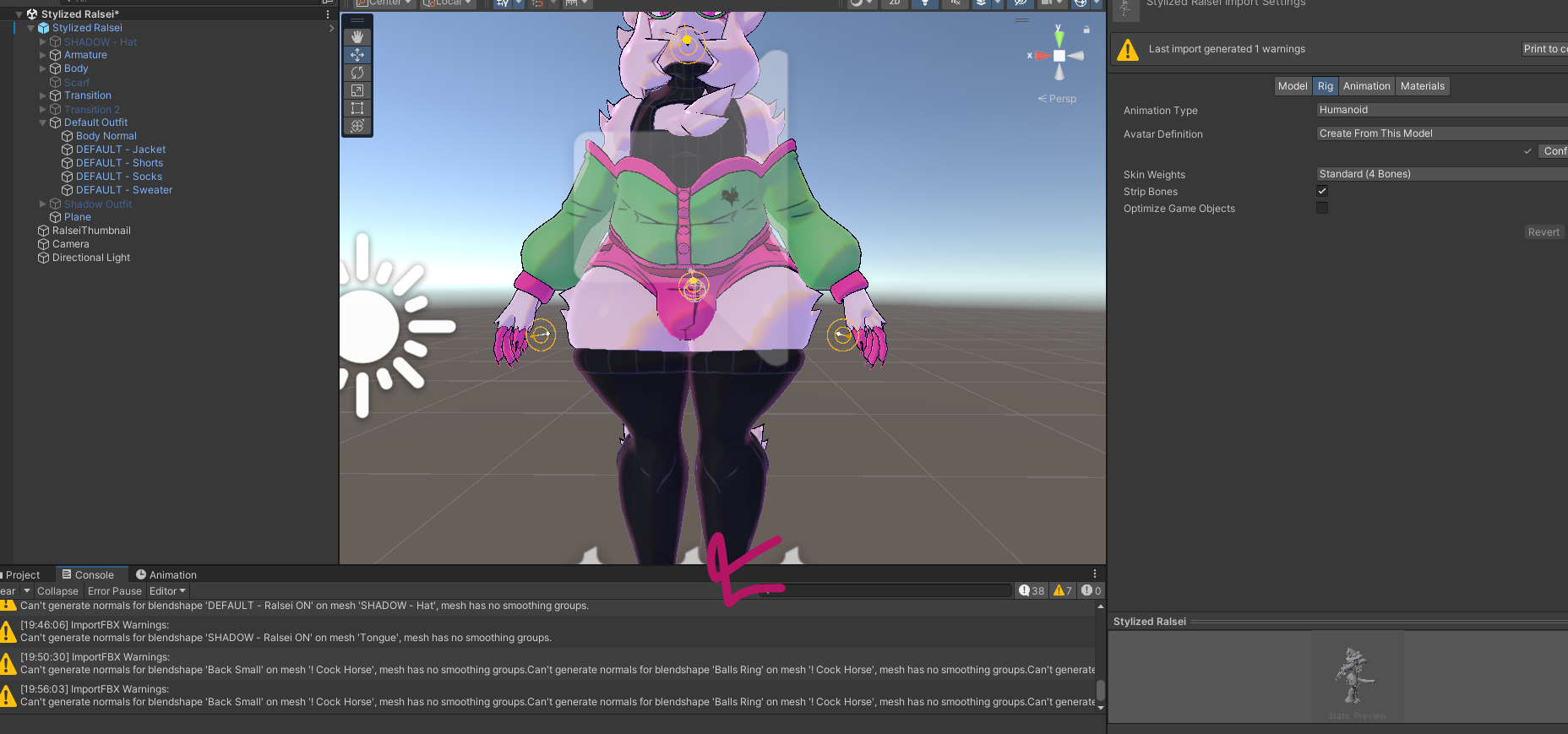
        also, check the console, what is this warning about?

        alt text

        cookiemonster655C 2 Replies Last reply
        2
        • missmycatM missmycat

          @cookiemonster655

          this happened to me once even when rig was set to humanoid. i never figured it out so i put the new body mesh onto the old fbx and it worked. what happens if you do that?

          select body, it's below the blendshapes

          alt text

          confirm in blender that your transforms are all 0,0,0 and scale is 1
          use either fbx all or fbx units scale

          alt text

          also, check the console, what is this warning about?

          alt text

          cookiemonster655C
          cookiemonster655C
          cookiemonster655
          wrote on last edited by
          #13

          @missmycat gimme one min and ill go check all of this :d I JUST WANTED TO LET U KNOW IM HERE ACTIVELY LOL

          cookiemonster655C 1 Reply Last reply
          😸
          0
          • cookiemonster655C cookiemonster655

            @missmycat gimme one min and ill go check all of this :d I JUST WANTED TO LET U KNOW IM HERE ACTIVELY LOL

            cookiemonster655C
            cookiemonster655C
            cookiemonster655
            wrote on last edited by cookiemonster655
            #14

            @missmycat putting the new body onto the old fbx do u mean like the og one? and instead of deleting the og i keep it and replace the body with my edit?

            missmycatM 1 Reply Last reply
            0
            • cookiemonster655C cookiemonster655

              @missmycat putting the new body onto the old fbx do u mean like the og one? and instead of deleting the og i keep it and replace the body with my edit?

              missmycatM
              missmycatM
              missmycat
              wrote on last edited by
              #15

              @cookiemonster655

              correct, freshly import the original fbx
              along with your new one from blender

              put only the og fbx into your scene

              in the hierarchy, select the part you are trying to replace
              scroll down in the "skinned mesh renderer" field until you see mesh (like in my post above)
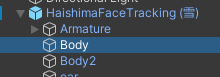
              alt text

              in your assets, click the little arrow to see everything inside your edited fbx

              alt text

              then you can just drag the mesh(es) over to the og fbx

              PS sorry for slow response i'm at work lol

              cookiemonster655C 2 Replies Last reply
              0
              • missmycatM missmycat

                @cookiemonster655

                correct, freshly import the original fbx
                along with your new one from blender

                put only the og fbx into your scene

                in the hierarchy, select the part you are trying to replace
                scroll down in the "skinned mesh renderer" field until you see mesh (like in my post above)

                alt text

                in your assets, click the little arrow to see everything inside your edited fbx

                alt text

                then you can just drag the mesh(es) over to the og fbx

                PS sorry for slow response i'm at work lol

                cookiemonster655C
                cookiemonster655C
                cookiemonster655
                wrote on last edited by
                #16

                @missmycat its okay! Ill go ahead and do this now 😄 thank you for helping me btw ^^

                1 Reply Last reply
                💕
                0
                • missmycatM missmycat

                  @cookiemonster655

                  correct, freshly import the original fbx
                  along with your new one from blender

                  put only the og fbx into your scene

                  in the hierarchy, select the part you are trying to replace
                  scroll down in the "skinned mesh renderer" field until you see mesh (like in my post above)

                  alt text

                  in your assets, click the little arrow to see everything inside your edited fbx

                  alt text

                  then you can just drag the mesh(es) over to the og fbx

                  PS sorry for slow response i'm at work lol

                  cookiemonster655C
                  cookiemonster655C
                  cookiemonster655
                  wrote on last edited by
                  #17

                  @missmycat a20c83f8-5400-4b24-b579-1adb518cc227-image.png its still being wonky whenever put on (same thing happens when any other part is changed such as the head)

                  1 Reply Last reply
                  0
                  • missmycatM missmycat

                    @cookiemonster655

                    this happened to me once even when rig was set to humanoid. i never figured it out so i put the new body mesh onto the old fbx and it worked. what happens if you do that?

                    select body, it's below the blendshapes

                    alt text

                    confirm in blender that your transforms are all 0,0,0 and scale is 1
                    use either fbx all or fbx units scale

                    alt text

                    also, check the console, what is this warning about?

                    alt text

                    cookiemonster655C
                    cookiemonster655C
                    cookiemonster655
                    wrote on last edited by
                    #18

                    @missmycat a4afc74e-df63-47e4-8f82-23b34c420457-image.png also these are the warnings i get on the fbx (i can take a closer ss if needed)

                    1 Reply Last reply
                    0
                    • missmycatM
                      missmycatM
                      missmycat
                      wrote on last edited by missmycat
                      #19

                      @cookiemonster655

                      ok darn the mesh thing was my only idea.... 🤔

                      is every warning about smoothing groups? try this export setting
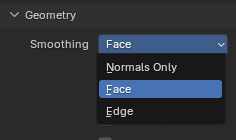
                      alt text

                      cookiemonster655C 1 Reply Last reply
                      0
                      • missmycatM
                        missmycatM
                        missmycat
                        wrote on last edited by
                        #20

                        it does look less garbled in that latest ss though

                        cookiemonster655C 1 Reply Last reply
                        0
                        • missmycatM missmycat

                          it does look less garbled in that latest ss though

                          cookiemonster655C
                          cookiemonster655C
                          cookiemonster655
                          wrote on last edited by
                          #21

                          @missmycat it does, so it did a little bit of something- its so confusing

                          1 Reply Last reply
                          0
                          • missmycatM missmycat

                            @cookiemonster655

                            ok darn the mesh thing was my only idea.... 🤔

                            is every warning about smoothing groups? try this export setting

                            alt text

                            cookiemonster655C
                            cookiemonster655C
                            cookiemonster655
                            wrote on last edited by
                            #22

                            @missmycat that helped with the error :3

                            1 Reply Last reply
                            0
                            • cookiemonster655C cookiemonster655

                              @nandorunner420 wdym by how i re-imported? did u wanna know the steps? (sorry im not great with words sometimes)
                              My export settings were: (only messed with what is shown) df3ecbc4-81f0-4f20-b921-089eb91123e4-image.png
                              and in blender it looks okay- bea3ab2b-92cb-4e14-9ebb-aa728dbcdf4a-image.png
                              To put it back into unity i just deleted the og fbx and replaced it with my version (that being the only way ive ever done it, I've barely done this stuff before lol

                              nandorunner420N
                              nandorunner420N
                              nandorunner420
                              wrote on last edited by
                              #23

                              @cookiemonster655, this might not fix the issue, but I'd recommend (from now on) just overriding the existing fbx with your edited one and having a copy of the original on hand. That being said I'm gonna try and see if I can import an edited fbx of this as well

                              cookiemonster655C 1 Reply Last reply
                              0
                              • nandorunner420N nandorunner420

                                @cookiemonster655, this might not fix the issue, but I'd recommend (from now on) just overriding the existing fbx with your edited one and having a copy of the original on hand. That being said I'm gonna try and see if I can import an edited fbx of this as well

                                cookiemonster655C
                                cookiemonster655C
                                cookiemonster655
                                wrote on last edited by
                                #24

                                @nandorunner420 will do!

                                nandorunner420N 1 Reply Last reply
                                0
                                • cookiemonster655C cookiemonster655

                                  @nandorunner420 will do!

                                  nandorunner420N
                                  nandorunner420N
                                  nandorunner420
                                  wrote on last edited by
                                  #25

                                  @cookiemonster655 okay so excuse the silly ass image but i had to make a blendshape real quick and the fbx is very weird for me. but i can import it just fine here edae603b-7c2a-4a6a-b47d-95c7a562cd2e-image.png though I did this with making a new blender project and overriding the first fbx that's attached to the avi, so ymmv

                                  nandorunner420N cookiemonster655C 2 Replies Last reply
                                  0
                                  • nandorunner420N nandorunner420

                                    @cookiemonster655 okay so excuse the silly ass image but i had to make a blendshape real quick and the fbx is very weird for me. but i can import it just fine here edae603b-7c2a-4a6a-b47d-95c7a562cd2e-image.png though I did this with making a new blender project and overriding the first fbx that's attached to the avi, so ymmv

                                    nandorunner420N
                                    nandorunner420N
                                    nandorunner420
                                    wrote on last edited by
                                    #26

                                    probably wasnt the best pic, heres one showing the key there too a005c493-d481-40d8-b284-560a64bda790-image.png

                                    1 Reply Last reply
                                    0
                                    • nandorunner420N nandorunner420

                                      @cookiemonster655 okay so excuse the silly ass image but i had to make a blendshape real quick and the fbx is very weird for me. but i can import it just fine here edae603b-7c2a-4a6a-b47d-95c7a562cd2e-image.png though I did this with making a new blender project and overriding the first fbx that's attached to the avi, so ymmv

                                      cookiemonster655C
                                      cookiemonster655C
                                      cookiemonster655
                                      wrote on last edited by
                                      #27

                                      @nandorunner420 "new blender project" being you made one instead of any of the ones that were included with the avatar, right? or was it one of them

                                      nandorunner420N 1 Reply Last reply
                                      0
                                      • cookiemonster655C
                                        cookiemonster655C
                                        cookiemonster655
                                        wrote on last edited by
                                        #28

                                        i did my edit completely on this one- wasnt sure if i was supposed to do edits on that one but i assumed maybe?
                                        image.png
                                        I could try making my own blend project tho, do a quick test and see?

                                        nandorunner420N 1 Reply Last reply
                                        0
                                        • cookiemonster655C cookiemonster655

                                          @nandorunner420 "new blender project" being you made one instead of any of the ones that were included with the avatar, right? or was it one of them

                                          nandorunner420N
                                          nandorunner420N
                                          nandorunner420
                                          wrote on last edited by
                                          #29

                                          @cookiemonster655 yup, i make new projects using the fbx in the project when i wanna edit the mesh

                                          1 Reply Last reply
                                          0

                                          Hello! It looks like you're interested in this conversation, but you don't have an account yet.

                                          Getting fed up of having to scroll through the same posts each visit? When you register for an account, you'll always come back to exactly where you were before, and choose to be notified of new replies (either via email, or push notification). You'll also be able to save bookmarks and upvote posts to show your appreciation to other community members.

                                          With your input, this post could be even better 💗

                                          Register Login
                                          Reply
                                          • Reply as topic
                                          Log in to reply
                                          • Oldest to Newest
                                          • Newest to Oldest
                                          • Most Votes


                                          • Login

                                          • Login or register to search.
                                          • First post
                                            Last post
                                          0
                                          • Categories
                                          • Recent
                                          • Tags
                                          • Popular