Skip to content
  • Categories
  • Recent
  • Tags
  • Popular
Skins
  • Light
  • Brite
  • Cerulean
  • Cosmo
  • Flatly
  • Journal
  • Litera
  • Lumen
  • Lux
  • Materia
  • Minty
  • Morph
  • Pulse
  • Sandstone
  • Simplex
  • Sketchy
  • Spacelab
  • United
  • Yeti
  • Zephyr
  • Dark
  • Cyborg
  • Darkly
  • Quartz
  • Slate
  • Solar
  • Superhero
  • Vapor

  • Default (Zephyr)
  • No Skin
Collapse
RipperStore Logo
  1. Home
  2. Support
  3. General Support
  4. SPS Problems

SPS Problems

Scheduled Pinned Locked Moved General Support
vrchatsps
46 Posts 9 Posters 20.4k Views 2 Watching
  • Oldest to Newest
  • Newest to Oldest
  • Most Votes
Reply
  • Reply as topic
Log in to reply
This topic has been deleted. Only users with topic management privileges can see it.
  • WienerW Wiener

    @SweetSangria said in SPS Problems:

    I've been fine using the lollipops for different bases, but I can't figure out how to successfully add SPS to non-lollipop models, and I haven't found any good resources to give step-by-steps on how to properly do that. Does anyone have any good instructions for that?

    You talking about Male or Female Models ?

    SweetSangriaS
    SweetSangriaS
    SweetSangria
    wrote on last edited by
    #13

    @Wiener Male. The female stuff is super easy with the SPS Configurator stuff.

    Upvotes always appreciated! <3

    1 Reply Last reply
    0
    • SweetSangriaS
      SweetSangriaS
      SweetSangria
      wrote on last edited by
      #14

      @Takisch Use the wholesome SPS Configurator with VRCFury in VCC. Then in Unity, it will be under the Tool Menu. Open the SPS Configurator. Select the appropriate base and foot position if you care about feet, and select/deselect what sockets you want added. You can also select the blendshapes you want associated. Then just click Add Sockets. You'll see them on the Hierarchy, and you can go through and move them around to adjust and get them lined up how you want them. If you've chosen the right base, they're usually pretty close to where they need to be anyway. It's super easy.
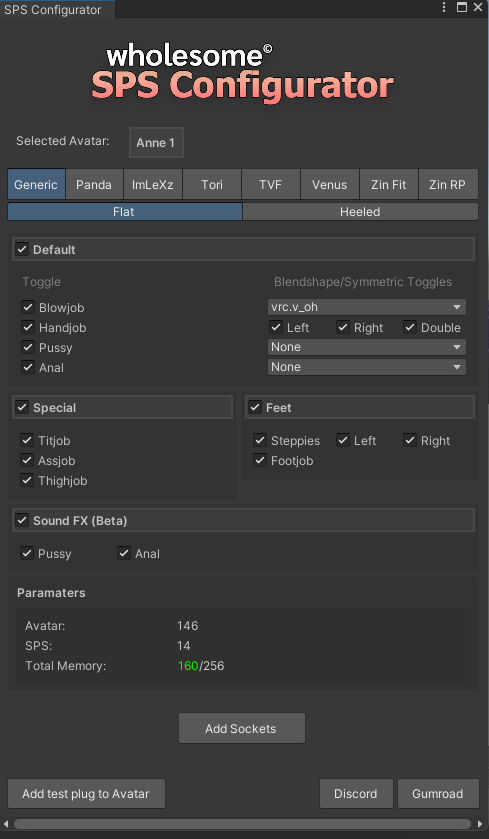
      c964f120-1324-4eea-8a44-c1d257ed9563-image.png

      Upvotes always appreciated! <3

      PTYBIIMAP 1 Reply Last reply
      😎
      1
      • SweetSangriaS
        SweetSangriaS
        SweetSangria
        wrote on last edited by
        #15

        @Takisch You're welcome. That's the way I always hope people will respond to me when I need help, with information clear enough for me to actually follow and understand.

        As far as the blendshapes: I marked with red where you can do that when you set it up. Depending on the base, it'll select the blendshape name that base usually uses, but you can just click on that to go through and find the blendshape you want. It'll usually be under "Body" and you might have to scroll through to find the right one.
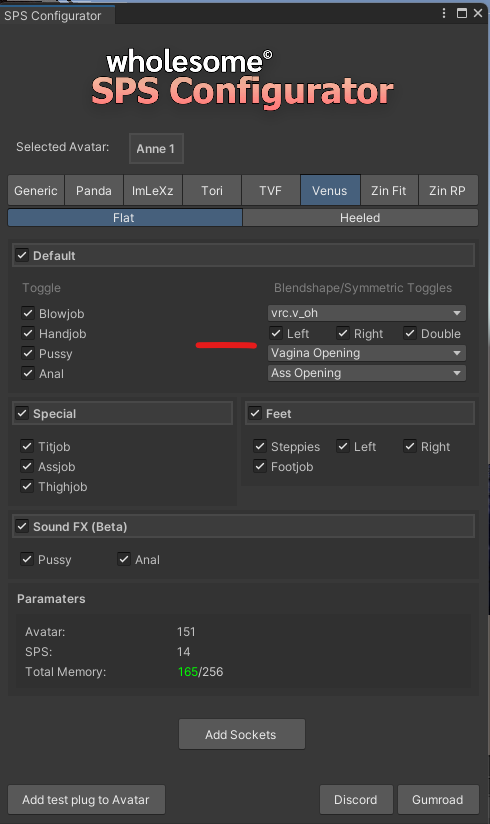
        c698553e-9e07-47fc-9b33-43ef7089b93b-image.png

        Another way to view the Blendshape options BEFORE you do the SPS Configurator is to just go to the Body and look there to figure out which one you want before you set up your SPS. Here's a screenshot of where to look for that, and luckily with this example it shows the NSFW options right at the top. But notice that with this one, even though it's a Venus base, the creator has set up a different name than what the Configurator automatically set. So that's why it's good to double check and make sure you're getting the right one for that specific avi.
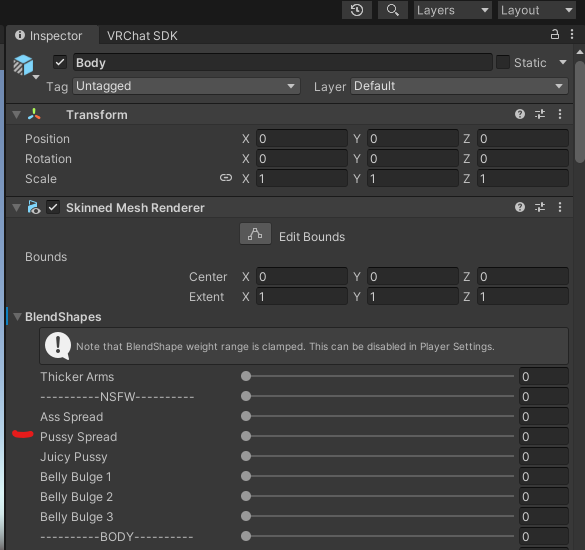
        2068fe72-6ed9-43b6-82e4-28af15d8d447-image.png

        You do have the option to set it or update it after you've gone through the SPS Configurator, and that's here under the SPS socket listed in the Hierarchy.
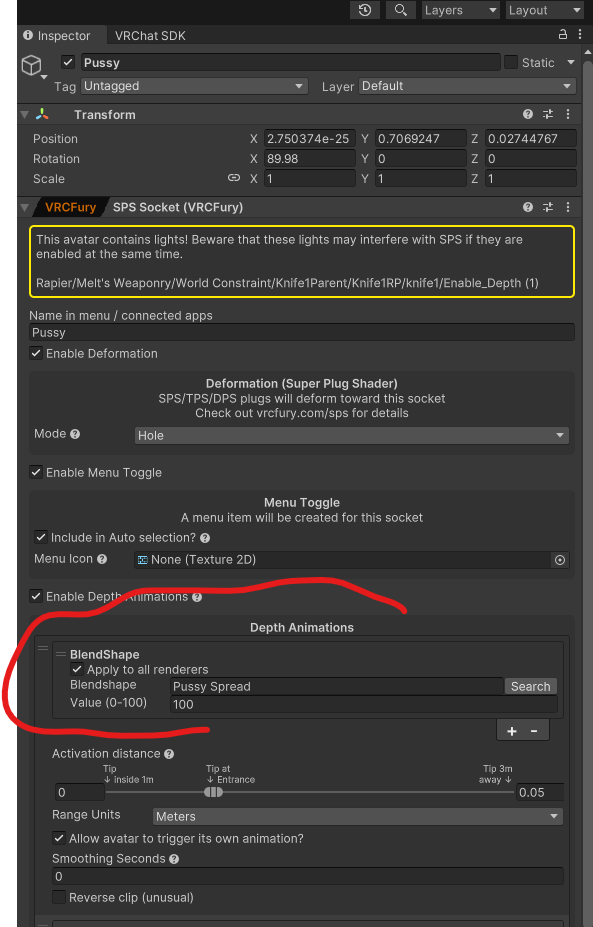
        021a920b-bf6b-4057-b0c4-e6d20ed9f158-image.png

        Hope all that made sense and helps!

        Upvotes always appreciated! <3

        1 Reply Last reply
        0
        • SweetSangriaS
          SweetSangriaS
          SweetSangria
          wrote on last edited by
          #16

          Oh and PS: Not all avatars HAVE that option. Most NSFW models do, but not always. So if you can't find it in any of these ways, it might just not be an option.

          Upvotes always appreciated! <3

          1 Reply Last reply
          0
          • SweetSangriaS
            SweetSangriaS
            SweetSangria
            wrote on last edited by
            #17

            @Takisch I'm afraid my helpfulness runs out here. I think you have to go into Blender to do that, and that's beyond my skill level at this point. Sorry!

            Upvotes always appreciated! <3

            1 Reply Last reply
            0
            • SweetSangriaS
              SweetSangriaS
              SweetSangria
              wrote on last edited by
              #18

              @Takisch You're welcome. I'm glad it helped. Now I wish someone would help me figure out how to do the plugs in a similar way. 🤞

              Upvotes always appreciated! <3

              1 Reply Last reply
              0
              • WirorritosW
                WirorritosW
                Wirorritos
                wrote on last edited by
                #19

                Okay so Im trying to add the lollipop but every time it keeps saying that there is no script for it help?

                SweetSangriaS 1 Reply Last reply
                0
                • WirorritosW Wirorritos

                  Okay so Im trying to add the lollipop but every time it keeps saying that there is no script for it help?

                  SweetSangriaS
                  SweetSangriaS
                  SweetSangria
                  wrote on last edited by
                  #20

                  @spoonnza I can't promise this will work, but I've had it work before: Try adding "wholesome Dependencies" via VCC (and make sure you're using VRCFury, too). I hope that helps!

                  Upvotes always appreciated! <3

                  1 Reply Last reply
                  👏
                  0
                  • WirorritosW
                    WirorritosW
                    Wirorritos
                    wrote on last edited by
                    #21

                    @Takisch I got it fixed now im just having a shader issues

                    1 Reply Last reply
                    0
                    • WirorritosW
                      WirorritosW
                      Wirorritos
                      wrote on last edited by
                      #22

                      @Takisch Its way paler than the body texture and ive taken it in to unity and they match

                      1 Reply Last reply
                      0
                      • RichieR
                        RichieR
                        Richie
                        wrote on last edited by
                        #23

                        I have a problem myself, the face blendshape doesnt seems to work. Like i move the lolipop in place but the mouth doesnt open with the blendshapes i have set up, i use a combination of two mouth shapes for it.

                        1 Reply Last reply
                        0
                        • RichieR
                          RichieR
                          Richie
                          wrote on last edited by
                          #24

                          Could it be that liltoon shader have problem with sps?

                          kh4m4riK 1 Reply Last reply
                          0
                          • RichieR Richie

                            Could it be that liltoon shader have problem with sps?

                            kh4m4riK
                            kh4m4riK
                            kh4m4ri
                            wrote on last edited by
                            #25

                            @ug19zu5q7 This is likely, for SPS was made for realistic models. As you can see by the base choices it provides. Most realistic models use poiyomi.

                            1 Reply Last reply
                            0
                            • E
                              E
                              enano230
                              wrote on last edited by
                              #26

                              Captura de pantalla 2025-08-24 194956.png
                              Excuse me, I'm a bit new to Unity for this SPS. How can I fix it or where can I find that option? Because I search and don't see anything. Maybe I'm blind or just really stupid to not see it.

                              NightStormN 1 Reply Last reply
                              0
                              • E enano230

                                Captura de pantalla 2025-08-24 194956.png
                                Excuse me, I'm a bit new to Unity for this SPS. How can I fix it or where can I find that option? Because I search and don't see anything. Maybe I'm blind or just really stupid to not see it.

                                NightStormN
                                NightStormN
                                NightStorm
                                wrote on last edited by
                                #27

                                @enano230 in vrchat graphic settings

                                1 Reply Last reply
                                0
                                • SweetSangriaS SweetSangria referenced this topic on
                                • SweetSangriaS SweetSangria

                                  @Takisch Use the wholesome SPS Configurator with VRCFury in VCC. Then in Unity, it will be under the Tool Menu. Open the SPS Configurator. Select the appropriate base and foot position if you care about feet, and select/deselect what sockets you want added. You can also select the blendshapes you want associated. Then just click Add Sockets. You'll see them on the Hierarchy, and you can go through and move them around to adjust and get them lined up how you want them. If you've chosen the right base, they're usually pretty close to where they need to be anyway. It's super easy.

                                  c964f120-1324-4eea-8a44-c1d257ed9563-image.png

                                  PTYBIIMAP
                                  PTYBIIMAP
                                  PTYBIIMA
                                  wrote on last edited by
                                  #28

                                  @SweetSangria
                                  for some odd reason the configurator is just not fucking there

                                  SweetSangriaS 1 Reply Last reply
                                  0
                                  • PTYBIIMAP PTYBIIMA

                                    @SweetSangria
                                    for some odd reason the configurator is just not fucking there

                                    SweetSangriaS
                                    SweetSangriaS
                                    SweetSangria
                                    wrote on last edited by
                                    #29

                                    @PTYBIIMA https://wholesomevr.github.io/SPS-Configurator/ Go here and click "Add to VCC"

                                    Upvotes always appreciated! <3

                                    PTYBIIMAP 1 Reply Last reply
                                    0
                                    • SweetSangriaS SweetSangria

                                      @PTYBIIMA https://wholesomevr.github.io/SPS-Configurator/ Go here and click "Add to VCC"

                                      PTYBIIMAP
                                      PTYBIIMAP
                                      PTYBIIMA
                                      wrote on last edited by
                                      #30

                                      @SweetSangria I fixed it dw
                                      I had to re-open the project
                                      And actually I'm wondering if you could help with some issues that I'm having with an avatar

                                      SweetSangriaS 1 Reply Last reply
                                      0
                                      • PTYBIIMAP PTYBIIMA

                                        @SweetSangria I fixed it dw
                                        I had to re-open the project
                                        And actually I'm wondering if you could help with some issues that I'm having with an avatar

                                        SweetSangriaS
                                        SweetSangriaS
                                        SweetSangria
                                        wrote on last edited by
                                        #31

                                        @PTYBIIMA What's the issue?

                                        Upvotes always appreciated! <3

                                        PTYBIIMAP 1 Reply Last reply
                                        0
                                        • SweetSangriaS SweetSangria

                                          @PTYBIIMA What's the issue?

                                          PTYBIIMAP
                                          PTYBIIMAP
                                          PTYBIIMA
                                          wrote on last edited by
                                          #32

                                          @SweetSangria
                                          i honestly dont know cuz im honestly new-ish to unity and i cant read errors correctly I will send the screenshots of the errors and the avatar i used
                                          1 Reply Last reply
                                          0

                                          Hello! It looks like you're interested in this conversation, but you don't have an account yet.

                                          Getting fed up of having to scroll through the same posts each visit? When you register for an account, you'll always come back to exactly where you were before, and choose to be notified of new replies (either via email, or push notification). You'll also be able to save bookmarks and upvote posts to show your appreciation to other community members.

                                          With your input, this post could be even better 💗

                                          Register Login
                                          Reply
                                          • Reply as topic
                                          Log in to reply
                                          • Oldest to Newest
                                          • Newest to Oldest
                                          • Most Votes


                                          • Login

                                          • Login or register to search.
                                          • First post
                                            Last post
                                          0
                                          • Categories
                                          • Recent
                                          • Tags
                                          • Popular