Skip to content
  • Categories
  • Recent
  • Tags
  • Popular
Skins
  • Light
  • Brite
  • Cerulean
  • Cosmo
  • Flatly
  • Journal
  • Litera
  • Lumen
  • Lux
  • Materia
  • Minty
  • Morph
  • Pulse
  • Sandstone
  • Simplex
  • Sketchy
  • Spacelab
  • United
  • Yeti
  • Zephyr
  • Dark
  • Cyborg
  • Darkly
  • Quartz
  • Slate
  • Solar
  • Superhero
  • Vapor

  • Default (Zephyr)
  • No Skin
Collapse
RipperStore Logo
  1. Home
  2. Support
  3. General Support
  4. editing blendshapes on .asset files, or renaming blendshapes within unity?

editing blendshapes on .asset files, or renaming blendshapes within unity?

Scheduled Pinned Locked Moved General Support
helpfacetrackingunitysupport
6 Posts 4 Posters 388 Views 4 Watching
  • Oldest to Newest
  • Newest to Oldest
  • Most Votes
Reply
  • Reply as topic
Log in to reply
This topic has been deleted. Only users with topic management privileges can see it.
  • bubbilymB
    bubbilymB
    bubbilym
    wrote on last edited by
    #1

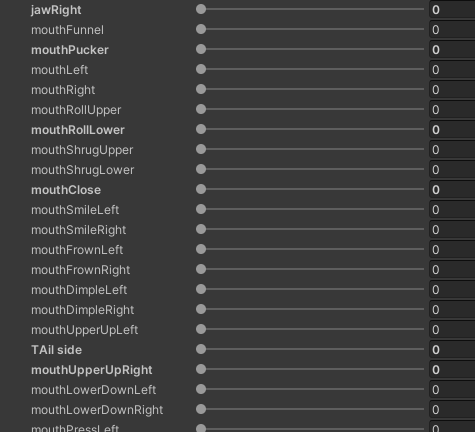
    i am trying to use the facetracking blendshapes on this avi, the issue is the blendshape names are lower case (refer to image below), the model is split into .asset files and not an fbx, how can i rename these so i can use them for ft? c2fe4fb5-9ca0-4ca9-bf05-5bb6d19acc28-image.png 812b5905-2546-4aeb-b22b-d8d1962addaf-image.png

    1 Reply Last reply
    1
    • bubbilymB
      bubbilymB
      bubbilym
      wrote on last edited by
      #2

      bump

      1 Reply Last reply
      0
      • bubbilymB
        bubbilymB
        bubbilym
        wrote on last edited by
        #3

        bump

        1 Reply Last reply
        0
        • BerryBushB
          BerryBushB
          BerryBush
          wrote on last edited by
          #4

          bump

          If i bump your post even though its already been solved or found, it's so I can come back to it later on my pc

          1 Reply Last reply
          0
          • LeafieL
            LeafieL
            Leafie
            wrote on last edited by
            #5

            bump

            1 Reply Last reply
            0
            • Chrissy1230C
              Chrissy1230C
              Chrissy1230
              wrote on last edited by
              #6

              Bump

              1 Reply Last reply
              0

              Hello! It looks like you're interested in this conversation, but you don't have an account yet.

              Getting fed up of having to scroll through the same posts each visit? When you register for an account, you'll always come back to exactly where you were before, and choose to be notified of new replies (either via email, or push notification). You'll also be able to save bookmarks and upvote posts to show your appreciation to other community members.

              With your input, this post could be even better 💗

              Register Login
              Reply
              • Reply as topic
              Log in to reply
              • Oldest to Newest
              • Newest to Oldest
              • Most Votes


              • Login

              • Login or register to search.
              • First post
                Last post
              0
              • Categories
              • Recent
              • Tags
              • Popular