Skip to content
  • Categories
  • Recent
  • Tags
  • Popular
Skins
  • Light
  • Brite
  • Cerulean
  • Cosmo
  • Flatly
  • Journal
  • Litera
  • Lumen
  • Lux
  • Materia
  • Minty
  • Morph
  • Pulse
  • Sandstone
  • Simplex
  • Sketchy
  • Spacelab
  • United
  • Yeti
  • Zephyr
  • Dark
  • Cyborg
  • Darkly
  • Quartz
  • Slate
  • Solar
  • Superhero
  • Vapor

  • Default (Zephyr)
  • No Skin
Collapse
RipperStore Logo
  1. Home
  2. Support
  3. General Support
  4. Shoes and gloves not fitting the Milltina body?

Shoes and gloves not fitting the Milltina body?

Scheduled Pinned Locked Moved General Support
supporthelpunity helpmilltinamilltina only
8 Posts 3 Posters 450 Views 2 Watching
  • Oldest to Newest
  • Newest to Oldest
  • Most Votes
Reply
  • Reply as topic
Log in to reply
This topic has been deleted. Only users with topic management privileges can see it.
  • CandiedGrimHyenaC
    CandiedGrimHyenaC
    CandiedGrimHyena
    wrote on last edited by CandiedGrimHyena
    #1

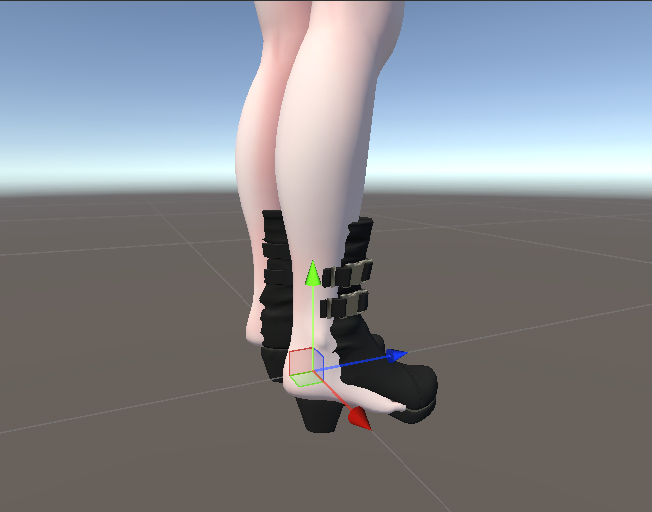
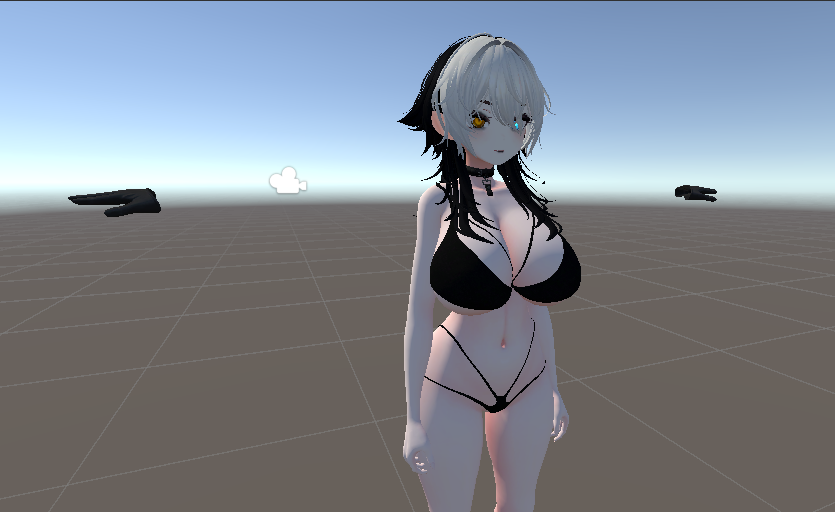
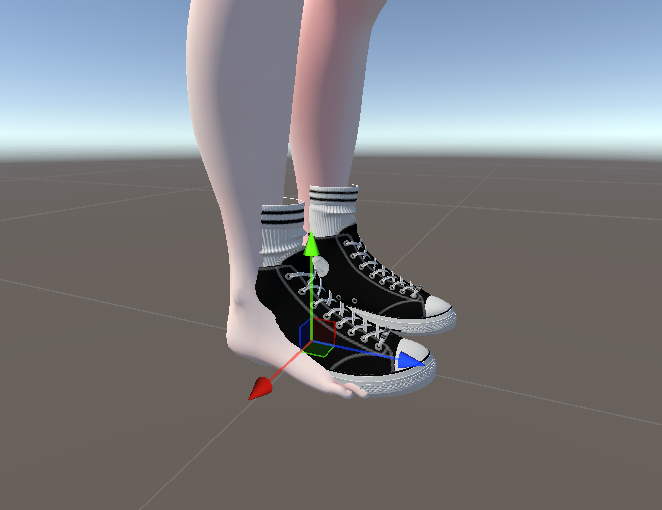
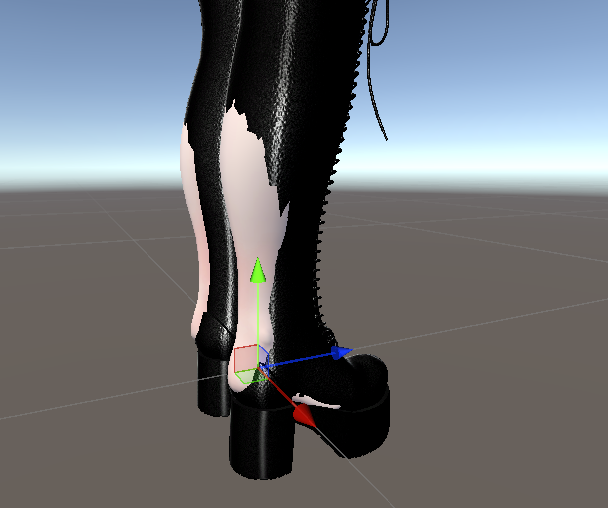
    So, I'm in the process of making my own Milltina avatar and I have gotten some shoes I'd like to use for her that were the packages FOR her, but I have run into a problem when going into gesture manager. For some reason, the shoes are not lined up with her feet AND her shrink feet and shrink leg blendshapes are not working when I toggle on ANY of the shoes?! And her gloves are not connected to her hands
    Screenshot 2026-06-08 010222.png
    Screenshot 2026-06-08 010351.png
    Screenshot 2026-06-08 010402.png
    Screenshot 2026-06-08 020403.png
    Can ANYONE help me with this issue?

    anonberryA 1 Reply Last reply
    0
    • Shiro_NekoS
      Shiro_NekoS
      Shiro_Neko
      wrote on last edited by Shiro_Neko
      #2

      Thats looks like you missed to put prefab into exactly avatar hierarchy and it is somewhere near in list.
      Or problem with link of armature of cloths.

      CandiedGrimHyenaC 1 Reply Last reply
      0
      • CandiedGrimHyenaC CandiedGrimHyena

        So, I'm in the process of making my own Milltina avatar and I have gotten some shoes I'd like to use for her that were the packages FOR her, but I have run into a problem when going into gesture manager. For some reason, the shoes are not lined up with her feet AND her shrink feet and shrink leg blendshapes are not working when I toggle on ANY of the shoes?! And her gloves are not connected to her hands
        Screenshot 2026-06-08 010222.png
        Screenshot 2026-06-08 010351.png
        Screenshot 2026-06-08 010402.png
        Screenshot 2026-06-08 020403.png
        Can ANYONE help me with this issue?

        anonberryA
        anonberryA
        anonberry
        wrote on last edited by
        #3

        @CandiedGrimHyena Are you using module avatar or any similar plugin?

        I often use translators, which can make my messages look ai-generated.

        CandiedGrimHyenaC 1 Reply Last reply
        0
        • Shiro_NekoS Shiro_Neko

          Thats looks like you missed to put prefab into exactly avatar hierarchy and it is somewhere near in list.
          Or problem with link of armature of cloths.

          CandiedGrimHyenaC
          CandiedGrimHyenaC
          CandiedGrimHyena
          wrote on last edited by
          #4

          @Shiro_Neko No, I put the prefab's into the avatar's hierarchy. And the link of the armature is inside the packages?

          Shiro_NekoS 1 Reply Last reply
          0
          • anonberryA anonberry

            @CandiedGrimHyena Are you using module avatar or any similar plugin?

            CandiedGrimHyenaC
            CandiedGrimHyenaC
            CandiedGrimHyena
            wrote on last edited by
            #5

            @anonberry Yes, I am. But unlike most of the other assests (like clothes), the shoes didn't come with a modular avatar mesh or anything like that in the prefab's

            1 Reply Last reply
            0
            • CandiedGrimHyenaC CandiedGrimHyena

              @Shiro_Neko No, I put the prefab's into the avatar's hierarchy. And the link of the armature is inside the packages?

              Shiro_NekoS
              Shiro_NekoS
              Shiro_Neko
              wrote on last edited by
              #6

              @CandiedGrimHyena

              It is in "Armature" that is most of time come with prefab file.
              Screenshot 2026-06-09 015428.png

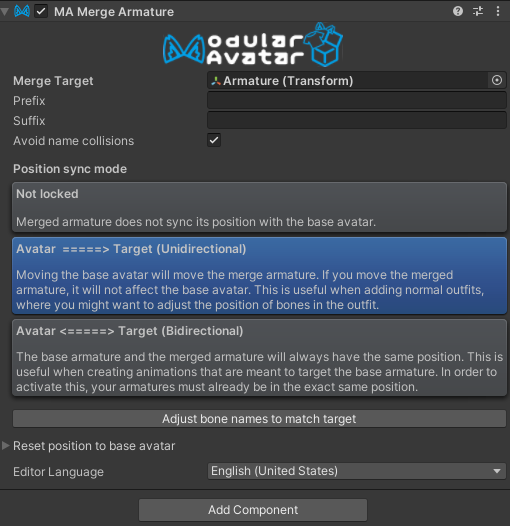
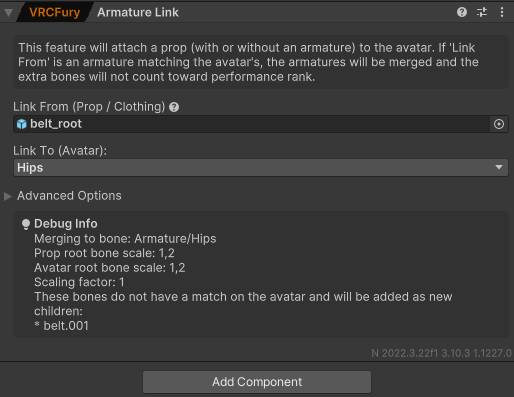
              Depends on prefab, it can come with Armature that connected to VRCFury (Armature Link) or to MA (Merge Armature). And sometimes it not have them at all.
              Screenshot 2026-06-09 015632.png Screenshot 2026-06-09 015845.png

              Check you assets for having one of them. If they don't have it, create new by using MA for example.
              If they have it, check if they target exactly part of your avatar Armature that needed and there are no errors.

              CandiedGrimHyenaC 1 Reply Last reply
              2
              • Shiro_NekoS Shiro_Neko

                @CandiedGrimHyena

                It is in "Armature" that is most of time come with prefab file.
                Screenshot 2026-06-09 015428.png

                Depends on prefab, it can come with Armature that connected to VRCFury (Armature Link) or to MA (Merge Armature). And sometimes it not have them at all.
                Screenshot 2026-06-09 015632.png Screenshot 2026-06-09 015845.png

                Check you assets for having one of them. If they don't have it, create new by using MA for example.
                If they have it, check if they target exactly part of your avatar Armature that needed and there are no errors.

                CandiedGrimHyenaC
                CandiedGrimHyenaC
                CandiedGrimHyena
                wrote on last edited by
                #7

                @Shiro_Neko That fixed it! TYSM for your help, I really appreciate it!! ❤

                Shiro_NekoS 1 Reply Last reply
                0
                • CandiedGrimHyenaC CandiedGrimHyena

                  @Shiro_Neko That fixed it! TYSM for your help, I really appreciate it!! ❤

                  Shiro_NekoS
                  Shiro_NekoS
                  Shiro_Neko
                  wrote on last edited by
                  #8

                  @CandiedGrimHyena

                  You welcome.

                  1 Reply Last reply
                  0

                  Hello! It looks like you're interested in this conversation, but you don't have an account yet.

                  Getting fed up of having to scroll through the same posts each visit? When you register for an account, you'll always come back to exactly where you were before, and choose to be notified of new replies (either via email, or push notification). You'll also be able to save bookmarks and upvote posts to show your appreciation to other community members.

                  With your input, this post could be even better 💗

                  Register Login
                  Reply
                  • Reply as topic
                  Log in to reply
                  • Oldest to Newest
                  • Newest to Oldest
                  • Most Votes


                  • Login

                  • Login or register to search.
                  • First post
                    Last post
                  0
                  • Categories
                  • Recent
                  • Tags
                  • Popular