Skip to content
  • Categories
  • Recent
  • Tags
  • Popular
Skins
  • Light
  • Brite
  • Cerulean
  • Cosmo
  • Flatly
  • Journal
  • Litera
  • Lumen
  • Lux
  • Materia
  • Minty
  • Morph
  • Pulse
  • Sandstone
  • Simplex
  • Sketchy
  • Spacelab
  • United
  • Yeti
  • Zephyr
  • Dark
  • Cyborg
  • Darkly
  • Quartz
  • Slate
  • Solar
  • Superhero
  • Vapor

  • Default (Zephyr)
  • No Skin
Collapse
RipperStore Logo
  1. Home
  2. Community
  3. General Questions
  4. How can I fix strange eye lashes

How can I fix strange eye lashes

Scheduled Pinned Locked Moved General Questions
helpmodelquestionpc onlyavatar
10 Posts 4 Posters 640 Views 1 Watching
  • Oldest to Newest
  • Newest to Oldest
  • Most Votes
Reply
  • Reply as topic
Log in to reply
This topic has been deleted. Only users with topic management privileges can see it.
  • rsjkkR
    rsjkkR
    rsjkk
    wrote on last edited by
    #1

    Summary

    I exported vrca into unity project using AssetRipper, and launched this project.
    I think this process is correct.
    But When I put prefab to hierarchy, prefab model has strange and thick eye lashes...

    I tried to export it to Binary FBX Model and import in blender, because I thought It can be fixed in blender. But it couldn't be load.

    Environment

    • Unity 2022.3.22f1
    • There is no additional unitypackages.
    • Launched from Unity Hub, not VCC.

    What should I do?

    1 Reply Last reply
    0
    • rsjkkR
      rsjkkR
      rsjkk
      wrote on last edited by
      #2

      Sample Image:
      image.png

      1 Reply Last reply
      0
      • ?
        ?
        A Former User
        wrote on last edited by [[global:former-user]]
        #3

        @rsjkk What shader are you using? poi?

        rsjkkR 1 Reply Last reply
        0
        • ? A Former User

          @rsjkk What shader are you using? poi?

          rsjkkR
          rsjkkR
          rsjkk
          wrote on last edited by
          #4

          @Matsuda Thank you reply!
          Yes. I'm using poi shader.

          1 Reply Last reply
          0
          • МинтиМ
            МинтиМ
            Минти
            wrote on last edited by
            #5

            try to change render type to transparent or transclipping or cutout or select other version of poi

            rsjkkR 1 Reply Last reply
            0
            • МинтиМ Минти

              try to change render type to transparent or transclipping or cutout or select other version of poi

              rsjkkR
              rsjkkR
              rsjkk
              wrote on last edited by
              #6

              @Minty228
              Sorry for the late reply.
              I searched how to change render type but I couldn't seem to do it even following the method I found...
              Is it need to import the poi-shader unitypackage to unity?

              b7d7a73d-da51-464e-9308-4cdf38260d9b-image.png

              МинтиМ 1 Reply Last reply
              0
              • rsjkkR rsjkk

                @Minty228
                Sorry for the late reply.
                I searched how to change render type but I couldn't seem to do it even following the method I found...
                Is it need to import the poi-shader unitypackage to unity?

                b7d7a73d-da51-464e-9308-4cdf38260d9b-image.png

                МинтиМ
                МинтиМ
                Минти
                wrote on last edited by Минти
                #7

                @rsjkk The shader settings should not look like this, and it should not be "hidden", either you need to reselect another shader (still poi), or delete the folder with _poiyomi and install it again

                1 Reply Last reply
                0
                • rsjkkR
                  rsjkkR
                  rsjkk
                  wrote on last edited by
                  #8

                  @Minty228 OK. Thanks!
                  I'll try it.

                  1 Reply Last reply
                  0
                  • rsjkkR
                    rsjkkR
                    rsjkk
                    wrote on last edited by
                    #9

                    @Minty228 Sorry. I'm late.
                    It took some trial and error, but after importing the Poi Shader package I downloaded from the official site and restarting the project, I changed the eyelash shader to the new poi shader and now I can change the color.
                    I thought the cause was the white 48x48 texture file selected for Texture, so I tried deselecting it, but that didn't fix it.
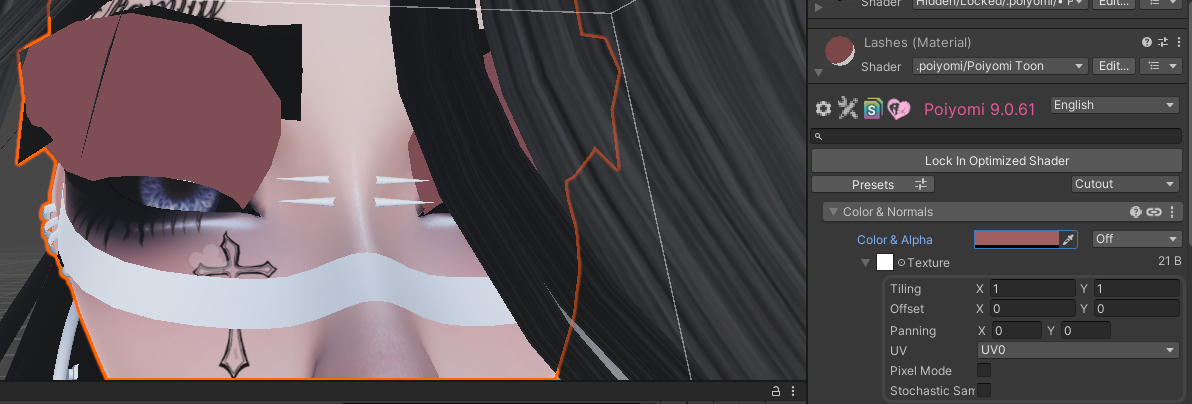

                    image.png

                    kh4m4riK 1 Reply Last reply
                    0
                    • rsjkkR rsjkk

                      @Minty228 Sorry. I'm late.
                      It took some trial and error, but after importing the Poi Shader package I downloaded from the official site and restarting the project, I changed the eyelash shader to the new poi shader and now I can change the color.
                      I thought the cause was the white 48x48 texture file selected for Texture, so I tried deselecting it, but that didn't fix it.

                      image.png

                      kh4m4riK
                      kh4m4riK
                      kh4m4ri
                      wrote on last edited by
                      #10

                      @rsjkk Hi! So sorry I'm late to this thread, but my guess is the lash has no alpha. As well as the albedo is just an opaque texture with no transparency to it.

                      1 Reply Last reply
                      0

                      Hello! It looks like you're interested in this conversation, but you don't have an account yet.

                      Getting fed up of having to scroll through the same posts each visit? When you register for an account, you'll always come back to exactly where you were before, and choose to be notified of new replies (either via email, or push notification). You'll also be able to save bookmarks and upvote posts to show your appreciation to other community members.

                      With your input, this post could be even better 💗

                      Register Login
                      Reply
                      • Reply as topic
                      Log in to reply
                      • Oldest to Newest
                      • Newest to Oldest
                      • Most Votes


                      • Login

                      • Login or register to search.
                      • First post
                        Last post
                      0
                      • Categories
                      • Recent
                      • Tags
                      • Popular