Skip to content
  • Categories
  • Recent
  • Tags
  • Popular
Skins
  • Light
  • Brite
  • Cerulean
  • Cosmo
  • Flatly
  • Journal
  • Litera
  • Lumen
  • Lux
  • Materia
  • Minty
  • Morph
  • Pulse
  • Sandstone
  • Simplex
  • Sketchy
  • Spacelab
  • United
  • Yeti
  • Zephyr
  • Dark
  • Cyborg
  • Darkly
  • Quartz
  • Slate
  • Solar
  • Superhero
  • Vapor

  • Default (Zephyr)
  • No Skin
Collapse
RipperStore Logo
  1. Home
  2. Guides
  3. Tutorials
  4. How do I adjust the chest size for a booth avatar past its limit?

How do I adjust the chest size for a booth avatar past its limit?

Scheduled Pinned Locked Moved Tutorials
questionhelp neededboobsmiltinaunity helphelpnsfwavatar edit
15 Posts 10 Posters 1.5k Views 7 Watching
  • Oldest to Newest
  • Newest to Oldest
  • Most Votes
Reply
  • Reply as topic
Log in to reply
This topic has been deleted. Only users with topic management privileges can see it.
  • G Gigachad69

    Usually just in Unity Scale go to Breast L and Breast R usually and Scale to 1.6 probably like in this picture

    akanelexA
    akanelexA
    akanelex
    wrote on last edited by akanelex
    #3

    @Gigachad69 Thank you for the reply! Do you think you could show me visually how to do this? I don't know the layout of Unity very well. This is what I'm looking at currently:
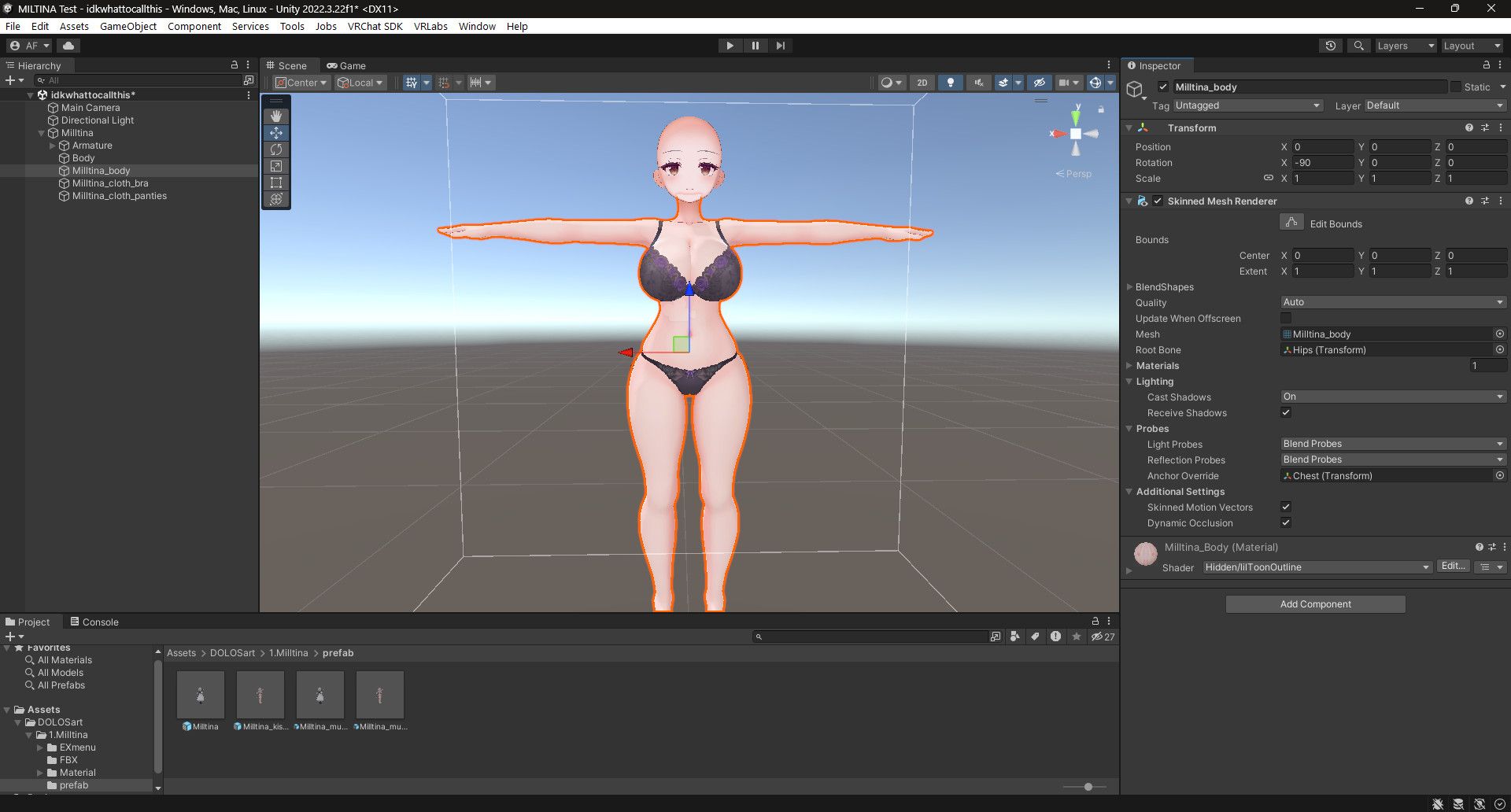
    4a92a881-98b5-4aac-ace8-196067d67764-image.jpeg

    1 Reply Last reply
    1
    • akanelexA
      akanelexA
      akanelex
      wrote on last edited by
      #4

      Oh, I think I've figured it out! You just go to the Amature and adjust the scale on the breasts!

      5d69b793-46ef-431b-9076-9c2f730b9b46-image.jpeg

      TyeXOT 1 Reply Last reply
      1
      • G
        G
        Gigachad69
        wrote on last edited by
        #5

        Yis you can also rotate and make them a bit more saggy With Rotations and position them a bit so they are not too close to each other just small adjustments

        1 Reply Last reply
        0
        • akanelexA akanelex

          Title says it all, I'm totally new to unity and 3D model editing, so a lot of terms go a bit over my head, such as "blendshapes" or "physbones".

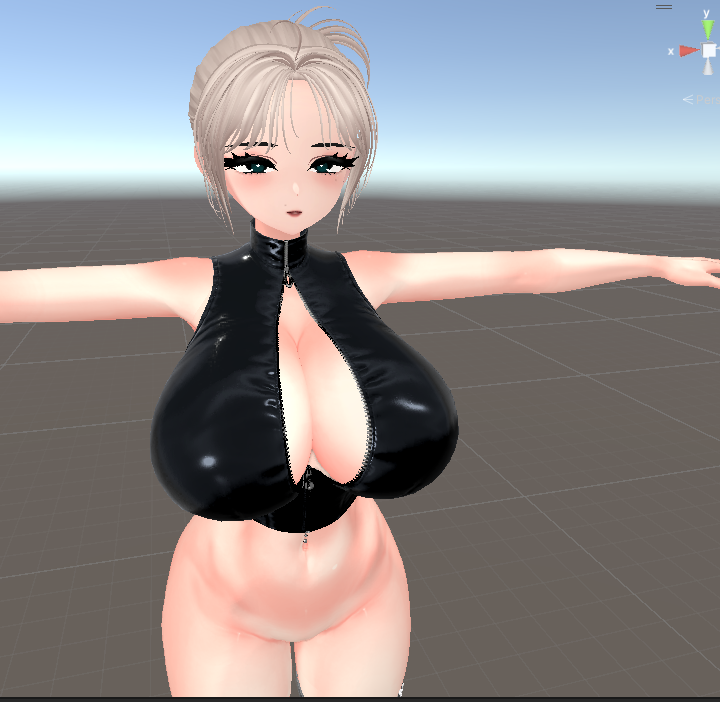
          My goal is to make a custom Miltina avatar, and I'd like to make her fairly busty. I'm taking a lot of inspiration from twitter user @Iris_Rybrant (reference of her model posted below). Could someone explain to me common methods for adjusting the size of breasts, and other body parts?

          https://x.com/Iris_Rybrant/status/2039267329847275587/photo/1
          e17e6120-755d-4ecf-aea9-a7a2c6ad401e-image.jpeg

          Heluvskaykay_H
          Heluvskaykay_H
          Heluvskaykay_
          wrote on last edited by
          #6

          @akanelex once you make it could you share it with me? I've been looking for avis like this and cant really find any unless i wanna give up 30-40$ and for and digital item that's insane.

          1 Reply Last reply
          0
          • Heluvskaykay_H Heluvskaykay_ referenced this topic on
          • T
            T
            tommy.1234
            wrote on last edited by
            #7

            and the Hips?

            1 Reply Last reply
            0
            • T
              T
              tommy.1234
              wrote on last edited by
              #8

              how can I make the hips bigger

              1 Reply Last reply
              0
              • akanelexA akanelex

                Oh, I think I've figured it out! You just go to the Amature and adjust the scale on the breasts!
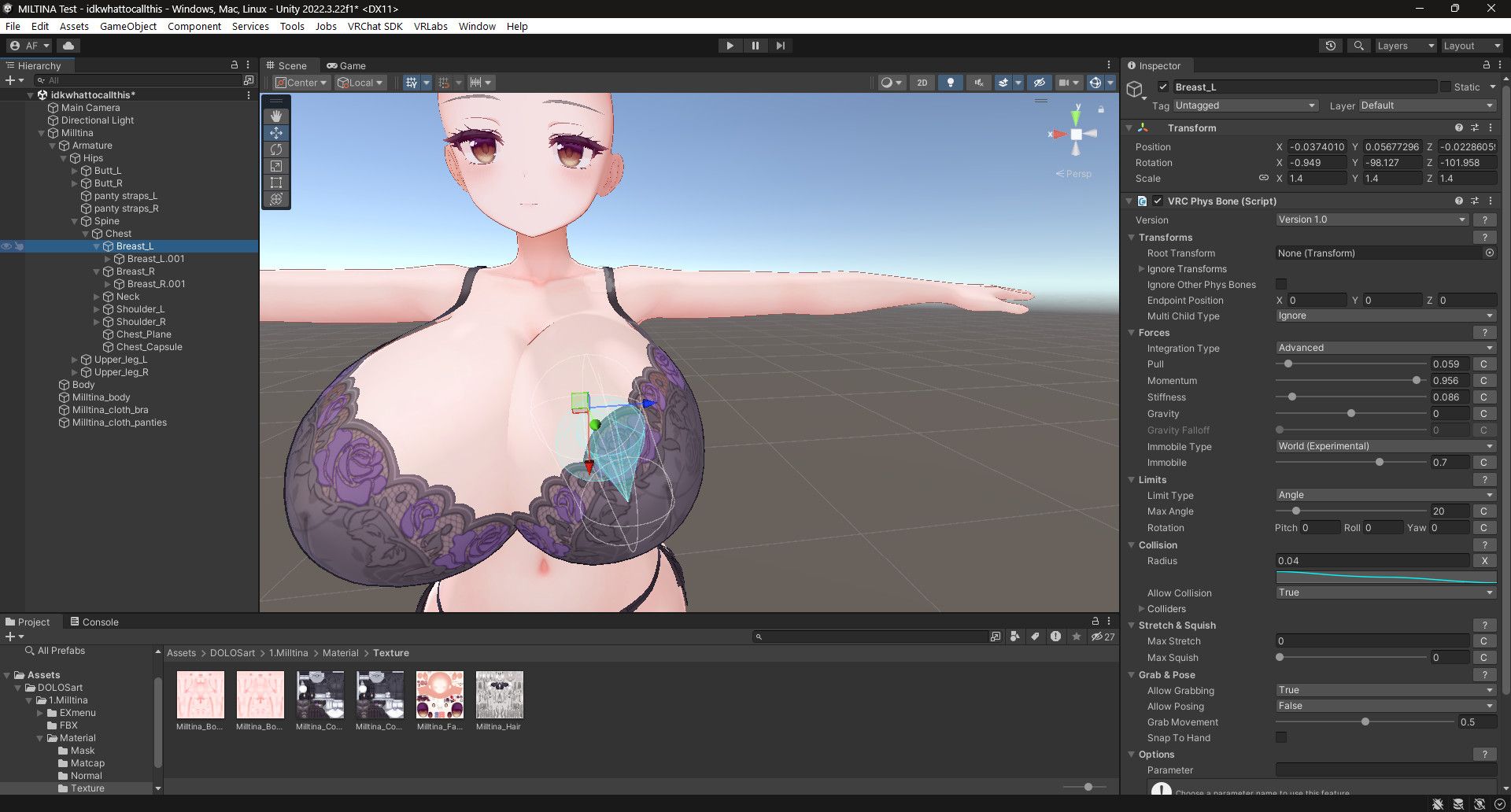
                5d69b793-46ef-431b-9076-9c2f730b9b46-image.jpeg

                TyeXOT
                TyeXOT
                TyeXO
                wrote on last edited by
                #9

                @akanelex Try not to rely on this. When things have bones that are weighted to have physbones, messing with the raw scale can sometimes break how that physbone will function in game. Its better to use blender or unity only tools to break the limits of premade shape-keys instead.

                I collect shit and I share shit, lets all shit together :D

                anonberryA dripsupplierD 2 Replies Last reply
                1
                • TyeXOT TyeXO

                  @akanelex Try not to rely on this. When things have bones that are weighted to have physbones, messing with the raw scale can sometimes break how that physbone will function in game. Its better to use blender or unity only tools to break the limits of premade shape-keys instead.

                  anonberryA
                  anonberryA
                  anonberry
                  wrote on last edited by
                  #10

                  @TyeXO how do you do that?

                  I often use translators, which can make my messages look ai-generated.

                  1 Reply Last reply
                  0
                  • TyeXOT TyeXO

                    @akanelex Try not to rely on this. When things have bones that are weighted to have physbones, messing with the raw scale can sometimes break how that physbone will function in game. Its better to use blender or unity only tools to break the limits of premade shape-keys instead.

                    dripsupplierD
                    dripsupplierD
                    dripsupplier
                    wrote on last edited by
                    #11

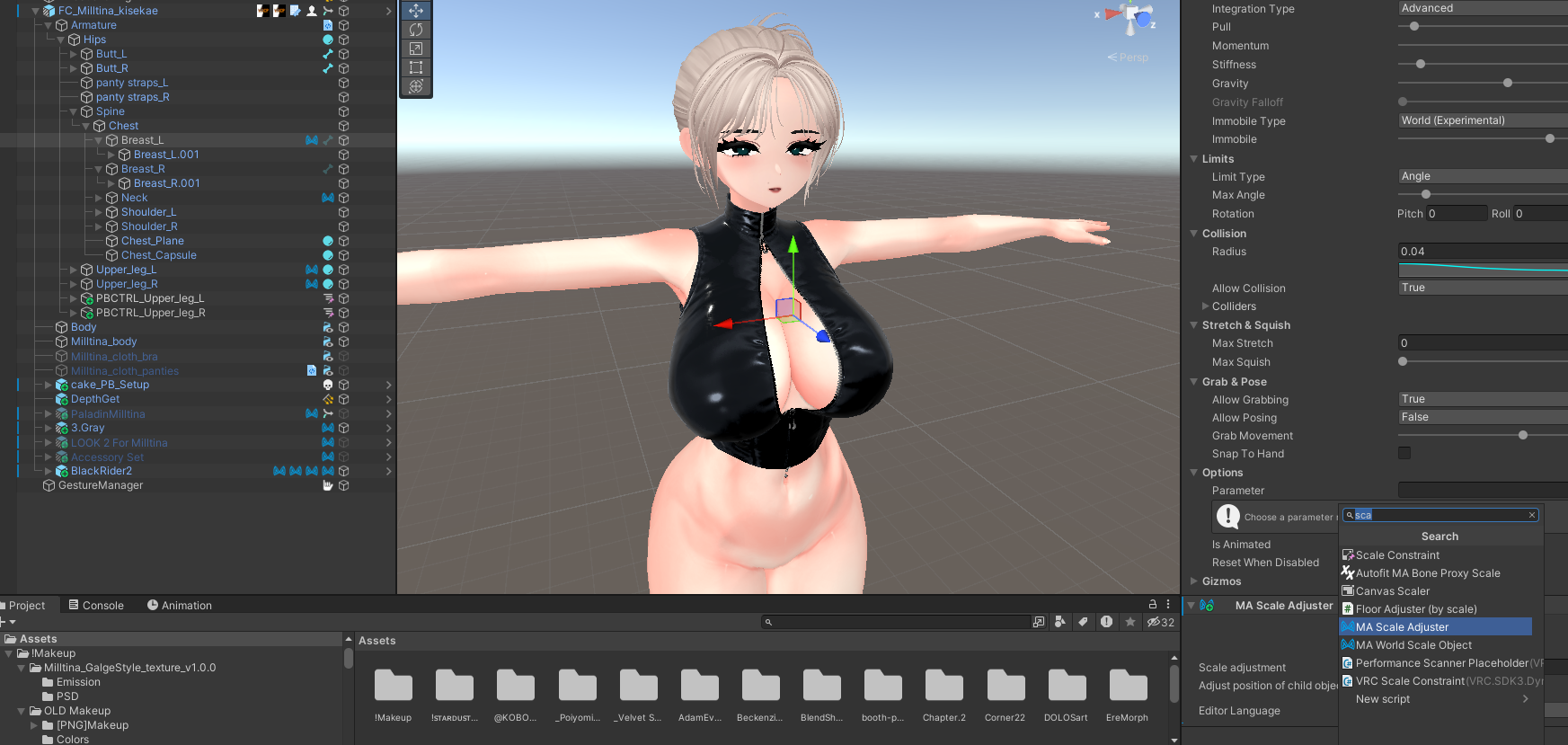
                    @TyeXO Instead of using the bone scaling specifically you can try Modular Avatar scale adjuster, it scales the mesh without messing with the bone itself, I use it for making fatter thighs or slimming down certain parts often and it works perfectly, it also gets around SPS non-uniform scaling issues if thats a concern!Screenshot 2026-06-29 172501.png Screenshot 2026-06-29 172537.png Screenshot 2026-06-29 172605.png

                    nobody can match my swag

                    TyeXOT 1 Reply Last reply
                    0
                    • dripsupplierD dripsupplier

                      @TyeXO Instead of using the bone scaling specifically you can try Modular Avatar scale adjuster, it scales the mesh without messing with the bone itself, I use it for making fatter thighs or slimming down certain parts often and it works perfectly, it also gets around SPS non-uniform scaling issues if thats a concern!Screenshot 2026-06-29 172501.png Screenshot 2026-06-29 172537.png Screenshot 2026-06-29 172605.png

                      TyeXOT
                      TyeXOT
                      TyeXO
                      wrote on last edited by
                      #12

                      @dripsupplier This is also a option, one that I've been a aware of for a good while now lol. However, I try to avoid using unity tools for major base edits as they can always fail to comply and now you have to redo everything, but it is good for light tweaks, such as making legs longer or thighs thicker. In that we are agreed.

                      I collect shit and I share shit, lets all shit together :D

                      1 Reply Last reply
                      0
                      • N
                        N
                        npnsd
                        wrote on last edited by npnsd
                        #13

                        There's a "plugin" called blendshape++, i think you can also apply to that aswell, combine with scale adjuster, for ma only

                        1 Reply Last reply
                        0
                        • BaphometscurseB
                          BaphometscurseB
                          Baphometscurse
                          wrote on last edited by
                          #14

                          https://payhip.com/b/NZ1zh?ref=jinxxy there is this, I can get the file for it uploaded to here if anyone would want this, I love using it and its super simple

                          Please don't put LF other things in post that have nothing to do with that, it does get to a point :')
                          No I don't wanna trade or buy models from you nor do I want my threads to become something for that

                          1 Reply Last reply
                          0
                          • O
                            O
                            omfgpeople
                            wrote on last edited by
                            #15

                            There's this tool you could use but 5.0.2 is kinda messed up with it's UI and isn't the most recent version

                            https://forum.ripper.store/post/1409405

                            1 Reply Last reply
                            0

                            Hello! It looks like you're interested in this conversation, but you don't have an account yet.

                            Getting fed up of having to scroll through the same posts each visit? When you register for an account, you'll always come back to exactly where you were before, and choose to be notified of new replies (either via email, or push notification). You'll also be able to save bookmarks and upvote posts to show your appreciation to other community members.

                            With your input, this post could be even better 💗

                            Register Login
                            Reply
                            • Reply as topic
                            Log in to reply
                            • Oldest to Newest
                            • Newest to Oldest
                            • Most Votes


                            • Login

                            • Login or register to search.
                            • First post
                              Last post
                            0
                            • Categories
                            • Recent
                            • Tags
                            • Popular