
Skip to content
  • Categories
  • Recent
  • Tags
  • Popular
Skins
  • Light
  • Brite
  • Cerulean
  • Cosmo
  • Flatly
  • Journal
  • Litera
  • Lumen
  • Lux
  • Materia
  • Minty
  • Morph
  • Pulse
  • Sandstone
  • Simplex
  • Sketchy
  • Spacelab
  • United
  • Yeti
  • Zephyr
  • Dark
  • Cyborg
  • Darkly
  • Quartz
  • Slate
  • Solar
  • Superhero
  • Vapor

  • Default (Zephyr)
  • No Skin
Collapse
RipperStore Logo
  1. Home
  2. Support
  3. General Support
  4. Adding clothes to this Ruri Model?

Adding clothes to this Ruri Model?

Scheduled Pinned Locked Moved General Support
helpclothing boothbooth avatar
8 Posts 2 Posters 651 Views 3 Watching
  • Oldest to Newest
  • Newest to Oldest
  • Most Votes
Reply
  • Reply as topic
Log in to reply
This topic has been deleted. Only users with topic management privileges can see it.
  • VisaeresV
    VisaeresV
    Visaeres
    wrote on last edited by
    #1

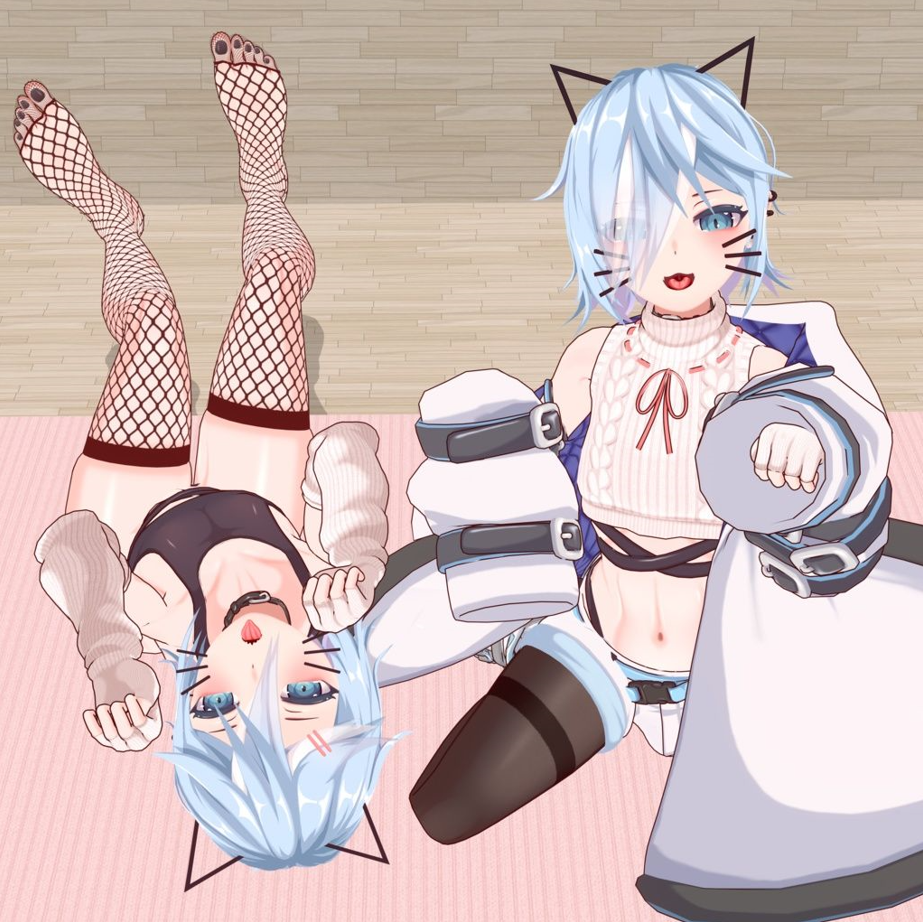
    Hi, so years ago I added this school uniform to this model. For the life of me I cannot remember how on earth I did it. Could someone help point in me the right direction?

    https://booth.pm/en/items/4877594
    ruri.PNG

    Wow that's a lot a' words, too bad I'm not reading em'

    1 Reply Last reply
    -1
    • bdawgB
      bdawgB
      bdawg
      wrote on last edited by
      #2

      If the outfit was made for the specific model, it should be as easy as using Modular Avatar to add it. If not, you would need to resize it and fit it in Blender.

      [Unity/Blender Support]
      If you need help with anything, please ask.

      VisaeresV 1 Reply Last reply
      0
      • bdawgB bdawg

        If the outfit was made for the specific model, it should be as easy as using Modular Avatar to add it. If not, you would need to resize it and fit it in Blender.

        VisaeresV
        VisaeresV
        Visaeres
        wrote on last edited by
        #3

        @bdawg That's just it, it's not set up for Modular, and nor did I have to use blender when I did it

        Wow that's a lot a' words, too bad I'm not reading em'

        1 Reply Last reply
        0
        • bdawgB
          bdawgB
          bdawg
          wrote on last edited by
          #4

          An outfit doesn't need a "Modular Setup" for you to add it with Modular to be honest. As long as it's fit to match the base you can just use Modular. Even if it isn't for the base you could still use Modular, it just wouldn't line up. My point is, it's still very much possible. I would really try just dragging and dropping it on and clicking Modular and seeing what happens. It's never been an issue for me in the past.

          [Unity/Blender Support]
          If you need help with anything, please ask.

          VisaeresV 1 Reply Last reply
          0
          • bdawgB bdawg

            An outfit doesn't need a "Modular Setup" for you to add it with Modular to be honest. As long as it's fit to match the base you can just use Modular. Even if it isn't for the base you could still use Modular, it just wouldn't line up. My point is, it's still very much possible. I would really try just dragging and dropping it on and clicking Modular and seeing what happens. It's never been an issue for me in the past.

            VisaeresV
            VisaeresV
            Visaeres
            wrote on last edited by Visaeres
            #5

            @bdawg Well, I did that a few mins ago, and it almost worked. The panties for whatever reason aren't fitting to the buttocks very well, lots of clipping. Same with the sweater, but it for the most part kinda works?

            Wow that's a lot a' words, too bad I'm not reading em'

            bdawgB 1 Reply Last reply
            0
            • VisaeresV Visaeres

              @bdawg Well, I did that a few mins ago, and it almost worked. The panties for whatever reason aren't fitting to the buttocks very well, lots of clipping. Same with the sweater, but it for the most part kinda works?

              bdawgB
              bdawgB
              bdawg
              wrote on last edited by
              #6

              @Visaeres
              I would recommend just reweighting those parts in Blender then. Unless you think that simply scaling in Unity would suffice, in that case I'd just resize in Unity

              [Unity/Blender Support]
              If you need help with anything, please ask.

              VisaeresV 1 Reply Last reply
              0
              • bdawgB bdawg

                @Visaeres
                I would recommend just reweighting those parts in Blender then. Unless you think that simply scaling in Unity would suffice, in that case I'd just resize in Unity

                VisaeresV
                VisaeresV
                Visaeres
                wrote on last edited by
                #7

                @bdawg What about with a model that has physbones in the chest? anything I can do in unity at all to make the top move WITH the physbone(s)?


                Wow that's a lot a' words, too bad I'm not reading em'

                bdawgB 1 Reply Last reply
                0
                • VisaeresV Visaeres

                  @bdawg What about with a model that has physbones in the chest? anything I can do in unity at all to make the top move WITH the physbone(s)?

                  bdawgB
                  bdawgB
                  bdawg
                  wrote on last edited by
                  #8

                  @Visaeres
                  You would unfortunately just need to reweight it in Blender if the chest doesn't already move properly. I don't believe there is a simple Unity fix if it isn't set up properly

                  [Unity/Blender Support]
                  If you need help with anything, please ask.

                  1 Reply Last reply
                  0

                  Hello! It looks like you're interested in this conversation, but you don't have an account yet.

                  Getting fed up of having to scroll through the same posts each visit? When you register for an account, you'll always come back to exactly where you were before, and choose to be notified of new replies (either via email, or push notification). You'll also be able to save bookmarks and upvote posts to show your appreciation to other community members.

                  With your input, this post could be even better 💗

                  Register Login
                  Reply
                  • Reply as topic
                  Log in to reply
                  • Oldest to Newest
                  • Newest to Oldest
                  • Most Votes


                  • Login

                  • Login or register to search.
                  • First post
                    Last post
                  0
                  • Categories
                  • Recent
                  • Tags
                  • Popular