Skip to content
  • Categories
  • Recent
  • Tags
  • Popular
Skins
  • Light
  • Brite
  • Cerulean
  • Cosmo
  • Flatly
  • Journal
  • Litera
  • Lumen
  • Lux
  • Materia
  • Minty
  • Morph
  • Pulse
  • Sandstone
  • Simplex
  • Sketchy
  • Spacelab
  • United
  • Yeti
  • Zephyr
  • Dark
  • Cyborg
  • Darkly
  • Quartz
  • Slate
  • Solar
  • Superhero
  • Vapor

  • Default (Zephyr)
  • No Skin
Collapse
RipperStore Logo
  1. Home
  2. Community
  3. General Questions
  4. How to set up PCSS?

How to set up PCSS?

Scheduled Pinned Locked Moved General Questions
boothshaderhelpquestion
36 Posts 28 Posters 32.3k Views 8 Watching
  • Oldest to Newest
  • Newest to Oldest
  • Most Votes
Reply
  • Reply as topic
Log in to reply
This topic has been deleted. Only users with topic management privileges can see it.
  • A
    A
    AnonyMelonyz
    wrote on last edited by
    #26

    I changed my avi height and now my lighting flickers, any way to fix this?

    DarkSkyD 1 Reply Last reply
    0
    • A AnonyMelonyz

      I changed my avi height and now my lighting flickers, any way to fix this?

      DarkSkyD
      DarkSkyD
      DarkSky
      wrote on last edited by
      #27

      @AnonyMelonyz I know this reply is late and probably not needed, but in case anyone has issues with PCSS lights flickering on the avatar when putting your height past 1.50m in VRChat: that is normal and intended because of how PCSS is optimized.

      You have the option to disable this though at the cost of getting some slightly worse performance: first of all, go to your Hierarchy and go to [Your Avatar] -> SelfLight -> AimSphere -> PhysBoneBase -> Sphere -> Spot Light. This object has a "Light" component on it, keep it there.
      Now go to your Assets in the folder view, and open the nHaruka -> PCSS4VRC folder. You'll find a file called "ShadowCullingOff". Now drag this file onto the "Light" component of the "Spot Light" object you found earlier. You have to drag it exactly onto the top bar that says "Light" by the way: you won't see any changes directly, but this basically turns off the optimization that PCSS is applying.

      Again, I'm posting this just in case anyone looks this up in the future and finds this thread ahahah

      1 Reply Last reply
      0
      • M
        M
        matyus02
        Banned
        wrote on last edited by
        #28

        hi can i get some rep here?

        1 Reply Last reply
        -1
        • X
          X
          xiaochenovo
          wrote on last edited by
          #29

          Hi, I need help with the PCSS plugin! Please help me!
          When I import PCSS into Unity and run it in the Editor, everything looks perfect. But once I upload the model into the game, the screen starts flashing badly—it’s really scary, and I have to turn it off immediately.
          In other test models, the result becomes extremely dark, even though I really love the look of PCSS.
          Is there any other solution I can try? I really need help!

          1 Reply Last reply
          0
          • AntiiA
            AntiiA
            Antii
            wrote on last edited by
            #30

            so far everytime I import PCSS, the nHaruka doesn't pop up, I use to use it so I know like how it's supposed to work, its just simply not popping up anymore.

            1 Reply Last reply
            0
            • kaiteK
              kaiteK
              kaite
              wrote on last edited by
              #31

              my nharuka pops up on my toolbar.. but the menu isn't in my avatar even when I set up properly and the lighting isn't working either.

              1 Reply Last reply
              0
              • Ketsu_K
                Ketsu_K
                Ketsu_
                wrote on last edited by Ketsu_
                #32

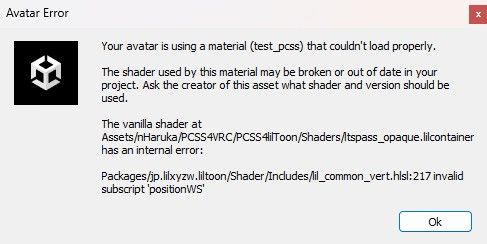
                what i'am doing wrong liltoon 2.3.2 pcss lil 8.4.2, with PCSS 9.0.6 same issue, tried liltoon 2.1.0 with 9.0.6. i'm using vrcfury and modular.

                @edit nevermind it was SPS lolipop. i just needed to exclude these.
                f2f43654-9067-4e7c-a364-165b50592056-image.jpeg

                sasakiS 1 Reply Last reply
                0
                • Ketsu_K Ketsu_

                  what i'am doing wrong liltoon 2.3.2 pcss lil 8.4.2, with PCSS 9.0.6 same issue, tried liltoon 2.1.0 with 9.0.6. i'm using vrcfury and modular.

                  @edit nevermind it was SPS lolipop. i just needed to exclude these.

                  f2f43654-9067-4e7c-a364-165b50592056-image.jpeg

                  sasakiS
                  sasakiS
                  sasaki
                  wrote on last edited by
                  #33

                  @Ketsu_ I dont know why it s not working but you can use realight instead of pcss because you are using liltoon,... Maybe it can do the same job -_- without ur issues .

                  1 Reply Last reply
                  0
                  • SoftBunnyS
                    SoftBunnyS
                    SoftBunny
                    wrote on last edited by
                    #34

                    'w' this hurts my brain reading it, i hope someone makes a video tutorial

                    1 Reply Last reply
                    0
                    • xgumX
                      xgumX
                      xgum
                      wrote on last edited by
                      #35

                      yea i imported the damn thing and followed the usual instructions to a T but still not seeing pcss appear in scene, im play mode, or in the game. tried many times.

                      1 Reply Last reply
                      0
                      • L
                        L
                        L4u
                        wrote last edited by
                        #36
                        This post is deleted!
                        1 Reply Last reply
                        0

                        Hello! It looks like you're interested in this conversation, but you don't have an account yet.

                        Getting fed up of having to scroll through the same posts each visit? When you register for an account, you'll always come back to exactly where you were before, and choose to be notified of new replies (either via email, or push notification). You'll also be able to save bookmarks and upvote posts to show your appreciation to other community members.

                        With your input, this post could be even better 💗

                        Register Login
                        Reply
                        • Reply as topic
                        Log in to reply
                        • Oldest to Newest
                        • Newest to Oldest
                        • Most Votes


                        • Login

                        • Login or register to search.
                        • First post
                          Last post
                        0
                        • Categories
                        • Recent
                        • Tags
                        • Popular