
Dear RipperStore People, how do i Optimize my avatar - Apr 9 Update
-
Link:
https://Fixupx.com/VRChat/status/2042306610458972637
https://ask.vrchat.com/t/developer-update-9-april-2026/48173
With the new VRChat Update coming soon...
How do I optimize my Avatar into '' Good ''
Can anyone give me a good Guide tutorial about it, please!
'' Avatar Performance Gated Group Instances
If you’ve ever attended a popular club world or event, you may have noticed that, due to the sheer number of attendees, your performance probably wasn’t all that great!A lot of this overhead has to do with the nature of user-generated content, namely, avatars. While we love all the creative ways you express yourself with your avatars, let’s be frank: a club stuffed with Very Poor avatars probably doesn’t make for the best experience overall for most players.
(Especially for the poor event runners tirelessly trying to convince others to change to a more performant avatar!)
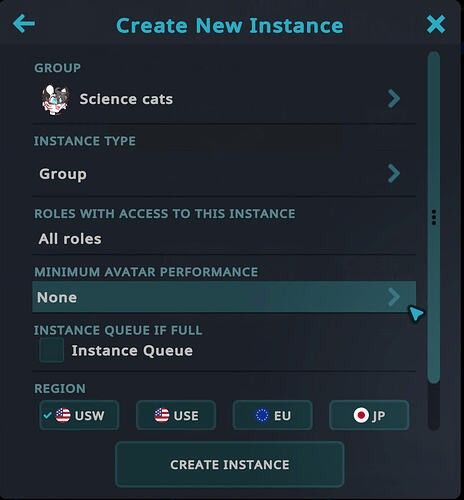
This is why we’re introducing a new tool for Group Instance types: Avatar Performance Gated Group Instances!
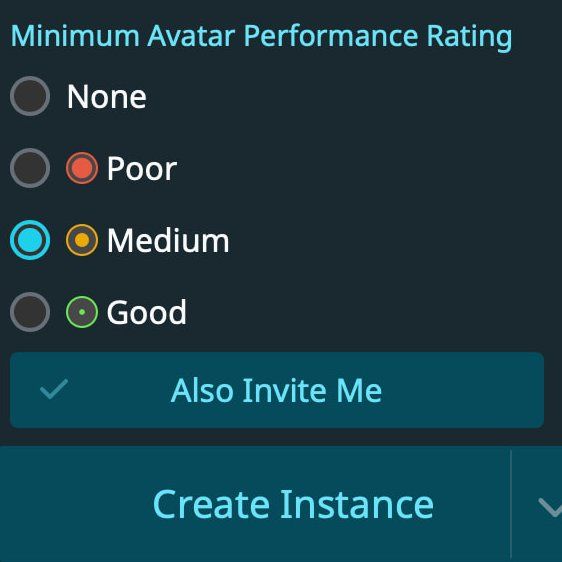
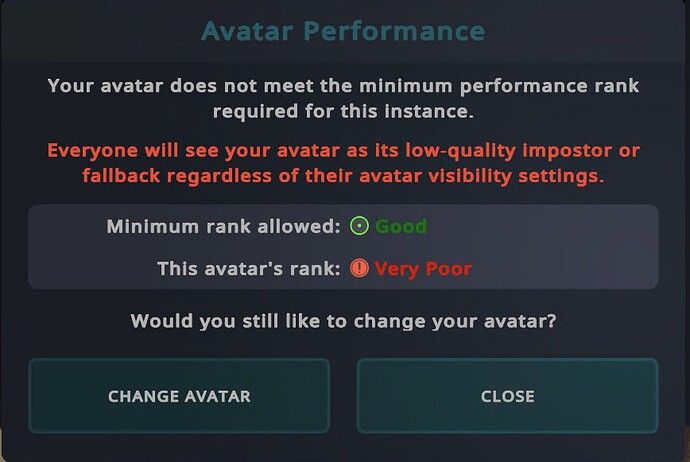
Performance Gated Instances allow you to configure a performance limit for avatars instance-wide. Any user that violates this limit will be shown as an impostor or their fallback avatar. This works in a very similar way to our current safety systems, just applied at an instance level.
All Group instance types now have the option to set minimum avatar performance requirements. By default, this is set to “None,” so if you don’t change anything here, you won’t notice any difference and the instance won’t have any avatar restrictions. '' - VRChat
-
look into this it helps me alot
-
@wouldyou I've been tinkering with performance for a pretty long time now and am an advocate of not ignoring it, tho I still don't know many things, but here are some pretty easy steps for significantly improving your performance rating:
Good practice:
- Don't put multiple clothes/hairstyles on one avi. With most modern avis being triangle heavy from the get-go and VRChat's abysmal (for modern PCs) 70k triangle limit you already have very little headroom to add your customizations, please distribute different outfits/hairstyles between separate avis and just switch between them when you feel like it (it is less convenient, but it's a small sacrifice)
Technical stuff:
-
https://github.com/d4rkc0d3r/d4rkAvatarOptimizer - slap this shit onto your main avi, set it to full, check if anything breaks in Gesture Manger (it most likely won't, across numerous avis it only broke something like one time)
-
DELETE MESHES OBSCURED BY YOUR CLOTHES!!! https://vpm.anatawa12.com/add-repo - add this to your VCC, then in your project enable the "AAO: Avatar Optimizer" package. Add "AAO Remove Meshes by Blendshape" component onto whatever is obscured by your clothes and checkmark everything you want removed (it is non-destructive, it won't ruin your avi as it only applies on upload). This will shave off a good chunk of triangles off of your avi
It also has a lot of other functions, but I've only used it for one day so I can't tell you about anything else. -
https://vpm.thry.dev is pretty self-explanatory, you add it, go to Thry -> Avatar -> VRAM, put your avi into it and REDUCE ALL THOSE FUCKASS 4k TEXTURES! You won't need them, do like 2k max (I would even recommend 1k for smaller parts like gloves/shoes/eyes/hair) until your Texture Memory is at least Poor or better
-
(Not my area of expertise) in Blender, you can import an FBX of an object and add a "Decimate" modifier to it, then set the ratio to ~0.5, which will shave off a good amount of triangles. One problem tho: it destroys your Blendshapes. I'm practically brand new to blender and idk if it's fixable, so I only use it on objects that don't need any blendshape modification
-
UPD. Refer to my next message in this thread, there is an extraordinary tool for significantly reducing triangle count that you should always use!
So in conclusion: d4rk optimizer will resolve most of your issues, AAO will help you with triangles (usually main issue in avis), Thry will help you easily reduce your texture size so you don't kill everyone's (and your own) VRAM.
PLEASE CORRECT ME IF I'M WRONG OR ADD SOMETHING THAT I FORGOT BECAUSE I'M IN NO WAY, SHAPE OR FORM A PRO AT CREATING/OPTIMIZING AVIS! I will edit this if I remember anything else.
Also there's this post, I only quickly skipped thru it but I think it's very similar to what I described. It has nice video demonstrations tho! (https://x.com/duinrahaic/status/1864819572596969874)
🌙 I WILL MAKE THE PROJECT MOON ASSETS FREE FOR EVERYONE
EASY AVI OPTIMIZATION GUIDE BY ME: CLICK!
My Project Moon avi cosplay tutorial: CLICK!
Please @ tag me if there's an update/link is broken/you have a suggestion about a Project Moon related item that I should share
Giving back to the community that allowed me to build numerous fantastic avatars for free
-
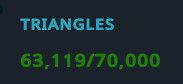
UPDATE! Found a REALLY good tool (WAAAY better than Meshia) to reduce triangles! At like ~70% ratio it looks very close to the original:
-
Download this (Mantis LOD Editor Professional Edition), import into your project, then download this free non-destructive tool that uses it - Booth Link and import it afterwards
-
In Unity, add "NDMF Mantis LOD Editor" component to each object in your hierarchy that you want to edit.
Then press "Preview" and move the "Quality" button until you're satisfied with the ration of Quality/Optimization, also feel free to play around with other settings
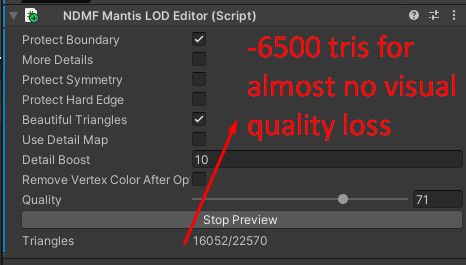
This saved one of my avis I thought to be unsaveable in terms of triangle count:
🌙 I WILL MAKE THE PROJECT MOON ASSETS FREE FOR EVERYONE
EASY AVI OPTIMIZATION GUIDE BY ME: CLICK!
My Project Moon avi cosplay tutorial: CLICK!
Please @ tag me if there's an update/link is broken/you have a suggestion about a Project Moon related item that I should share
Giving back to the community that allowed me to build numerous fantastic avatars for free
-
-
 T terew referenced this topic on


Hello! It looks like you're interested in this conversation, but you don't have an account yet.
Getting fed up of having to scroll through the same posts each visit? When you register for an account, you'll always come back to exactly where you were before, and choose to be notified of new replies (either via email, or push notification). You'll also be able to save bookmarks and upvote posts to show your appreciation to other community members.
With your input, this post could be even better 💗
Register Login