Skip to content
  • Categories
  • Recent
  • Tags
  • Popular
Skins
  • Light
  • Brite
  • Cerulean
  • Cosmo
  • Flatly
  • Journal
  • Litera
  • Lumen
  • Lux
  • Materia
  • Minty
  • Morph
  • Pulse
  • Sandstone
  • Simplex
  • Sketchy
  • Spacelab
  • United
  • Yeti
  • Zephyr
  • Dark
  • Cyborg
  • Darkly
  • Quartz
  • Slate
  • Solar
  • Superhero
  • Vapor

  • Default (Zephyr)
  • No Skin
Collapse
RipperStore Logo
  1. Home
  2. Guides
  3. Tutorials
  4. How do I add assets to my avatar?

How do I add assets to my avatar?

Scheduled Pinned Locked Moved Tutorials
boothbooth assetsbooth avatarhelpguidance
18 Posts 3 Posters 6.2k Views
  • Oldest to Newest
  • Newest to Oldest
  • Most Votes
Reply
  • Reply as topic
Log in to reply
This topic has been deleted. Only users with topic management privileges can see it.
  • gothcakesG gothcakes

    @solamistaken Duly noted love! This guide was really helpful, although Im having a slight hiccup-! (What a surprise.)

    At this part, "Find your current menu asset. (You can click on the menu in the avatar descriptor to get teleported to its folder in the project.) Then, Ctrl-C and Ctrl-V to make a copy of it, and drag that new copy overtop of the old menu in the avatar descriptor. .." How doesss iiii..uhhh do this? stupid question again- I reread this twice and my brain can't register on what Im supposed to do -w-'

    'Luminus'
    'Luminus'
    'Luminus
    wrote on last edited by
    #7

    @gothcakes a little bit of tips for u if u want add something like for example dynamic expression by rescery ,u can just simply use vrcfury full controller component and just drag and drop the asset controller to the component ex:(action fx gesture fx ,parameter,or even menu)

    gothcakesG 1 Reply Last reply
    0
    • gothcakesG gothcakes

      @solamistaken Duly noted love! This guide was really helpful, although Im having a slight hiccup-! (What a surprise.)

      At this part, "Find your current menu asset. (You can click on the menu in the avatar descriptor to get teleported to its folder in the project.) Then, Ctrl-C and Ctrl-V to make a copy of it, and drag that new copy overtop of the old menu in the avatar descriptor. .." How doesss iiii..uhhh do this? stupid question again- I reread this twice and my brain can't register on what Im supposed to do -w-'

      solamistakenS
      solamistakenS
      solamistaken
      wrote on last edited by
      #8

      @gothcakes Basically, you're looking for your current menu asset so you can add a piece to it. The easiest way is usually to find it from your avatar descriptor, since clicking on things from it will highlight it, wherever it is in your project. If you're having trouble finding it, you can also look wherever the rest of your files are for the base.

      o/
      Sucker for lots of cheap toys (that add up to be expensive...)

      No trades. Gift it to everyone and we'll all be happier :3

      gothcakesG 1 Reply Last reply
      0
      • solamistakenS solamistaken

        @gothcakes Basically, you're looking for your current menu asset so you can add a piece to it. The easiest way is usually to find it from your avatar descriptor, since clicking on things from it will highlight it, wherever it is in your project. If you're having trouble finding it, you can also look wherever the rest of your files are for the base.

        gothcakesG
        gothcakesG
        gothcakes
        wrote on last edited by
        #9

        @solamistaken Ahhhhhh, is this where im supposed to be Love? d77c726b-06da-4e13-85d6-6d80d10d5599-image.png
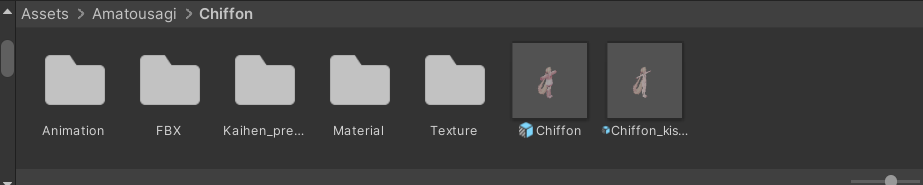
        I mean its where it took me ! :3

        solamistakenS 1 Reply Last reply
        0
        • 'Luminus' 'Luminus

          @gothcakes a little bit of tips for u if u want add something like for example dynamic expression by rescery ,u can just simply use vrcfury full controller component and just drag and drop the asset controller to the component ex:(action fx gesture fx ,parameter,or even menu)

          gothcakesG
          gothcakesG
          gothcakes
          wrote on last edited by
          #10

          @Luminus Dutifully noted! I appreciate it :3

          1 Reply Last reply
          0
          • gothcakesG gothcakes

            @solamistaken Ahhhhhh, is this where im supposed to be Love? d77c726b-06da-4e13-85d6-6d80d10d5599-image.png
            I mean its where it took me ! :3

            solamistakenS
            solamistakenS
            solamistaken
            wrote on last edited by
            #11

            @gothcakes It's likely in the Animation or Kaihen folders, but it should bring you directly to the menu when you click on it... does it have any toggles on it by default? It might not actually have a menu on it yet, in which case you can just put the English menu in the "menu" slot (or do it through VRCFury or MA)

            o/
            Sucker for lots of cheap toys (that add up to be expensive...)

            No trades. Gift it to everyone and we'll all be happier :3

            gothcakesG 1 Reply Last reply
            0
            • solamistakenS
              solamistakenS
              solamistaken
              wrote on last edited by
              #12

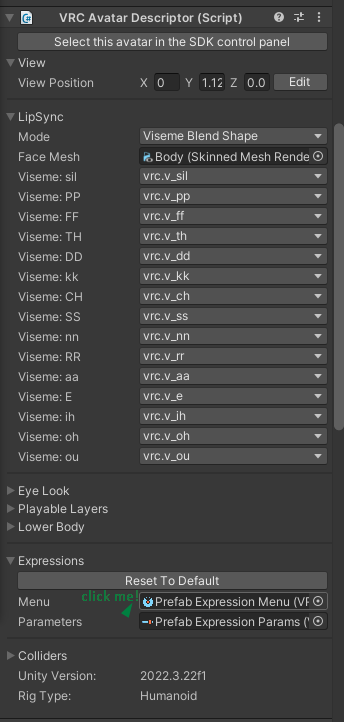
              In case it helps:
              Avatar descriptor, arrow pointing to the Menu option
              Long screenshot, showing highlighted menu

              o/
              Sucker for lots of cheap toys (that add up to be expensive...)

              No trades. Gift it to everyone and we'll all be happier :3

              gothcakesG 1 Reply Last reply
              0
              • solamistakenS solamistaken

                @gothcakes It's likely in the Animation or Kaihen folders, but it should bring you directly to the menu when you click on it... does it have any toggles on it by default? It might not actually have a menu on it yet, in which case you can just put the English menu in the "menu" slot (or do it through VRCFury or MA)

                gothcakesG
                gothcakesG
                gothcakes
                wrote on last edited by
                #13

                @solamistaken Yeah! It has toggles by default! The Kaihen folders is just the Prefab..And the animation folder has all this stuff in it- 02a685a5-1794-46fd-b70f-872f0c08a55e-image.png

                solamistakenS 1 Reply Last reply
                0
                • gothcakesG gothcakes

                  @solamistaken Yeah! It has toggles by default! The Kaihen folders is just the Prefab..And the animation folder has all this stuff in it- 02a685a5-1794-46fd-b70f-872f0c08a55e-image.png

                  solamistakenS
                  solamistakenS
                  solamistaken
                  wrote on last edited by
                  #14

                  @gothcakes Those three "Clothing_..." buttons are menus, so one of them is probably the menu you need (hopefully?) See what's inside them, they might be submenus or they might be language translations

                  o/
                  Sucker for lots of cheap toys (that add up to be expensive...)

                  No trades. Gift it to everyone and we'll all be happier :3

                  1 Reply Last reply
                  0
                  • solamistakenS solamistaken

                    In case it helps:
                    Avatar descriptor, arrow pointing to the Menu option
                    Long screenshot, showing highlighted menu

                    gothcakesG
                    gothcakesG
                    gothcakes
                    wrote on last edited by
                    #15

                    @solamistaken OH OH- I AM, BIG STUPIDDD... Im there now- sorry for the brainfart on my part-

                    solamistakenS 1 Reply Last reply
                    0
                    • gothcakesG gothcakes

                      @solamistaken OH OH- I AM, BIG STUPIDDD... Im there now- sorry for the brainfart on my part-

                      solamistakenS
                      solamistakenS
                      solamistaken
                      wrote on last edited by
                      #16

                      @gothcakes No worries! If you get stuck anywhere else, feel free to add me on Discord (same name) if you prefer

                      o/
                      Sucker for lots of cheap toys (that add up to be expensive...)

                      No trades. Gift it to everyone and we'll all be happier :3

                      gothcakesG 1 Reply Last reply
                      0
                      • solamistakenS solamistaken

                        @gothcakes No worries! If you get stuck anywhere else, feel free to add me on Discord (same name) if you prefer

                        gothcakesG
                        gothcakesG
                        gothcakes
                        wrote on last edited by
                        #17

                        @solamistaken D'aw that'd be much better! As long as you don't mind the bombardment of stupid questions! ❤

                        solamistakenS 1 Reply Last reply
                        0
                        • gothcakesG gothcakes

                          @solamistaken D'aw that'd be much better! As long as you don't mind the bombardment of stupid questions! ❤

                          solamistakenS
                          solamistakenS
                          solamistaken
                          wrote on last edited by
                          #18

                          @gothcakes No worries at all, and no such thing as stupid questions
                          o/
                          Sucker for lots of cheap toys (that add up to be expensive...)

                          No trades. Gift it to everyone and we'll all be happier :3

                          1 Reply Last reply
                          0

                          Hello! It looks like you're interested in this conversation, but you don't have an account yet.

                          Getting fed up of having to scroll through the same posts each visit? When you register for an account, you'll always come back to exactly where you were before, and choose to be notified of new replies (either via email, or push notification). You'll also be able to save bookmarks and upvote posts to show your appreciation to other community members.

                          With your input, this post could be even better 💗

                          Register Login
                          Reply
                          • Reply as topic
                          Log in to reply
                          • Oldest to Newest
                          • Newest to Oldest
                          • Most Votes


                          • Login

                          • Login or register to search.
                          • First post
                            Last post
                          0
                          • Categories
                          • Recent
                          • Tags
                          • Popular