
How do I add assets to my avatar?
-
It's not a stupid question at all, especially since the things you're hoping to add are a bit more abstract. I don't use Chiffon, so I can't completely walk you through it, but judging from those packages it should be pretty simple(tm).
If you don't have it already, you'll want VRLabs' Avatars 3.0 Manager which makes it way easier to merge layers together without thinking too hard about it.Let's start with the dynamic expressions, since that's going to be the more difficult one of the two:
First, drag the "Dynamic expressions" prefab onto your avatar in the hierarchy, so it sits under it. There's a whole bunch of extra stuff inside you don't need to worry about, but for now just focus on the three "Constraint(x)" objects at the top of it. Click on one, and then work down your avatar's armature (bone structure) until you find the bone the name mentions. Drag it into the "Sources" box in the constraint to set it up. (For example, the one named "Contraint(Breast_R.002) would likely have you go from the hips up to the chest, then into the right breast's bones.)
Then we can set up the menu, layers and parameters.If you've installed the AV3 manager from above, you can find it in the VRLabs tab at the top of your Unity window. Open it and drag your avatar into the "Avatar" box so it populates with your current setup. Click on "Additive" so it drops down.
If your avatar doesn't have an additive layer already (i.e. you get two boxes with "Use Custom Animator Layer" and "Use Default Animator Layer as custom"), pick "Use Custom Animator Layer" and drag the controller labelled "Chiffon Additive eye" into the box.
If it does have an additive layer, you'll instead see "Add animator to merge". Click that, then drag the same controller in, then press "Merge on new" to stick both controllers together.
Then, do the same thing with the Gesture dropdown and "Chiffon_Gesture(modify".
Then, do the same thing with the FX dropdown and "FX Add".
With FX, you'll see a whole bunch of new boxes show up. We need to click both buttons on everything from "DE-Dynamic expressions on" to "DE-UI off". After that, click on the second box in the top left of the AV3 manager window (the one with three lines and three dots). For the same options as the last step, we're going to press the middle row of buttons. This sets up things with the menu and lets the avatar save its settings between worlds.
Congrats, you've set up all of your layers! Unity is all set up to be able to move your avatar the right way, now we just need to tell VRChat when to do that.Find your current menu asset. (You can click on the menu in the avatar descriptor to get teleported to its folder in the project.) Then, Ctrl-C and Ctrl-V to make a copy of it, and drag that new copy overtop of the old menu in the avatar descriptor. Click on your new menu again to re-open it in the inspector window, then press the little plus button at the bottom of the "controls" menu. Set the name and image to whatever you like, and the type to SubMenu. You'll see an extra button at the bottom of the window now with "Sub Menu" and a spot to put your menu; find the "Chiffon Expression(English)" menu and put it into that box. If you're having trouble keeping the menu open while going through folders, you can either press the lock button at the very top right of the inspector menu, or click on the circle-in-a-circle next to the submenu box and search for the menu instead.
You're done (I promise!)
The kemomimi animations seem to be options to replace the hand expressions at first glance. Find your FX controller (same way as the menu, click on it from the avatar descriptor) and double-click it to open it in the Animator window. You'll probably see a bunch of stuff here, but the only things you care about are "Right hand" and "Left hand" (these are guesses, I don't know how Chiffon's FX is set up. They should be named similarly). You should see a whole bunch of "fist", "open hand", "fingergun" etc that correspond with the same gestures in VRChat. Pick one that you want to change, then drag the animation into the "motion" box. You should be able to preview the animations by clicking once (so you see the little box at the bottom of the inspector) then dragging your avatar into the text asking you to drag an avatar. You might have to zoom in a bit to see what it's actually doing.Sorry if this is stupid long, and let me know if something isn't working as you expect it to/you can't find a setting. We were all in your place once.
-
For future reference, a lot of (other) Japanese prefabs like the dynamic expressions use MA (Modular Avatar) instead, where the prefab creator does all the work and you just drag-and-drop the prefab into your model. Rescery's stuff is an outlier to not use it these days honestly
o/
Sucker for lots of cheap toys (that add up to be expensive...)No trades. Gift it to everyone and we'll all be happier :3
-
For future reference, a lot of (other) Japanese prefabs like the dynamic expressions use MA (Modular Avatar) instead, where the prefab creator does all the work and you just drag-and-drop the prefab into your model. Rescery's stuff is an outlier to not use it these days honestly
@solamistaken THANK YOU SO MUCH SWEET DEAR, there is not a single way I could express the sheer amount of raw gratitude and thanks I have. This was exactly what I needed to hear, thank you so much Angel. Once again, thank you for helping me get started and learn without having a conniption on unity, may you have an extremely lovely night and or day! <333 :3
MANY HEARTS.

-
@solamistaken THANK YOU SO MUCH SWEET DEAR, there is not a single way I could express the sheer amount of raw gratitude and thanks I have. This was exactly what I needed to hear, thank you so much Angel. Once again, thank you for helping me get started and learn without having a conniption on unity, may you have an extremely lovely night and or day! <333 :3
MANY HEARTS.
@gothcakes No worries at all. Rescery's BOOTH page does have an instruction video for setting up the prefab, so if I forgot something (I mostly skimmed it to double-check a few things that might have been different from the Manuka prefab) that would be a good resource to look through.
o/
Sucker for lots of cheap toys (that add up to be expensive...)No trades. Gift it to everyone and we'll all be happier :3
-
@gothcakes No worries at all. Rescery's BOOTH page does have an instruction video for setting up the prefab, so if I forgot something (I mostly skimmed it to double-check a few things that might have been different from the Manuka prefab) that would be a good resource to look through.
@solamistaken Duly noted love! This guide was really helpful, although Im having a slight hiccup-! (What a surprise.)
At this part, "Find your current menu asset. (You can click on the menu in the avatar descriptor to get teleported to its folder in the project.) Then, Ctrl-C and Ctrl-V to make a copy of it, and drag that new copy overtop of the old menu in the avatar descriptor. .." How doesss iiii..uhhh do this? stupid question again- I reread this twice and my brain can't register on what Im supposed to do -w-'
-
@solamistaken Duly noted love! This guide was really helpful, although Im having a slight hiccup-! (What a surprise.)
At this part, "Find your current menu asset. (You can click on the menu in the avatar descriptor to get teleported to its folder in the project.) Then, Ctrl-C and Ctrl-V to make a copy of it, and drag that new copy overtop of the old menu in the avatar descriptor. .." How doesss iiii..uhhh do this? stupid question again- I reread this twice and my brain can't register on what Im supposed to do -w-'
@gothcakes a little bit of tips for u if u want add something like for example dynamic expression by rescery ,u can just simply use vrcfury full controller component and just drag and drop the asset controller to the component ex:(action fx gesture fx ,parameter,or even menu)
-
@solamistaken Duly noted love! This guide was really helpful, although Im having a slight hiccup-! (What a surprise.)
At this part, "Find your current menu asset. (You can click on the menu in the avatar descriptor to get teleported to its folder in the project.) Then, Ctrl-C and Ctrl-V to make a copy of it, and drag that new copy overtop of the old menu in the avatar descriptor. .." How doesss iiii..uhhh do this? stupid question again- I reread this twice and my brain can't register on what Im supposed to do -w-'
@gothcakes Basically, you're looking for your current menu asset so you can add a piece to it. The easiest way is usually to find it from your avatar descriptor, since clicking on things from it will highlight it, wherever it is in your project. If you're having trouble finding it, you can also look wherever the rest of your files are for the base.
o/
Sucker for lots of cheap toys (that add up to be expensive...)No trades. Gift it to everyone and we'll all be happier :3
-
@gothcakes Basically, you're looking for your current menu asset so you can add a piece to it. The easiest way is usually to find it from your avatar descriptor, since clicking on things from it will highlight it, wherever it is in your project. If you're having trouble finding it, you can also look wherever the rest of your files are for the base.
-
@gothcakes a little bit of tips for u if u want add something like for example dynamic expression by rescery ,u can just simply use vrcfury full controller component and just drag and drop the asset controller to the component ex:(action fx gesture fx ,parameter,or even menu)
-
@solamistaken Ahhhhhh, is this where im supposed to be Love?
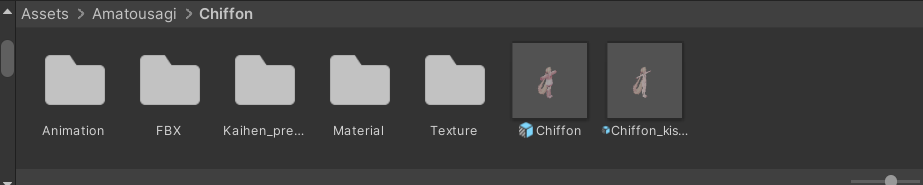
I mean its where it took me ! :3@gothcakes It's likely in the Animation or Kaihen folders, but it should bring you directly to the menu when you click on it... does it have any toggles on it by default? It might not actually have a menu on it yet, in which case you can just put the English menu in the "menu" slot (or do it through VRCFury or MA)
-
@gothcakes It's likely in the Animation or Kaihen folders, but it should bring you directly to the menu when you click on it... does it have any toggles on it by default? It might not actually have a menu on it yet, in which case you can just put the English menu in the "menu" slot (or do it through VRCFury or MA)
-
@solamistaken Yeah! It has toggles by default! The Kaihen folders is just the Prefab..And the animation folder has all this stuff in it-

@gothcakes Those three "Clothing_..." buttons are menus, so one of them is probably the menu you need (hopefully?) See what's inside them, they might be submenus or they might be language translations
-
In case it helps:
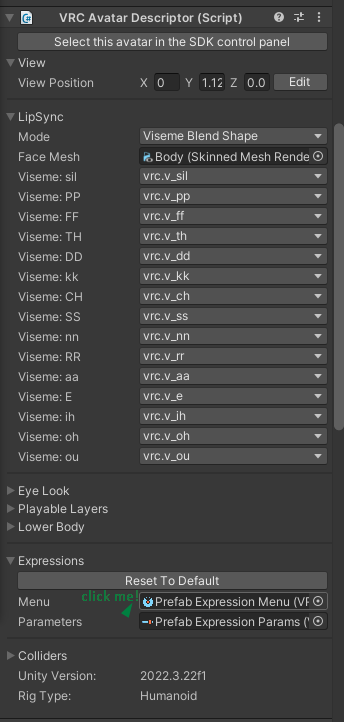

-
@solamistaken OH OH- I AM, BIG STUPIDDD... Im there now- sorry for the brainfart on my part-
@gothcakes No worries! If you get stuck anywhere else, feel free to add me on Discord (same name) if you prefer
o/
Sucker for lots of cheap toys (that add up to be expensive...)No trades. Gift it to everyone and we'll all be happier :3
-
@gothcakes No worries! If you get stuck anywhere else, feel free to add me on Discord (same name) if you prefer
-
@solamistaken D'aw that'd be much better! As long as you don't mind the bombardment of stupid questions!
@gothcakes No worries at all, and no such thing as stupid questions


Hello! It looks like you're interested in this conversation, but you don't have an account yet.
Getting fed up of having to scroll through the same posts each visit? When you register for an account, you'll always come back to exactly where you were before, and choose to be notified of new replies (either via email, or push notification). You'll also be able to save bookmarks and upvote posts to show your appreciation to other community members.
With your input, this post could be even better 💗
Register Login