
Can anyone help me with '' Breast Physics Plus Plus '' Tutorial Please!
-
Hi i got stuck with the part...Breast Physics Plus Plus part and it's not working!
Here the booth Link
https://nharuka.booth.pm/items/5453882
I am really not sure what I am doing.
Avatar
Left breasts (1st bone)
Left PhysBoneRight Breast (1st bone)
Right PhysBoneand something with chest in Japanese
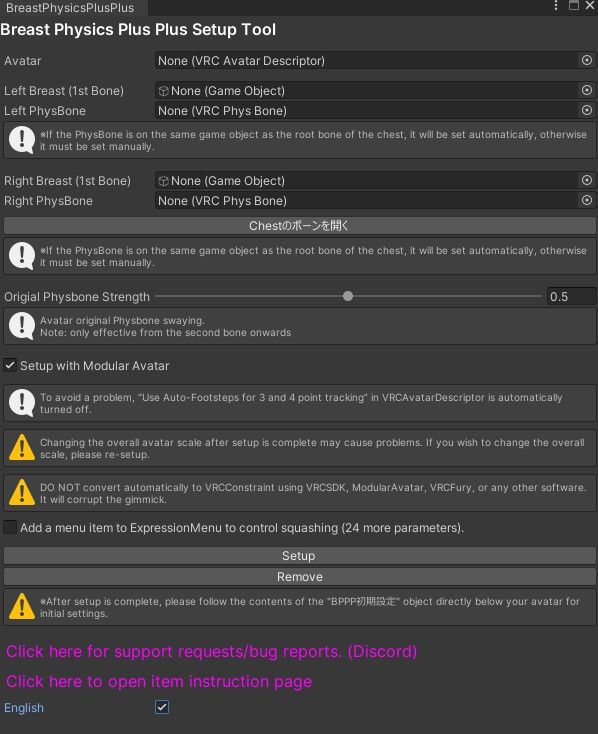
Does anyone know this, please help.
-
This is my first time posting on the forums, but I have used this quite extensively. I hope your able to see this since it has been over a month!
If you click on the chest button, it'll direct your scene hierarchy to the chosen avatars(in the avatar slot) chest part/bone of the avatars armature. You use this to find your breast bone of the armature.
Once you have found the breast part of the armature, you'll probably have a breast armature that has children for the right and left breast. This is what it means when it says the "first bone" of each breast. Just drag and drop each armature part on the scene hierarchy to each respective slot.
IF you have individual physbones on each 1st bone of the right and left breast, it should automatically populate the physbone slot of the menu. If it does not, then it is most likely on the parent of the right and left breast armature part. You can check this by clicking on the parent of the right and left breast armature part and look if there is a physbone component. Just drop and drop the parent breast armature part on each physbone slot and it should populate with the physbone that affects both the right and left breast armatures if so. Most avatars I have used require this time and should be easy to go.
I ignore the "original physbone strength" option, I have seen excellent results using the built in "bouncy-ness" options you use once all the parts are on your avatar.I have gotten an error using Breast Physics Plus Plus, and if you get an error do this. Check if there are any children of the 1st armature parts of the left and right breasts. If there aren't, the it is probably the cause of your error. I have checked the discord for the error that was caused by that and someone else had the same issue.
If this is the case, make a new empty object as a child under the 1st bone of the right and left armatures and name it like "Right/Left Breast (1)" (for organization).
Once you have an empty object as a child for each breast armature part, just move it to the center of the each respective breast. This should fix the issue.
This happens because Breast Physics Plus Plus is expecting there to be at least one empty object as a child of the 1st bone of the left and right breast armature parts, I theorize it is because it uses that child armature bone as part of the physics engine/process.Hope this helps!
-
This is my first time posting on the forums, but I have used this quite extensively. I hope your able to see this since it has been over a month!
If you click on the chest button, it'll direct your scene hierarchy to the chosen avatars(in the avatar slot) chest part/bone of the avatars armature. You use this to find your breast bone of the armature.
Once you have found the breast part of the armature, you'll probably have a breast armature that has children for the right and left breast. This is what it means when it says the "first bone" of each breast. Just drag and drop each armature part on the scene hierarchy to each respective slot.
IF you have individual physbones on each 1st bone of the right and left breast, it should automatically populate the physbone slot of the menu. If it does not, then it is most likely on the parent of the right and left breast armature part. You can check this by clicking on the parent of the right and left breast armature part and look if there is a physbone component. Just drop and drop the parent breast armature part on each physbone slot and it should populate with the physbone that affects both the right and left breast armatures if so. Most avatars I have used require this time and should be easy to go.
I ignore the "original physbone strength" option, I have seen excellent results using the built in "bouncy-ness" options you use once all the parts are on your avatar.I have gotten an error using Breast Physics Plus Plus, and if you get an error do this. Check if there are any children of the 1st armature parts of the left and right breasts. If there aren't, the it is probably the cause of your error. I have checked the discord for the error that was caused by that and someone else had the same issue.
If this is the case, make a new empty object as a child under the 1st bone of the right and left armatures and name it like "Right/Left Breast (1)" (for organization).
Once you have an empty object as a child for each breast armature part, just move it to the center of the each respective breast. This should fix the issue.
This happens because Breast Physics Plus Plus is expecting there to be at least one empty object as a child of the 1st bone of the left and right breast armature parts, I theorize it is because it uses that child armature bone as part of the physics engine/process.Hope this helps!
@HelloWorld_ the breasts jitter on my avatar. do you have a fix for this ?
Hello! It looks like you're interested in this conversation, but you don't have an account yet.
Getting fed up of having to scroll through the same posts each visit? When you register for an account, you'll always come back to exactly where you were before, and choose to be notified of new replies (either via email, or push notification). You'll also be able to save bookmarks and upvote posts to show your appreciation to other community members.
With your input, this post could be even better 💗
Register Login