Skip to content
  • Categories
  • Recent
  • Tags
  • Popular
Skins
  • Light
  • Brite
  • Cerulean
  • Cosmo
  • Flatly
  • Journal
  • Litera
  • Lumen
  • Lux
  • Materia
  • Minty
  • Morph
  • Pulse
  • Sandstone
  • Simplex
  • Sketchy
  • Spacelab
  • United
  • Yeti
  • Zephyr
  • Dark
  • Cyborg
  • Darkly
  • Quartz
  • Slate
  • Solar
  • Superhero
  • Vapor

  • Default (Zephyr)
  • No Skin
Collapse
RipperStore Logo
  1. Home
  2. Assets
  3. Looking for...
  4. Gumroad/Payhip Avatars
  5. Frieren by Kleymir_

Frieren by Kleymir_

Scheduled Pinned Locked Moved Gumroad/Payhip Avatars
looking forpatreonfrieren
145 Posts 53 Posters 31.6k Views 96 Watching
  • Oldest to Newest
  • Newest to Oldest
  • Most Votes
Reply
  • Reply as topic
Log in to reply
This topic has been deleted. Only users with topic management privileges can see it.
  • VisaeresV Visaeres

    @PotatoLord Splendid! That's good to hear, perhaps we should talk more about that in DMs?

    PotatoLordP
    PotatoLordP
    PotatoLord
    wrote on last edited by
    #127

    @Visaeres Whenever you're free send me a message

    1 Reply Last reply
    0
    • PotatoLordP
      PotatoLordP
      PotatoLord
      wrote on last edited by PotatoLord
      #128

      After staying up untill 3am I'm POSSIBLY done with editing this model
      Thank you @visaeres for telling me about a lot of tiny mistakes that were still happening and hopefully y'all enjoy the model for real this time lmao

      [register or login to view this hidden content] (Edit cuz I uploaded the wrong version lmao)

      3ec26ca2-4452-47c7-8e2f-dc12a51b35d5-image.jpeg

      nachsuper99+2N VisaeresV PIC_FATP 3 Replies Last reply
      ❤ 🤙
      13
      • PotatoLordP PotatoLord

        After staying up untill 3am I'm POSSIBLY done with editing this model
        Thank you @visaeres for telling me about a lot of tiny mistakes that were still happening and hopefully y'all enjoy the model for real this time lmao

        [register or login to view this hidden content] (Edit cuz I uploaded the wrong version lmao)

        3ec26ca2-4452-47c7-8e2f-dc12a51b35d5-image.jpeg

        nachsuper99+2N
        nachsuper99+2N
        nachsuper99+2
        wrote on last edited by
        #129

        @PotatoLord Thank you so much man, i really appreciate your work honestly ^^

        1 Reply Last reply
        ❤
        1
        • PotatoLordP PotatoLord

          After staying up untill 3am I'm POSSIBLY done with editing this model
          Thank you @visaeres for telling me about a lot of tiny mistakes that were still happening and hopefully y'all enjoy the model for real this time lmao

          [register or login to view this hidden content] (Edit cuz I uploaded the wrong version lmao)

          3ec26ca2-4452-47c7-8e2f-dc12a51b35d5-image.jpeg

          VisaeresV
          VisaeresV
          Visaeres
          wrote on last edited by
          #130

          @PotatoLord Awesome sauce! And you're welcome, I'm always happy to help perfect a model! (Trust me, your prior work was still incredible)

          Wow that's a lot a' words, too bad I'm not reading em'

          1 Reply Last reply
          ❤
          3
          • EchidnaE
            EchidnaE
            Echidna
            wrote on last edited by Echidna
            #131

            Well done on making it work. I kept working on it but when I saw body parts having 17 materials(leg, arm) I ended giving up. I see you atlas'd most of the materials on body, not the same for clothes.
            It really does look bad in VRC without the blender modifiers for sharpness, smoothness, & subdisivion.

            A few things that would be nice:
            Each part of cloth to be toggled on/off separately, each a skinned mesh.
            The vagina and ass shapekeys from default.

            A few issues:
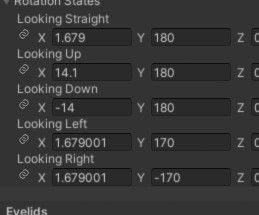
            Face has weight paint from hip. "eye 2" has little weight paint all over face. Eye bone being angled in front means eye rotation doesn't work(like eye tracking or eye moving towards whoever you're looking at).

            I made exactly those changes above, .fbx exported with CATS so you can overwrite the one from PotatoLord from 8 days ago.

            [register or login to view this hidden content]
            (* this will mess with your material order, and slots, so you'll have to figure out & put in materials again if using this. make sure you are using the prefab. you can use "revert" and it will tell you which material it was supposed to be )

            eye rotation values I suggest: bc3ea52e-ef45-4fe4-8aa3-cbad89b9f52b-image.jpeg

            Signature: "Unless otherwise told:
            Echidna will not be uploading any updated versions of this asstes in the future, so please do not ask about it in this thread.
            If you have never shared any "Gifts / Download" posts yourself, please refrain from requesting a re-upload."
            Thank me by finding one of the items I'm bumping.

            VisaeresV PotatoLordP VRCavi21xV 3 Replies Last reply
            ❤ 🤡
            3
            • D
              D
              DAEDRICswat
              wrote on last edited by
              #132

              Eager to see updates to this one!

              1 Reply Last reply
              0
              • EchidnaE Echidna

                Well done on making it work. I kept working on it but when I saw body parts having 17 materials(leg, arm) I ended giving up. I see you atlas'd most of the materials on body, not the same for clothes.
                It really does look bad in VRC without the blender modifiers for sharpness, smoothness, & subdisivion.

                A few things that would be nice:
                Each part of cloth to be toggled on/off separately, each a skinned mesh.
                The vagina and ass shapekeys from default.

                A few issues:
                Face has weight paint from hip. "eye 2" has little weight paint all over face. Eye bone being angled in front means eye rotation doesn't work(like eye tracking or eye moving towards whoever you're looking at).

                I made exactly those changes above, .fbx exported with CATS so you can overwrite the one from PotatoLord from 8 days ago.

                [register or login to view this hidden content]
                (* this will mess with your material order, and slots, so you'll have to figure out & put in materials again if using this. make sure you are using the prefab. you can use "revert" and it will tell you which material it was supposed to be )

                eye rotation values I suggest: bc3ea52e-ef45-4fe4-8aa3-cbad89b9f52b-image.jpeg

                VisaeresV
                VisaeresV
                Visaeres
                wrote on last edited by
                #133

                @Echidna Kinda ripping into the work that was done but alright.

                Wow that's a lot a' words, too bad I'm not reading em'

                xedinhoX 1 Reply Last reply
                😕
                -2
                • EchidnaE Echidna

                  Well done on making it work. I kept working on it but when I saw body parts having 17 materials(leg, arm) I ended giving up. I see you atlas'd most of the materials on body, not the same for clothes.
                  It really does look bad in VRC without the blender modifiers for sharpness, smoothness, & subdisivion.

                  A few things that would be nice:
                  Each part of cloth to be toggled on/off separately, each a skinned mesh.
                  The vagina and ass shapekeys from default.

                  A few issues:
                  Face has weight paint from hip. "eye 2" has little weight paint all over face. Eye bone being angled in front means eye rotation doesn't work(like eye tracking or eye moving towards whoever you're looking at).

                  I made exactly those changes above, .fbx exported with CATS so you can overwrite the one from PotatoLord from 8 days ago.

                  [register or login to view this hidden content]
                  (* this will mess with your material order, and slots, so you'll have to figure out & put in materials again if using this. make sure you are using the prefab. you can use "revert" and it will tell you which material it was supposed to be )

                  eye rotation values I suggest: bc3ea52e-ef45-4fe4-8aa3-cbad89b9f52b-image.jpeg

                  PotatoLordP
                  PotatoLordP
                  PotatoLord
                  wrote on last edited by
                  #134

                  @Echidna I'm glad people are taking their time to fix some of the issues I still left in the model lmao, I may come back to this and actually keep shit separete this time but for now I'll just leave it as is.
                  Also I had no clue about the eye weight painting lmao, probably because I just used cats to get rid of "useless" bones in the face.
                  Thank your work with the model btw, I really appriciate it!

                  1 Reply Last reply
                  0
                  • VisaeresV Visaeres

                    @Echidna Kinda ripping into the work that was done but alright.

                    xedinhoX
                    xedinhoX
                    xedinho
                    wrote on last edited by
                    #135

                    @Visaeres RIPPERstore btw


                    Make sure to check out Asset Hunter!

                    Milltina, Sio, Shinano enjoyer
                    Robotfucker

                    view count

                    1 Reply Last reply
                    🤡
                    0
                    • substanceS
                      substanceS
                      substance
                      wrote on last edited by
                      #136

                      bump

                      EchidnaE 1 Reply Last reply
                      -1
                      • substanceS substance

                        bump

                        EchidnaE
                        EchidnaE
                        Echidna
                        wrote on last edited by
                        #137

                        @substance what are you bumping? PotatoLord already posted the file.

                        Signature: "Unless otherwise told:
                        Echidna will not be uploading any updated versions of this asstes in the future, so please do not ask about it in this thread.
                        If you have never shared any "Gifts / Download" posts yourself, please refrain from requesting a re-upload."
                        Thank me by finding one of the items I'm bumping.

                        substanceS 1 Reply Last reply
                        0
                        • EchidnaE Echidna

                          @substance what are you bumping? PotatoLord already posted the file.

                          substanceS
                          substanceS
                          substance
                          wrote on last edited by
                          #138

                          @Echidna bump

                          1 Reply Last reply
                          -2
                          • EchidnaE Echidna

                            Well done on making it work. I kept working on it but when I saw body parts having 17 materials(leg, arm) I ended giving up. I see you atlas'd most of the materials on body, not the same for clothes.
                            It really does look bad in VRC without the blender modifiers for sharpness, smoothness, & subdisivion.

                            A few things that would be nice:
                            Each part of cloth to be toggled on/off separately, each a skinned mesh.
                            The vagina and ass shapekeys from default.

                            A few issues:
                            Face has weight paint from hip. "eye 2" has little weight paint all over face. Eye bone being angled in front means eye rotation doesn't work(like eye tracking or eye moving towards whoever you're looking at).

                            I made exactly those changes above, .fbx exported with CATS so you can overwrite the one from PotatoLord from 8 days ago.

                            [register or login to view this hidden content]
                            (* this will mess with your material order, and slots, so you'll have to figure out & put in materials again if using this. make sure you are using the prefab. you can use "revert" and it will tell you which material it was supposed to be )

                            eye rotation values I suggest: bc3ea52e-ef45-4fe4-8aa3-cbad89b9f52b-image.jpeg

                            VRCavi21xV
                            VRCavi21xV
                            VRCavi21x
                            wrote on last edited by
                            #139

                            @Echidna I am still decently new at Unity and I tried using your version but when I try to test it says it has no Avatar Descriptors am I inserting the Prefab incorrectly or is this just a Bug?

                            ALilRottenA EchidnaE 2 Replies Last reply
                            0
                            • VRCavi21xV VRCavi21x

                              @Echidna I am still decently new at Unity and I tried using your version but when I try to test it says it has no Avatar Descriptors am I inserting the Prefab incorrectly or is this just a Bug?

                              ALilRottenA
                              ALilRottenA
                              ALilRotten
                              wrote on last edited by
                              #140

                              @VRCavi21x

                              You can just put one in. It's pretty easy.
                              Click the avatar in the hierarchy, look to the far right of the screen in the other panel.
                              Click on "Add Componet" or what ever it says.
                              Type in "Avatar" you'll see a thing that says "VRC Avatar Descriptor".
                              Add that.

                              Go through it and make sure everything you need is in there.
                              If you know what you're doing in it that is.

                              If not:

                              Playable Layers

                              • Insert the Menu the model has
                              • Insert the parameters the model has

                              Visemes

                              • Click on auto. It should work if it has any

                              View

                              • Drag the little ball you see when you click on edit view to between the eyes, just on the bridge of the nose

                              Eyes

                              • Insert the eye bones into the left and right eye components

                              • Edit the eye movement from top to bottom in the list. Adjust them accordingly. Remember, your left is the model's right.

                              • For blinking (if any) use shape keys, go through the animations given and find "blink" or "blinking" or "Eyes Closed" just anything that could be a blink

                              • The other parts don't matter, but you can include them if you wish.

                              • I rig up models
                              • I add clothing/assets to premade models
                              • Learning how to make models
                              • Can make VRC ports
                              • I teach people via YT

                              [I do NOT do trades]

                              :Feel free to message me, just don't be demanding.:

                              1 Reply Last reply
                              1
                              • PotatoLordP PotatoLord

                                After staying up untill 3am I'm POSSIBLY done with editing this model
                                Thank you @visaeres for telling me about a lot of tiny mistakes that were still happening and hopefully y'all enjoy the model for real this time lmao

                                [register or login to view this hidden content] (Edit cuz I uploaded the wrong version lmao)

                                3ec26ca2-4452-47c7-8e2f-dc12a51b35d5-image.jpeg

                                PIC_FATP
                                PIC_FATP
                                PIC_FAT
                                wrote on last edited by
                                #141

                                @PotatoLord Muito Obrigado !!!!!! 🙂

                                1 Reply Last reply
                                0
                                • VRCavi21xV VRCavi21x

                                  @Echidna I am still decently new at Unity and I tried using your version but when I try to test it says it has no Avatar Descriptors am I inserting the Prefab incorrectly or is this just a Bug?

                                  EchidnaE
                                  EchidnaE
                                  Echidna
                                  wrote on last edited by
                                  #142

                                  @VRCavi21x Just use full prefab made by PotatoLord and replace FBX file in explorer. Maybe understand how bigger sold upload avatars are uploaded instead of using a custom model the first time.

                                  Signature: "Unless otherwise told:
                                  Echidna will not be uploading any updated versions of this asstes in the future, so please do not ask about it in this thread.
                                  If you have never shared any "Gifts / Download" posts yourself, please refrain from requesting a re-upload."
                                  Thank me by finding one of the items I'm bumping.

                                  VRCavi21xV 1 Reply Last reply
                                  -4
                                  • EchidnaE Echidna

                                    @VRCavi21x Just use full prefab made by PotatoLord and replace FBX file in explorer. Maybe understand how bigger sold upload avatars are uploaded instead of using a custom model the first time.

                                    VRCavi21xV
                                    VRCavi21xV
                                    VRCavi21x
                                    wrote on last edited by VRCavi21x
                                    #143

                                    @Echidna I have infact done uploads before and dealt with models of different varieties from edits, fixes, and buggy, or official,

                                    so instead of giving a douche unneeded response about telling someone to learn something and giving a bare bone response you either keep to yourself or actually be a viable help with offering ways to make sure people can do this without error

                                    and forgive the hostile response its just that your phrasing just didn't come off friendly and seemed very rude if that wasn't your intention.

                                    VisaeresV 1 Reply Last reply
                                    2
                                    • VRCavi21xV VRCavi21x

                                      @Echidna I have infact done uploads before and dealt with models of different varieties from edits, fixes, and buggy, or official,

                                      so instead of giving a douche unneeded response about telling someone to learn something and giving a bare bone response you either keep to yourself or actually be a viable help with offering ways to make sure people can do this without error

                                      and forgive the hostile response its just that your phrasing just didn't come off friendly and seemed very rude if that wasn't your intention.

                                      VisaeresV
                                      VisaeresV
                                      Visaeres
                                      wrote on last edited by
                                      #144

                                      @VRCavi21x How to tell if and when someone never touched blender, go around saying dumb shit like that guy did lol

                                      Wow that's a lot a' words, too bad I'm not reading em'

                                      xedinhoX 1 Reply Last reply
                                      0
                                      • VisaeresV Visaeres

                                        @VRCavi21x How to tell if and when someone never touched blender, go around saying dumb shit like that guy did lol

                                        xedinhoX
                                        xedinhoX
                                        xedinho
                                        wrote on last edited by
                                        #145

                                        @Visaeres they are talking about a missing avatar descriptor, what does that have to do with blender 🥀


                                        Make sure to check out Asset Hunter!

                                        Milltina, Sio, Shinano enjoyer
                                        Robotfucker

                                        view count

                                        1 Reply Last reply
                                        0

                                        Hello! It looks like you're interested in this conversation, but you don't have an account yet.

                                        Getting fed up of having to scroll through the same posts each visit? When you register for an account, you'll always come back to exactly where you were before, and choose to be notified of new replies (either via email, or push notification). You'll also be able to save bookmarks and upvote posts to show your appreciation to other community members.

                                        With your input, this post could be even better 💗

                                        Register Login
                                        Reply
                                        • Reply as topic
                                        Log in to reply
                                        • Oldest to Newest
                                        • Newest to Oldest
                                        • Most Votes


                                        • Login

                                        • Login or register to search.
                                        • First post
                                          Last post
                                        0
                                        • Categories
                                        • Recent
                                        • Tags
                                        • Popular