Skip to content
  • Categories
  • Recent
  • Tags
  • Popular
Skins
  • Light
  • Brite
  • Cerulean
  • Cosmo
  • Flatly
  • Journal
  • Litera
  • Lumen
  • Lux
  • Materia
  • Minty
  • Morph
  • Pulse
  • Sandstone
  • Simplex
  • Sketchy
  • Spacelab
  • United
  • Yeti
  • Zephyr
  • Dark
  • Cyborg
  • Darkly
  • Quartz
  • Slate
  • Solar
  • Superhero
  • Vapor

  • Default (Zephyr)
  • No Skin
Collapse
RipperStore Logo
  1. Home
  2. Support
  3. General Support
  4. Heyaa! blender help!<3

Heyaa! blender help!<3

Scheduled Pinned Locked Moved General Support
7 Posts 6 Posters 742 Views 1 Watching
  • Oldest to Newest
  • Newest to Oldest
  • Most Votes
Reply
  • Reply as topic
Log in to reply
This topic has been deleted. Only users with topic management privileges can see it.
  • KonataK
    KonataK
    Konata
    wrote on last edited by
    #1

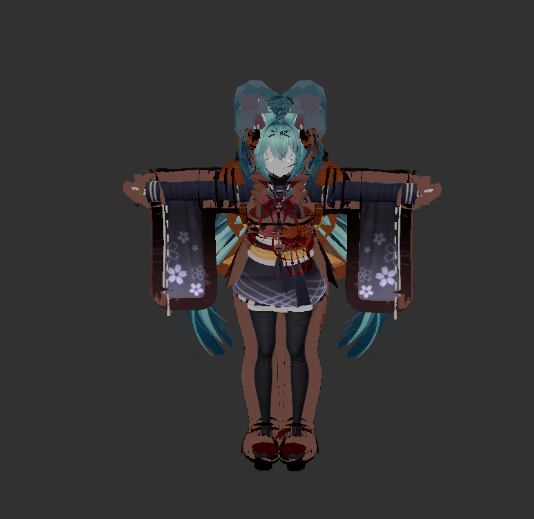
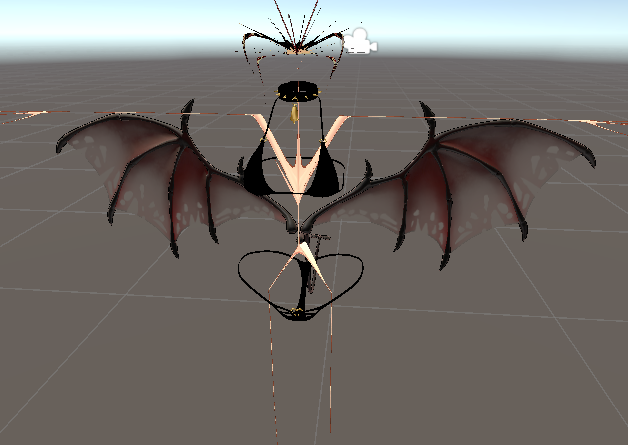
    So ive just started using blender taking small steps cause pheww but i tried to take the tail off my rindo and then export her back and replace the old fbx annn she turns out looking like chernobyl please help qwq ❤
    9a537d73-21f0-42e9-913c-5263e1c3df4b-image.png
    29da8a8e-5ebd-475b-974d-b91562631b97-image.png

    1 Reply Last reply
    0
    • ikirutoastI
      ikirutoastI
      ikirutoast
      wrote on last edited by
      #2

      It’s hard to tell, but the first image looks like your mesh normals is inverted in blender. Possibly due to negative scaling and can cause your mesh to be invisible unless backface culling is enabled.

      Try checking face orientation on the top right of the viewport(2 circles overlapping symbol) under geometry. If it’s red, you need to flip them - edit mode, mesh, normals, flip while selecting affected parts. Your mesh and armature transforms should also be positive 1 in blender.

      1 Reply Last reply
      0
      • WeeWooW
        WeeWooW
        WeeWoo
        wrote on last edited by
        #3

        You're never supposed to replace the fbx/save over the fbx in your unity file it, will corrupt the model! Next time you make fbx edits make sure the name is different from the one in your project 🙂

        ( ͡° ͜ʖ ͡^)~☆

        I give gift, I baby my bang...

        KonataK 1 Reply Last reply
        0
        • WeeWooW WeeWoo

          You're never supposed to replace the fbx/save over the fbx in your unity file it, will corrupt the model! Next time you make fbx edits make sure the name is different from the one in your project 🙂

          KonataK
          KonataK
          Konata
          wrote on last edited by
          #4

          @WeeWoo ill give this a go thank you!

          1 Reply Last reply
          0
          • momM
            momM
            mom
            wrote on last edited by
            #5

            When exporting an fbx from blender, Make sure you select FBX all under Transform !! image_2024-02-10_080420136.png

            The first image is just your outlines being messed up since this option wasn't selected on export. It used to happen to me all the time :3

            ☾✩☽
            she/her! / local mom / Have a wonderful day!! (Not interested in trades, lol. Just share to everyone instead.) Don't forget to upvote your local asset providers!
            ☾✩☽

            1 Reply Last reply
            0
            • DyttoD
              DyttoD
              Dytto
              wrote on last edited by
              #6

              The same thing happened to me

              meow

              1 Reply Last reply
              0
              • C0rd3dC
                C0rd3dC
                C0rd3d
                wrote on last edited by
                #7

                This looks like you replaced the fbx and in doing so, the altered bones caused the avatar (a certain file that tells unity this is what your bones are for a humanoid rig, looks like a lil' blue man) to completely misunderstand the new bone changes. Just go into your fbx settings, and change it to humanoid, either select the old avatar or make a new one from there. This should make it look normal again.

                Furry femboy looking for things because money is hard to come by.

                1 Reply Last reply
                0

                Hello! It looks like you're interested in this conversation, but you don't have an account yet.

                Getting fed up of having to scroll through the same posts each visit? When you register for an account, you'll always come back to exactly where you were before, and choose to be notified of new replies (either via email, or push notification). You'll also be able to save bookmarks and upvote posts to show your appreciation to other community members.

                With your input, this post could be even better 💗

                Register Login
                Reply
                • Reply as topic
                Log in to reply
                • Oldest to Newest
                • Newest to Oldest
                • Most Votes


                • Login

                • Login or register to search.
                • First post
                  Last post
                0
                • Categories
                • Recent
                • Tags
                • Popular