Skip to content
  • Categories
  • Recent
  • Tags
  • Popular
Skins
  • Light
  • Brite
  • Cerulean
  • Cosmo
  • Flatly
  • Journal
  • Litera
  • Lumen
  • Lux
  • Materia
  • Minty
  • Morph
  • Pulse
  • Sandstone
  • Simplex
  • Sketchy
  • Spacelab
  • United
  • Yeti
  • Zephyr
  • Dark
  • Cyborg
  • Darkly
  • Quartz
  • Slate
  • Solar
  • Superhero
  • Vapor

  • Default (Zephyr)
  • No Skin
Collapse
RipperStore Logo
  1. Home
  2. Assets
  3. Looking for...
  4. Hair
  5. LF: does anyone know what booth hairstyle is this?

LF: does anyone know what booth hairstyle is this?

Scheduled Pinned Locked Moved Unsolved Hair
rurunelooking forhelpboothbooth hair
14 Posts 2 Posters 730 Views
  • Oldest to Newest
  • Newest to Oldest
  • Most Votes
Reply
  • Reply as topic
Log in to reply
This topic has been deleted. Only users with topic management privileges can see it.
  • RustdeokoroR Rustdeokoro

    whatisthis.png

    PonponP
    PonponP
    Ponpon
    wrote on last edited by Ponpon
    #2

    @Rustdeokoro
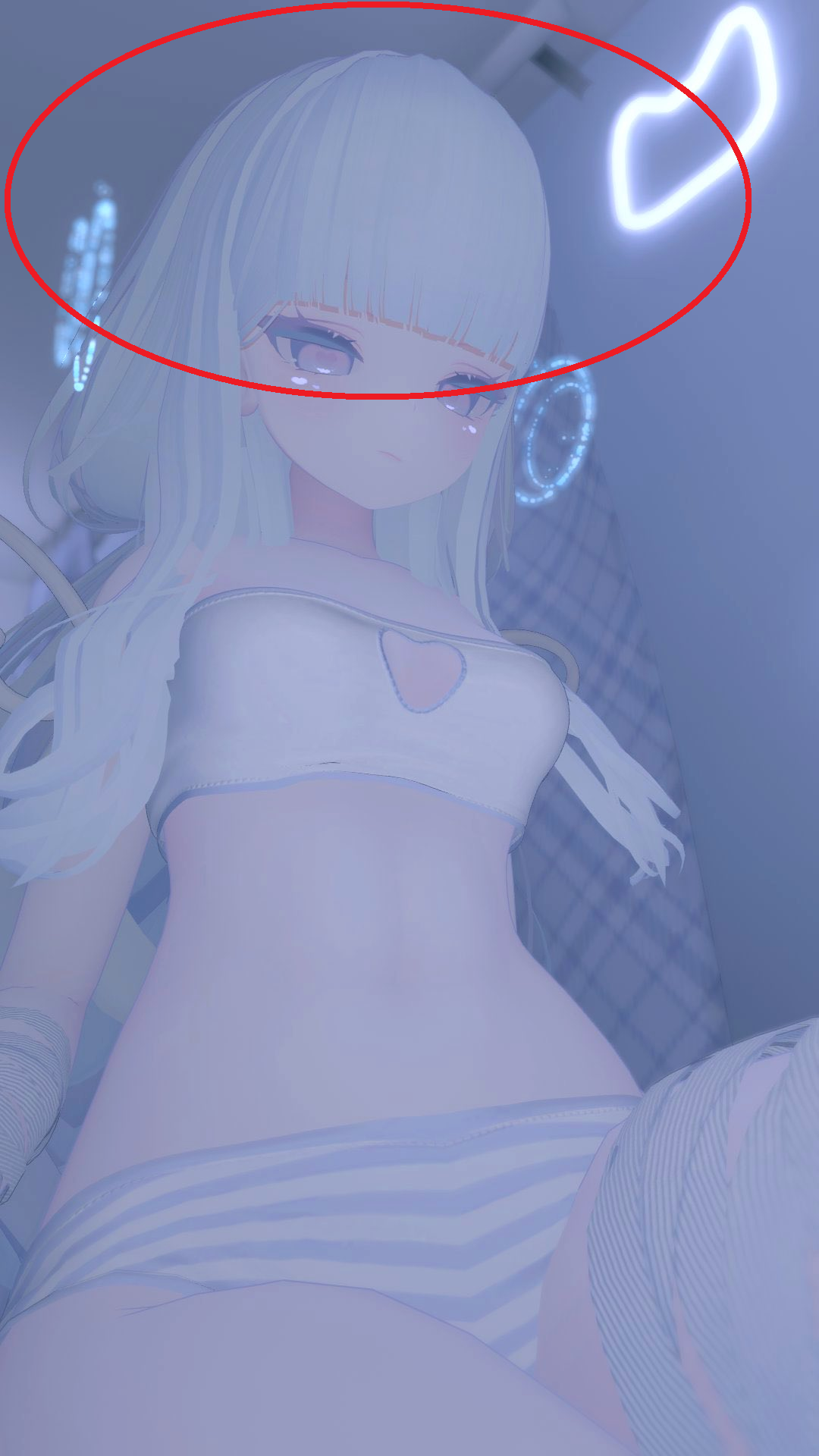
    If you mean the bangs, you can recreate that using the shape keys included in Lulune's default hair. I actually checked it with Lulune’s avatar.☺

    I’d be happy if I could bring you a little happiness 😺🐾

    RustdeokoroR 1 Reply Last reply
    0
    • PonponP Ponpon

      @Rustdeokoro
      If you mean the bangs, you can recreate that using the shape keys included in Lulune's default hair. I actually checked it with Lulune’s avatar.☺

      RustdeokoroR
      RustdeokoroR
      Rustdeokoro
      wrote on last edited by
      #3

      @Ponpon no i don't think that's a default rurune, i checked the default shapekeys it's a different hairstyle.

      i'm talking about the full booth hairstyle not the Bangs

      1 Reply Last reply
      0
      • RustdeokoroR
        RustdeokoroR
        Rustdeokoro
        wrote on last edited by
        #4

        coulditbepng.png

        could it be that?

        PonponP 1 Reply Last reply
        0
        • RustdeokoroR Rustdeokoro

          coulditbepng.png

          could it be that?

          PonponP
          PonponP
          Ponpon
          wrote on last edited by
          #5

          @Rustdeokoro
          68fb049b-7a52-48fd-a5c0-a5326f619bec-2025-06-17.png
          Sorry, I misunderstood—I thought you were looking for the bangs area marked in red.
          Yes, I also recreated it using the shape keys, just like in your screenshot.
          But if this isn’t the hairstyle you were looking for, I’m sorry about that...😥

          I’d be happy if I could bring you a little happiness 😺🐾

          RustdeokoroR 1 Reply Last reply
          0
          • PonponP Ponpon

            @Rustdeokoro
            68fb049b-7a52-48fd-a5c0-a5326f619bec-2025-06-17.png
            Sorry, I misunderstood—I thought you were looking for the bangs area marked in red.
            Yes, I also recreated it using the shape keys, just like in your screenshot.
            But if this isn’t the hairstyle you were looking for, I’m sorry about that...😥

            RustdeokoroR
            RustdeokoroR
            Rustdeokoro
            wrote on last edited by
            #6

            @Ponpon is there a Shapekey name that Make the side hair move like yours picture to see white clothes
            b26f53b7-d8bb-440f-8b78-a5b17bfea975-image.png

            This is only Shapekeys for default rurune hairs i had.

            1d719b57-d5c9-4c54-8e5f-9d567f79cfb6-image.png

            PonponP 1 Reply Last reply
            0
            • RustdeokoroR Rustdeokoro

              @Ponpon is there a Shapekey name that Make the side hair move like yours picture to see white clothes
              b26f53b7-d8bb-440f-8b78-a5b17bfea975-image.png

              This is only Shapekeys for default rurune hairs i had.

              1d719b57-d5c9-4c54-8e5f-9d567f79cfb6-image.png

              PonponP
              PonponP
              Ponpon
              wrote on last edited by
              #7

              @Rustdeokoro
              I recreated the look by stretching and bending the bones of the side hair.
              Actually, there aren't any shapekeys for the side hair in Rurune's default hair, so this was the only way I could do it😓

              I’d be happy if I could bring you a little happiness 😺🐾

              RustdeokoroR 1 Reply Last reply
              0
              • PonponP Ponpon

                @Rustdeokoro
                I recreated the look by stretching and bending the bones of the side hair.
                Actually, there aren't any shapekeys for the side hair in Rurune's default hair, so this was the only way I could do it😓

                RustdeokoroR
                RustdeokoroR
                Rustdeokoro
                wrote on last edited by
                #8

                @Ponpon can you teach me how you do that please.

                PonponP 1 Reply Last reply
                0
                • RustdeokoroR Rustdeokoro

                  @Ponpon can you teach me how you do that please.

                  PonponP
                  PonponP
                  Ponpon
                  wrote on last edited by
                  #9

                  @Rustdeokoro
                  692a9199-11da-4ac6-8857-84d7812b006e-06-17 1.png 284967da-fba2-4953-a7ba-a723332905b2-06-17 2.png
                  You can achieve the same look by selecting the [side_L] and [side_R] bones shown in the first screenshot and entering the same values for Transform as in the second screenshot.

                  However, to make it look cleaner, I recommend changing the Gravity value under PB in Side_root to around 0.2. (This part is a matter of personal preference, so you can adjust it as you like.)

                  I’d be happy if I could bring you a little happiness 😺🐾

                  RustdeokoroR 1 Reply Last reply
                  0
                  • PonponP Ponpon

                    @Rustdeokoro
                    692a9199-11da-4ac6-8857-84d7812b006e-06-17 1.png 284967da-fba2-4953-a7ba-a723332905b2-06-17 2.png
                    You can achieve the same look by selecting the [side_L] and [side_R] bones shown in the first screenshot and entering the same values for Transform as in the second screenshot.

                    However, to make it look cleaner, I recommend changing the Gravity value under PB in Side_root to around 0.2. (This part is a matter of personal preference, so you can adjust it as you like.)

                    RustdeokoroR
                    RustdeokoroR
                    Rustdeokoro
                    wrote on last edited by Rustdeokoro
                    #10

                    @Ponpon i got it correct but it's weird that the whole hair is clipped through clothes and the jacket anything problem there?

                    1d71a94e-e7ce-40ab-b7f4-f319942ca4a2-image.png

                    d1021e84-3ced-4fe6-a583-af7d0b4bbcc3-image.png

                    PonponP 1 Reply Last reply
                    0
                    • RustdeokoroR Rustdeokoro

                      @Ponpon i got it correct but it's weird that the whole hair is clipped through clothes and the jacket anything problem there?

                      1d71a94e-e7ce-40ab-b7f4-f319942ca4a2-image.png

                      d1021e84-3ced-4fe6-a583-af7d0b4bbcc3-image.png

                      PonponP
                      PonponP
                      Ponpon
                      wrote on last edited by
                      #11

                      @Rustdeokoro
                      You can adjust the colliders on Breast_L and Breast_R to help prevent the hair from clipping through the body. However, adjusting colliders can be tricky, and a certain amount of clipping is often unavoidable😢

                      I’d be happy if I could bring you a little happiness 😺🐾

                      RustdeokoroR 1 Reply Last reply
                      0
                      • PonponP Ponpon

                        @Rustdeokoro
                        You can adjust the colliders on Breast_L and Breast_R to help prevent the hair from clipping through the body. However, adjusting colliders can be tricky, and a certain amount of clipping is often unavoidable😢

                        RustdeokoroR
                        RustdeokoroR
                        Rustdeokoro
                        wrote on last edited by
                        #12

                        @Ponpon what the best settings Numbers For Colliders on Breast_L and Breast_R?

                        PonponP 1 Reply Last reply
                        0
                        • RustdeokoroR Rustdeokoro

                          @Ponpon what the best settings Numbers For Colliders on Breast_L and Breast_R?

                          PonponP
                          PonponP
                          Ponpon
                          wrote on last edited by
                          #13

                          @Rustdeokoro
                          I don’t really mind a little bit of clipping, so I usually just leave the collider at its default size.
                          If you want to minimize clipping, the best way is to slowly adjust the collider size and keep testing until it looks right.

                          I’d be happy if I could bring you a little happiness 😺🐾

                          1 Reply Last reply
                          0
                          • RustdeokoroR
                            RustdeokoroR
                            Rustdeokoro
                            wrote on last edited by
                            #14

                            thank you, i see what can i do about it.
                            1 Reply Last reply
                            0

                            Hello! It looks like you're interested in this conversation, but you don't have an account yet.

                            Getting fed up of having to scroll through the same posts each visit? When you register for an account, you'll always come back to exactly where you were before, and choose to be notified of new replies (either via email, or push notification). You'll also be able to save bookmarks and upvote posts to show your appreciation to other community members.

                            With your input, this post could be even better 💗

                            Register Login
                            Reply
                            • Reply as topic
                            Log in to reply
                            • Oldest to Newest
                            • Newest to Oldest
                            • Most Votes


                            • Login

                            • Login or register to search.
                            • First post
                              Last post
                            0
                            • Categories
                            • Recent
                            • Tags
                            • Popular