
got errors after applying pcs to my avatar. how can I fix this?
-
using 1.8.02 version
-
This post is deleted!
-
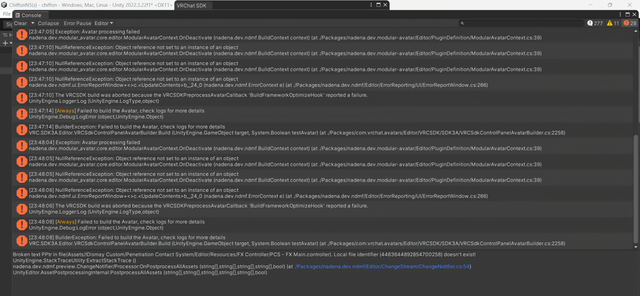
[23:47:05] Exception: Avatar processing failed ‣ nadena.dev.modular_avatar.core.editor.ModularAvatarContext.OnDeactivate_(nadena.dev.ndmt.BuildContextcontext) (at./Packages/nadena.dev.modular-avatar,Editor/PluginDetiniticn/ModularAvatarCcntext.cs:39) (23:47:10] NullReferenceException: Object reference not set to an instance of an object nadena.dev.modular_avatar.core.editor.ModularAvatarContext.OnDeactivate(nadena.dev.ndmf.RuildContext cantext) (at./Packages/nadena.dev.modular-avatar/Editor/PluginDefinition/ModularAvatarContext.cs:39) [23:47:10] NullReferenceException: Object reference not set to an instance of an object nadena.dev.modular_avatar.care.editor.ModularAvatarContext.OnDeactivate[nadena.dev.ndmf.RuildContextcontex:)(at./Packages/nadena.dev.modular-avatar/Editar;PluginDefinition/ModularAvatarContext.cs:39) [23:47:10] NullReferenseException: Object reference nat set to an instance of an object nadena.dev.ndmf.ui.ErrorReportWindowr+c>c.<UpdateContentssb_24_0 inaden3.dev.ndmf.ErorContext e)lat-/Packages/nadena.dev.ndmfjEditor/ErrorReporting/UliErrorReportWindow.cs:266) [23:47:10] The vRCSDK build was abcrted because the VRCSDKPreprocessAvatarCallback ' Buildl rameworkOptimizel oak' reported a tailure. Unity Engine.Logger:Log 1UnityEngine.LogType,object) !23:47:14] [Always] Failed to bui Id the Avatar, check logs for more details UnityEngine.Debug:LcgError (cbject,Unisy Engine.Object) [23:47:14] BuilderException: Failed ta buila the Avatar, check logs for more details VRC.SDK3A.Edi!or.VRCSdkControlPanelAvatarBuilder.Build (UnityEngine.GameObject target, System.Bcolean tes[Avatar) (at ./'Packages/com.vrchat.avatars/Editor/VRCSDK/SDK3AVRCSdkContrcIPanelAvatarBuilder.cs:2258) [23:48:04] Exceptiun: Avatar proc essing failed nadena.dev.mocular_evater.core.editor.kodulerAvatarContext.OnDeactivate[nadena.dev.ndmf.BuildContextcontext)(at./Packages/nadena.dev.modular-avatar;Editor/PluginDefinition/ModularÀvatarContext.cs:39) 123-48:05] NillReferenceExcepti; ion: Objectr reference nol set toan instance cf an cbject nadena.dev.modularavater.core. editor.M ocularAv; atarcontext.OnDeactivate inadena. dev. ndmf.Bui dContext context) (at iPackagesinadena.c dev. modular- avatar,EditerPluginDefiniticn/ModularAwatarContextcs;39) 23:48:05] NullReferenceException: Object reference not set to an instance cf an cbject nadena.dev.modular_avatar.core.editor.ModularAvatarContext.OnDeactivate [nadena.dev.ndmf.BuildContextcontext) (at./Packages/nadena.dev.modular-avatar/Editor/PluginDefinition/ModularAvatarContext.cs:39) [23:48:06] NullReferenceException: Object reference not set to an instance cf an ctject nadena.dev.ndmf.ui.ErrorRepartWindows<>c.<UpdateCantents>b_24_0 [nadena.dev.ndmf.FrrorContext e) (at./Packages/nadena.dev.ndmf,Editor/ErrorReporting/UljEmorReportWindow.cs:266) [23:48:06) The VRCSDK build was a borted because the VRCSDKPreprocess AvatarCallback "Buildf ramework OptimizeHlook' reported a failure. Unity Engine.L ogger:Log (UnityEngine.LogType,object) [23:46:06) [Always] failed tc build the Avatar, check logs for more details UnityEngine.Debug:LcgEmor (cbject,UnityEngine.object) !23:48:08] BuildlerFxception: Failed to build the Avatar, check lags for more details VRC.SDK3A.Editior.VRCSdkControlPanelAvatarBuilder.Build (UnityEngine.GameObject target, System.Bcolean testAvatar) (at ./Packages/com.vrchatavatars/Èditcr/VRCSDK/SDK3A;VRCSdkCcntrolPanelÄvatarBuilder.cs:22581
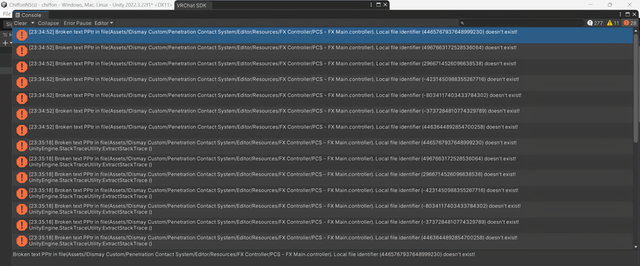
23:34:52] Broken text PPtr in file (Assets/!Dismay Custom/Penetration Contact System/Editor/Resources/FX Controller/PCS - FX Main.controller). Local file identifier (4465767937648999230) doesn't exist![23:34:52] Broken text PPtr in file (Assets/!Dismay Custom/Penetration Contact System/Editor/Resources/FX Controller/PCS - FX Main.controller). Local file identifier (4967663172528536064) doesn't exist!
[23:34:52] Broken text PPtr in file(Assets/IDismay Custom/Penetration Contact System/Editor/Resources/FX Controller/PCS - FX Main.controller). Local file identifier (2966714526096638538) doesn't exist!
[23:34:52] Broken text PPtr in file (Assets/!Dismay Custom/Penetration Contact System/Editor/Resources/FX Controller/PCS - FX Main.controller). Local file identifier (-4231450988355267716) doesn't exist!
[23:34:52] Broken text PPtr in file (Assets/!Dismay Custom/Penetration Contact System/Editor/Resources/FX Controller/PCS - FX Main.controller). Local file identifier (-8034117403433784302) doesn't exist!
[23:34:52] Broken text PPtr in file (Assets/!Dismay Custom/Penetration Contact System/Editor/Resources/FX Controller/PCS - FX Main.controller). Local file identifier (-3737284810774329789) doesn't exist!
[23:34:52] Broken text PPtr in file (Assets/!Dismay Custom/Penetration Contact System/Editor/Resources/FX Controller/PCS - FX Main.controller). Local file identifier (4463644892854700258) doesn't exist!
[23:35:18] Broken text PPtr in file (Assets/!Dismay Custom/Penetration Contact System/Editor/Resources/FX Controller/PCS - FX Main.controller). Local file identifier (4465767937648999230) doesn't exist!
UnityEngine.StackTraceUtility:ExtractStackTrace() [23:35:18] Broken text PPtr in file (Assets/IDismay Custom/Penetration Contact System/Editor/Resources/FX Controller/PCS - FX Main.controller). Local file identifier (4967663172528536064) doesn't exist!
UnityEngine.StackTraceUtility:ExtractStackTrace ()
[23:35:18] Broken text PPtr in file (Assets/IDismay Custom/Penetration Contact System/Editor/Resources/FX Controller/PCS - FX Main.controller). Local file identifier (2966714526096638538) doesn't exist!
UnityEngine.StackTraceUtility:ExtractStackTrace() [23:35:18] Broken text PPtr in file (Assets/IDismay Custom/Penetration Contact System/Editor/Resources/FX Controller/PCS - FX Main.controller). Local file identifier (-4231450988355267716) doesn't exist!
UnityEngine.StackTraceUtility:ExtractStackTrace ()
[23:35:18] Broken text PPtr in file (Assets/Dismay Custom/Penetration Contact System/Editor/Resources/FX Controller/PCS - FX Main.controller). Local file identifier (-8034117403433784302) doesn't exist!
UnityEngine.StackTraceUtility:ExtractStackTrace() [23:35:18] Broken text PPtr in file(Assets/!Dismay Custom/Penetration Contact System/Editor/Resources/FX Controller/PCS - FX Main.controller). Local file identifier (-3737284810774329789) doesn't exist!
UnityEngine.Stack Trace Utility:ExtractStackTrace ()
[23:35:18] Broken text PPtr in file (Assets/Dismay Custom/Penetration Contact System/Editor/Resources/FX Controller/PCS - FX Main.controller). Local file identifier (4463644892854700258) doesn't exist!
UnityEngine.StackTraceUtility:ExtractStackTrace ()
-
It says its been setup it with Modular Avatar and its says its missing, do you have it installed in your project since you get the option to setup with either VRCFury or Modular Avatar on the top option box
Hello! It looks like you're interested in this conversation, but you don't have an account yet.
Getting fed up of having to scroll through the same posts each visit? When you register for an account, you'll always come back to exactly where you were before, and choose to be notified of new replies (either via email, or push notification). You'll also be able to save bookmarks and upvote posts to show your appreciation to other community members.
With your input, this post could be even better 💗
Register Login