Skip to content
  • Categories
  • Recent
  • Tags
  • Popular
Skins
  • Light
  • Brite
  • Cerulean
  • Cosmo
  • Flatly
  • Journal
  • Litera
  • Lumen
  • Lux
  • Materia
  • Minty
  • Morph
  • Pulse
  • Sandstone
  • Simplex
  • Sketchy
  • Spacelab
  • United
  • Yeti
  • Zephyr
  • Dark
  • Cyborg
  • Darkly
  • Quartz
  • Slate
  • Solar
  • Superhero
  • Vapor

  • Default (Zephyr)
  • No Skin
Collapse
RipperStore Logo
  1. Home
  2. Assets
  3. General Assets
  4. LF Selestia skin texture - no built in hair shadow

LF Selestia skin texture - no built in hair shadow

Scheduled Pinned Locked Moved General Assets
selestia hairselestialooking forhelp
6 Posts 4 Posters 1.2k Views 1 Watching
  • Oldest to Newest
  • Newest to Oldest
  • Most Votes
Reply
  • Reply as topic
Log in to reply
This topic has been deleted. Only users with topic management privileges can see it.
  • harpysunshineH
    harpysunshineH
    harpysunshine
    wrote on last edited by
    #1

    I'm pretty knew to using the Selestia model, and it seems a lot of skins have the default hair shadow still on the face skin texture, so using hairs that don't have bangs looks messed up. Is there any skins that don't have that built in shadow? Or am I just looking at it differently that I'm the one messing up?

    Thank you so much in advance! ♥ Genuinely lost.

    c0tt0nc4ndyC 1 Reply Last reply
    0
    • harpysunshineH harpysunshine

      I'm pretty knew to using the Selestia model, and it seems a lot of skins have the default hair shadow still on the face skin texture, so using hairs that don't have bangs looks messed up. Is there any skins that don't have that built in shadow? Or am I just looking at it differently that I'm the one messing up?

      Thank you so much in advance! ♥ Genuinely lost.

      c0tt0nc4ndyC
      c0tt0nc4ndyC
      c0tt0nc4ndy
      wrote on last edited by
      #2

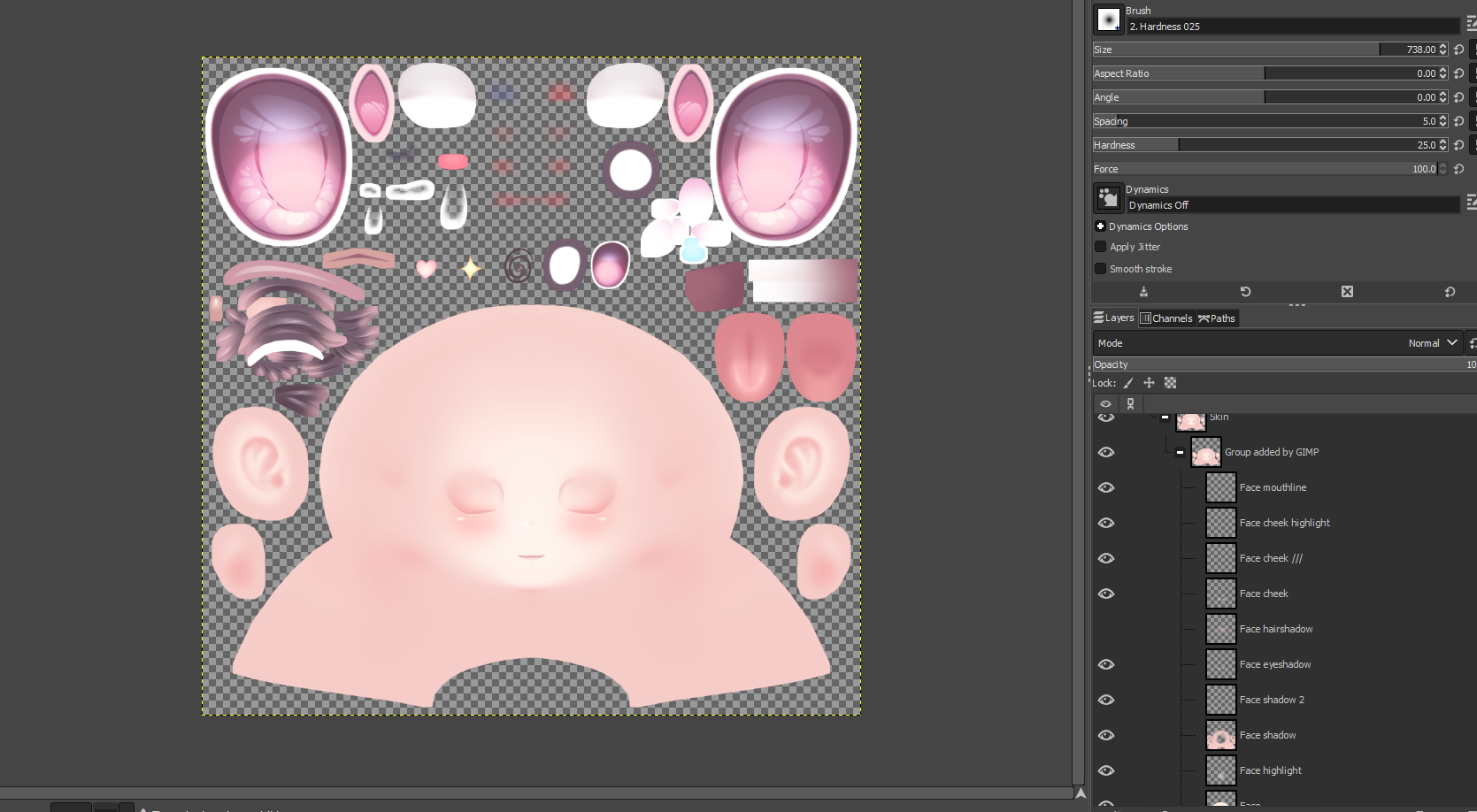
      @harpysunshine Hey! All you gotta do is edit the PSD, I attached a screenshot but in gimp you can toggle the hair shadow off. Then export it as a PNG!
      7c16bd83-5081-4a37-9922-d0cbbd50e2d8-image.png

      mwa ꒰ᐢ. .ᐢ꒱₊˚⊹

      harpysunshineH K 2 Replies Last reply
      1
      • yalllahY
        yalllahY
        yalllah
        wrote on last edited by
        #3

        thank youu I been wondering how to remove it lmo

        ya

        c0tt0nc4ndyC 1 Reply Last reply
        1
        • c0tt0nc4ndyC c0tt0nc4ndy

          @harpysunshine Hey! All you gotta do is edit the PSD, I attached a screenshot but in gimp you can toggle the hair shadow off. Then export it as a PNG!
          7c16bd83-5081-4a37-9922-d0cbbd50e2d8-image.png

          harpysunshineH
          harpysunshineH
          harpysunshine
          wrote on last edited by
          #4

          @c0tt0nc4ndy thank yoou! I don't have PS and kept opening it on Krita and it wasn't working lol. Thank you sooo much! 😊 ❤

          1 Reply Last reply
          1
          • yalllahY yalllah

            thank youu I been wondering how to remove it lmo

            c0tt0nc4ndyC
            c0tt0nc4ndyC
            c0tt0nc4ndy
            wrote on last edited by
            #5

            @yalllah @harpysunshine no problem! happy to help 🙂

            mwa ꒰ᐢ. .ᐢ꒱₊˚⊹

            1 Reply Last reply
            0
            • c0tt0nc4ndyC c0tt0nc4ndy

              @harpysunshine Hey! All you gotta do is edit the PSD, I attached a screenshot but in gimp you can toggle the hair shadow off. Then export it as a PNG!
              7c16bd83-5081-4a37-9922-d0cbbd50e2d8-image.png

              K
              K
              Kittsua
              wrote on last edited by Kittsua
              #6

              @c0tt0nc4ndy hey, can you give me that PSD file? I'm really having a hard time separating each part one by one, and I saw that yours already has all the parts separated. Sorry in advance for asking suddenly

              1 Reply Last reply
              0

              Hello! It looks like you're interested in this conversation, but you don't have an account yet.

              Getting fed up of having to scroll through the same posts each visit? When you register for an account, you'll always come back to exactly where you were before, and choose to be notified of new replies (either via email, or push notification). You'll also be able to save bookmarks and upvote posts to show your appreciation to other community members.

              With your input, this post could be even better 💗

              Register Login
              Reply
              • Reply as topic
              Log in to reply
              • Oldest to Newest
              • Newest to Oldest
              • Most Votes


              • Login

              • Login or register to search.
              • First post
                Last post
              0
              • Categories
              • Recent
              • Tags
              • Popular