Skip to content
  • Categories
  • Recent
  • Tags
  • Popular
Skins
  • Light
  • Brite
  • Cerulean
  • Cosmo
  • Flatly
  • Journal
  • Litera
  • Lumen
  • Lux
  • Materia
  • Minty
  • Morph
  • Pulse
  • Sandstone
  • Simplex
  • Sketchy
  • Spacelab
  • United
  • Yeti
  • Zephyr
  • Dark
  • Cyborg
  • Darkly
  • Quartz
  • Slate
  • Solar
  • Superhero
  • Vapor

  • Default (Zephyr)
  • No Skin
Collapse
RipperStore Logo
  1. Home
  2. Guides
  3. Tutorials
  4. How to Remove Missings Scripts easily Tutorial

How to Remove Missings Scripts easily Tutorial

Scheduled Pinned Locked Moved Tutorials
3 Posts 3 Posters 9.9k Views
  • Oldest to Newest
  • Newest to Oldest
  • Most Votes
Reply
  • Reply as topic
Log in to reply
This topic has been deleted. Only users with topic management privileges can see it.
  • ?
    ?
    A Former User
    wrote on last edited by [[global:former-user]]
    #1

    Introduction

    In this Tutorial i will show you how to Remove Missing Mono Scripts easily with 1 Script

    Prerequisites

    Missing Script Remover Translated Version

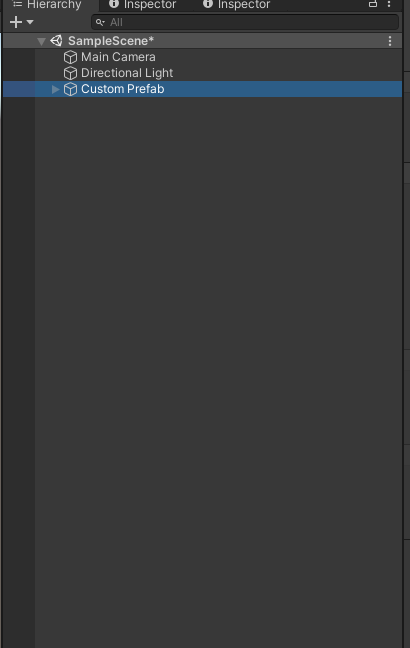
    Placing the Prefab

    After your done with the Beginner Tutorial you put your Prefab which can be find in Asset_Bundles and put that Prefab in your Scene Hierarchy19250003-955e-44d7-ab6b-c7027002a7e9-image.png

    Importing the Missing Script Remover

    Now you import the Missing Script Remover that is link in the top and start Importing it under the Prerequisites.

    How to use the Missing Script Remover

    Head to the top and search for the tab called RiClothes and open MissingRemover

    Screenshot_3.png

    Now you drag and drop the Prefab in there and Start the Script
    Here is a Gif how to do that Click me

    Important Notes:
    • Originial Code belongs to the owner here is a link to him Click me

    -Following this tutorial you should be able to remove every Missing Mono Script with 1 Click from your Avatar. for questions Join this Discord server Ripperstore Discord Server

    Click here to get back to the Beginner Tutorial

    1 Reply Last reply
    1
    • System referenced this topic on
    • CrystalDustC CrystalDust referenced this topic on
    • VisaeresV
      VisaeresV
      Visaeres
      wrote on last edited by
      #2

      Doesn't work lol

      Wow that's a lot a' words, too bad I'm not reading em'

      1 Reply Last reply
      0
      • shovivsolutionsS
        shovivsolutionsS
        shovivsolutions
        wrote on last edited by
        #3

        I hope it will work, but I was wrong.

        1 Reply Last reply
        0

        Hello! It looks like you're interested in this conversation, but you don't have an account yet.

        Getting fed up of having to scroll through the same posts each visit? When you register for an account, you'll always come back to exactly where you were before, and choose to be notified of new replies (either via email, or push notification). You'll also be able to save bookmarks and upvote posts to show your appreciation to other community members.

        With your input, this post could be even better 💗

        Register Login
        Reply
        • Reply as topic
        Log in to reply
        • Oldest to Newest
        • Newest to Oldest
        • Most Votes


        • Login

        • Login or register to search.
        • First post
          Last post
        0
        • Categories
        • Recent
        • Tags
        • Popular