
Skip to content
  • Categories
  • Recent
  • Tags
  • Popular
Skins
  • Light
  • Brite
  • Cerulean
  • Cosmo
  • Flatly
  • Journal
  • Litera
  • Lumen
  • Lux
  • Materia
  • Minty
  • Morph
  • Pulse
  • Sandstone
  • Simplex
  • Sketchy
  • Spacelab
  • United
  • Yeti
  • Zephyr
  • Dark
  • Cyborg
  • Darkly
  • Quartz
  • Slate
  • Solar
  • Superhero
  • Vapor

  • Default (Zephyr)
  • No Skin
Collapse
RipperStore Logo
  1. Home
  2. Support
  3. General Support
  4. trying to edit gogoloco height

trying to edit gogoloco height

Scheduled Pinned Locked Moved General Support
10 Posts 4 Posters 1.7k Views 2 Watching
  • Oldest to Newest
  • Newest to Oldest
  • Most Votes
Reply
  • Reply as topic
Log in to reply
This topic has been deleted. Only users with topic management privileges can see it.
  • AnteupplayaA
    AnteupplayaA
    Anteupplaya
    wrote on last edited by Anteupplaya
    #1

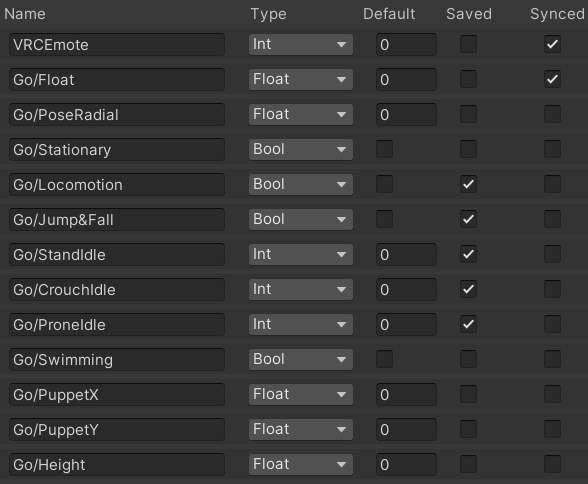
    tbh idk where it is. the owner said its go/height params. but i dont think its this. but idk where else to look. Screenshot 2024-05-29 005830.png
    1 Reply Last reply
    0
    • AnteupplayaA
      AnteupplayaA
      Anteupplaya
      wrote on last edited by
      #2

      can someone help please?

      1 Reply Last reply
      0
      • AnteupplayaA
        AnteupplayaA
        Anteupplaya
        wrote on last edited by
        #3

        image.png
        image.png

        1 Reply Last reply
        0
        • AnteupplayaA
          AnteupplayaA
          Anteupplaya
          wrote on last edited by
          #4

          i found these is one of these them? i think the second one may be it.

          1 Reply Last reply
          0
          • AnteupplayaA
            AnteupplayaA
            Anteupplaya
            wrote on last edited by
            #5

            @Veruda im trying to change max height to go higher with gogo loco playspace.

            1 Reply Last reply
            0
            • AnteupplayaA
              AnteupplayaA
              Anteupplaya
              wrote on last edited by
              #6

              and if possible lower too but i was told it only goes head height

              1 Reply Last reply
              0
              • AnteupplayaA
                AnteupplayaA
                Anteupplaya
                wrote on last edited by
                #7

                btw its this im trying to change.
                image.png the one im hovering over

                1 Reply Last reply
                0
                • PumpkinSpicedP
                  PumpkinSpicedP
                  PumpkinSpiced
                  wrote on last edited by
                  #8

                  You ever figure this out?

                  ~Milltina hoarder~

                  kh4m4riK 1 Reply Last reply
                  0
                  • PumpkinSpicedP PumpkinSpiced

                    You ever figure this out?

                    kh4m4riK
                    kh4m4riK
                    kh4m4ri
                    wrote on last edited by
                    #9

                    @PumpkinSpiced Edit the parameter "Go/Height" in the sitting and base animations. Editing Go/Height only lets you go so high regardless of what the number is. To go even higher you need to mess with the Assets -> GoGo -> GoLoco -> Animations -> Clips -> Poses -> Root and change the animation go_root_1.00_high .


                    C 1 Reply Last reply
                    0
                    • kh4m4riK kh4m4ri

                      @PumpkinSpiced Edit the parameter "Go/Height" in the sitting and base animations. Editing Go/Height only lets you go so high regardless of what the number is. To go even higher you need to mess with the Assets -> GoGo -> GoLoco -> Animations -> Clips -> Poses -> Root and change the animation go_root_1.00_high .

                      C
                      C
                      CoffeeRipper
                      wrote on last edited by
                      #10

                      @kh4m4ri said:

                      Go/Height

                      Explain more how loco gogo works. I can't find any info about it. I will try to reverse engineer the " Go/Height" you said. I wanna know how loco gogo has it animations because I can't find in inside of the animator.

                      1 Reply Last reply
                      0

                      Hello! It looks like you're interested in this conversation, but you don't have an account yet.

                      Getting fed up of having to scroll through the same posts each visit? When you register for an account, you'll always come back to exactly where you were before, and choose to be notified of new replies (either via email, or push notification). You'll also be able to save bookmarks and upvote posts to show your appreciation to other community members.

                      With your input, this post could be even better 💗

                      Register Login
                      Reply
                      • Reply as topic
                      Log in to reply
                      • Oldest to Newest
                      • Newest to Oldest
                      • Most Votes


                      • Login

                      • Login or register to search.
                      • First post
                        Last post
                      0
                      • Categories
                      • Recent
                      • Tags
                      • Popular