Skip to content
  • Categories
  • Recent
  • Tags
  • Popular
Skins
  • Light
  • Brite
  • Cerulean
  • Cosmo
  • Flatly
  • Journal
  • Litera
  • Lumen
  • Lux
  • Materia
  • Minty
  • Morph
  • Pulse
  • Sandstone
  • Simplex
  • Sketchy
  • Spacelab
  • United
  • Yeti
  • Zephyr
  • Dark
  • Cyborg
  • Darkly
  • Quartz
  • Slate
  • Solar
  • Superhero
  • Vapor

  • Default (Zephyr)
  • No Skin
Collapse
RipperStore Logo
  1. Home
  2. Community
  3. General Questions
  4. Looking for someone to make vrc ready vanny from this blend file

Looking for someone to make vrc ready vanny from this blend file

Scheduled Pinned Locked Moved General Questions
unslovedblend filehelpfnaf
143 Posts 39 Posters 3.8k Views 60 Watching
  • Oldest to Newest
  • Newest to Oldest
  • Most Votes
Reply
  • Reply as topic
Log in to reply
This topic has been deleted. Only users with topic management privileges can see it.
  • KryFuzeK KryFuze

    bump for fix

    M
    M
    mindlessgonzo
    wrote last edited by
    #134

    @KryFuze So here's how I finally got to work:

    1. Make sure your Blender is the most recent version over whatever you normally use and Unity at 2022.3.22f1. I cheesed it with the Steam version of Blender at 5.1 per @lowlvl
    2. Get the original VRModels archive file. Unzip it elsewhere, make sure the blender file is not saved in Edit Mode (shortcut is just the TAB button).
    3. In VRC CC or Alcom, use Poi, VRCFury, Pumpkin's Avi Tools, GogoLoco, Final IK Stub on a fresh project. You'll know it'll work if you see a little preview of Vanessa instead of a Blender icon and the "prefabs" are not deemed missing.
    4. Go to the Quest model. Delete the ones deemed missing scripts. (Those are from VRC Quest Tools and will have no impact on how the avi functions.)
    5. Upload like normal.

    And here's my proof:
    VRChat_2026-10-23_18-52-45.212_1920x1080.png

    ThatToastyBunT delicatejupiterD 2 Replies Last reply
    3
    • M mindlessgonzo

      @KryFuze So here's how I finally got to work:

      1. Make sure your Blender is the most recent version over whatever you normally use and Unity at 2022.3.22f1. I cheesed it with the Steam version of Blender at 5.1 per @lowlvl
      2. Get the original VRModels archive file. Unzip it elsewhere, make sure the blender file is not saved in Edit Mode (shortcut is just the TAB button).
      3. In VRC CC or Alcom, use Poi, VRCFury, Pumpkin's Avi Tools, GogoLoco, Final IK Stub on a fresh project. You'll know it'll work if you see a little preview of Vanessa instead of a Blender icon and the "prefabs" are not deemed missing.
      4. Go to the Quest model. Delete the ones deemed missing scripts. (Those are from VRC Quest Tools and will have no impact on how the avi functions.)
      5. Upload like normal.

      And here's my proof:
      VRChat_2026-10-23_18-52-45.212_1920x1080.png

      ThatToastyBunT
      ThatToastyBunT
      ThatToastyBun
      wrote last edited by
      #135

      @mindlessgonzo could u possibly export her from the new unity scene u uploaded her in and post her here? 😖

      M 1 Reply Last reply
      0
      • ThatToastyBunT ThatToastyBun

        @mindlessgonzo could u possibly export her from the new unity scene u uploaded her in and post her here? 😖

        M
        M
        mindlessgonzo
        wrote last edited by
        #136

        @ThatToastyBun Sadly, I didn't make a new unity scene. It just relied on the old one.

        1 Reply Last reply
        0
        • delicatejupiterD
          delicatejupiterD
          delicatejupiter
          wrote last edited by
          #137

          bump bc i am so confused qwq thank you for all the work everyone has done thus far

          1 Reply Last reply
          0
          • M mindlessgonzo

            @KryFuze So here's how I finally got to work:

            1. Make sure your Blender is the most recent version over whatever you normally use and Unity at 2022.3.22f1. I cheesed it with the Steam version of Blender at 5.1 per @lowlvl
            2. Get the original VRModels archive file. Unzip it elsewhere, make sure the blender file is not saved in Edit Mode (shortcut is just the TAB button).
            3. In VRC CC or Alcom, use Poi, VRCFury, Pumpkin's Avi Tools, GogoLoco, Final IK Stub on a fresh project. You'll know it'll work if you see a little preview of Vanessa instead of a Blender icon and the "prefabs" are not deemed missing.
            4. Go to the Quest model. Delete the ones deemed missing scripts. (Those are from VRC Quest Tools and will have no impact on how the avi functions.)
            5. Upload like normal.

            And here's my proof:
            VRChat_2026-10-23_18-52-45.212_1920x1080.png

            delicatejupiterD
            delicatejupiterD
            delicatejupiter
            wrote last edited by
            #138

            @mindlessgonzo i got it!! the blender part was easier than i thought!! thank you :3 âĪ

            1 Reply Last reply
            0
            • StolasGoetiaS
              StolasGoetiaS
              StolasGoetia
              wrote last edited by
              #139

              bump for unity package o:

              1 Reply Last reply
              0
              • S
                S
                Squerciatti
                wrote last edited by
                #140

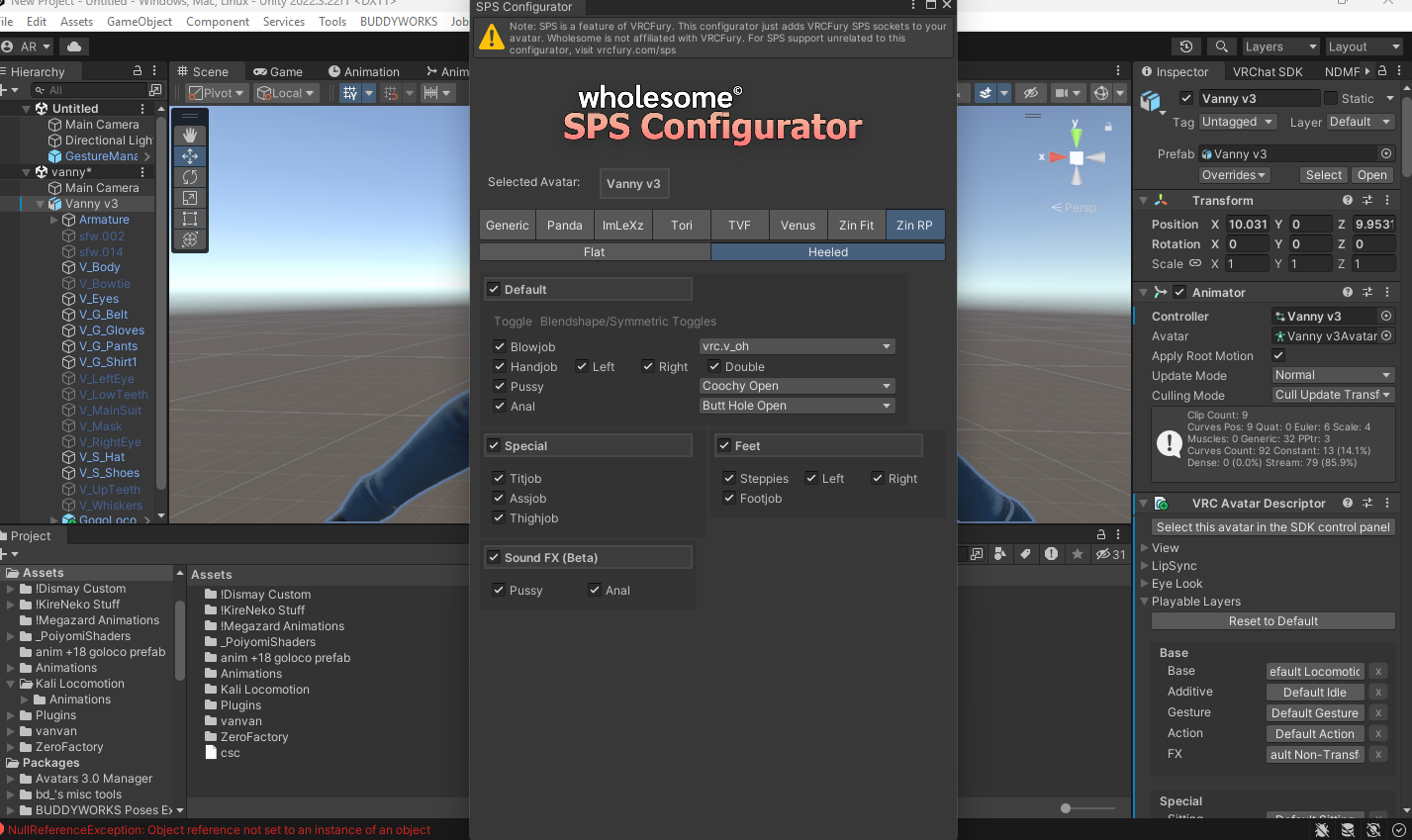
                anyone else having toruble trying to add SPS? there's no the "ADD" option
                Captura de pantalla 2026-10-24 215718.png

                1 Reply Last reply
                0
                • KryFuzeK
                  KryFuzeK
                  KryFuze
                  wrote last edited by
                  #141

                  bump for fixed quest

                  1 Reply Last reply
                  0
                  • D
                    D
                    DavyTheBunni
                    wrote last edited by
                    #142

                    bump bc i am so confused

                    1 Reply Last reply
                    0
                    • T
                      T
                      takodaplays132
                      wrote last edited by
                      #143

                      has anyone made/are working on a ready-to-go unity package? if not, could someone better explain how to do it?
                      1 Reply Last reply
                      0

                      Hello! It looks like you're interested in this conversation, but you don't have an account yet.

                      Getting fed up of having to scroll through the same posts each visit? When you register for an account, you'll always come back to exactly where you were before, and choose to be notified of new replies (either via email, or push notification). You'll also be able to save bookmarks and upvote posts to show your appreciation to other community members.

                      With your input, this post could be even better 💗

                      Register Login
                      Reply
                      • Reply as topic
                      Log in to reply
                      • Oldest to Newest
                      • Newest to Oldest
                      • Most Votes


                      • Login

                      • Login or register to search.
                      • First post
                        Last post
                      0
                      • Categories
                      • Recent
                      • Tags
                      • Popular