Skip to content
  • Categories
  • Recent
  • Tags
  • Popular
Skins
  • Light
  • Brite
  • Cerulean
  • Cosmo
  • Flatly
  • Journal
  • Litera
  • Lumen
  • Lux
  • Materia
  • Minty
  • Morph
  • Pulse
  • Sandstone
  • Simplex
  • Sketchy
  • Spacelab
  • United
  • Yeti
  • Zephyr
  • Dark
  • Cyborg
  • Darkly
  • Quartz
  • Slate
  • Solar
  • Superhero
  • Vapor

  • Default (Zephyr)
  • No Skin
Collapse
RipperStore Logo
  1. Home
  2. Guides
  3. Tutorials
  4. trying to get better at making model edits, will take any and all advice i can get

trying to get better at making model edits, will take any and all advice i can get

Scheduled Pinned Locked Moved Tutorials
helpedit
11 Posts 3 Posters 260 Views 1 Watching
  • Oldest to Newest
  • Newest to Oldest
  • Most Votes
Reply
  • Reply as topic
Log in to reply
This topic has been deleted. Only users with topic management privileges can see it.
  • StolenStardustS
    StolenStardustS
    StolenStardust
    wrote on last edited by
    #1

    i know the basics but my issue is how do i make it look polished or good, so far all i understand is sculpt tooling it and stuff but its difficult to improve on it

    I <3 Fexa
    Hopefully ill finish all my edits soon

    1 Reply Last reply
    0
    • StolenStardustS
      StolenStardustS
      StolenStardust
      wrote on last edited by
      #2

      bump

      I <3 Fexa
      Hopefully ill finish all my edits soon

      1 Reply Last reply
      0
      • StolenStardustS
        StolenStardustS
        StolenStardust
        wrote on last edited by
        #3

        bumpa

        I <3 Fexa
        Hopefully ill finish all my edits soon

        1 Reply Last reply
        0
        • StolenStardustS
          StolenStardustS
          StolenStardust
          wrote on last edited by
          #4

          bump

          I <3 Fexa
          Hopefully ill finish all my edits soon

          1 Reply Last reply
          0
          • StolenStardustS
            StolenStardustS
            StolenStardust
            wrote last edited by
            #5

            bump

            I <3 Fexa
            Hopefully ill finish all my edits soon

            1 Reply Last reply
            0
            • SymphoniaLoudS
              SymphoniaLoudS
              SymphoniaLoud
              wrote last edited by
              #6

              The keyword here is “Remesh.”

              https://www.youtube.com/watch?v=DYjcTDqn_xA

              Please dont forget to upvote :)

              StolenStardustS 1 Reply Last reply
              0
              • SymphoniaLoudS SymphoniaLoud

                The keyword here is “Remesh.”

                https://www.youtube.com/watch?v=DYjcTDqn_xA

                StolenStardustS
                StolenStardustS
                StolenStardust
                wrote last edited by
                #7

                @SymphoniaLoud interesting, im a little confused on what this kinda doesthough since sculpt mode can do pretty similar stuff

                I <3 Fexa
                Hopefully ill finish all my edits soon

                1 Reply Last reply
                0
                • SymphoniaLoudS
                  SymphoniaLoudS
                  SymphoniaLoud
                  wrote last edited by SymphoniaLoud
                  #8

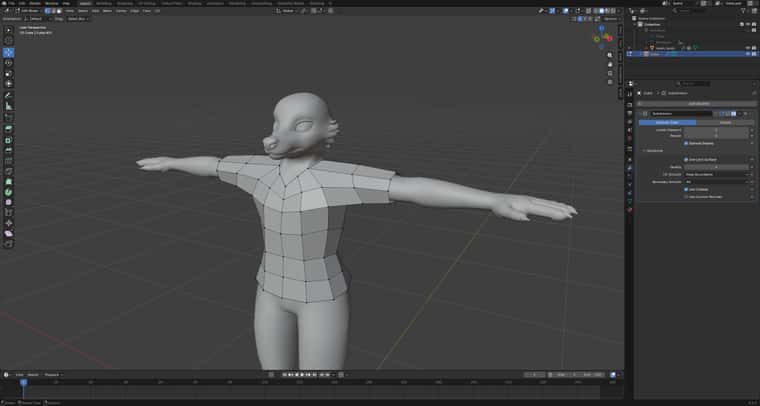
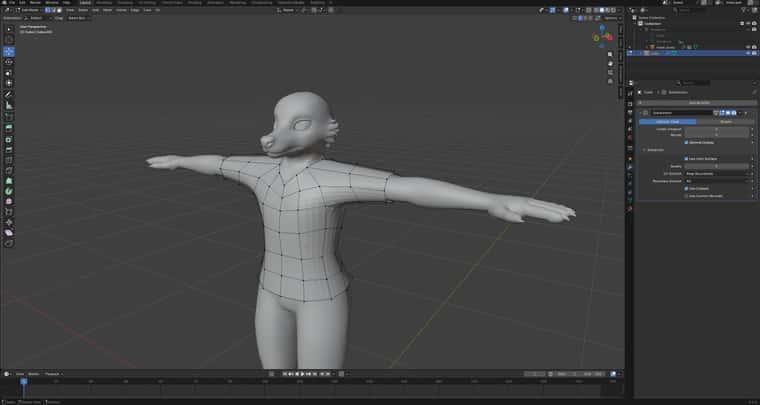
                  The Remesh modifier uses the geometry of an existing mesh to generate a new topology. It is non-destructive, as it can be toggled on or off at any time 😉 For example, it is useful for creating new garments for an existing avatar.

                  Before:
                  e4a3e4e4-309d-48b1-8d58-c7dad91264bf-image.jpeg

                  After:
                  356d3bc8-d915-4967-a23d-807077fd5e2d-image.jpeg

                  Please dont forget to upvote :)

                  1 Reply Last reply
                  0
                  • StolenStardustS
                    StolenStardustS
                    StolenStardust
                    wrote last edited by
                    #9

                    interesting, ty for the explanation!

                    I <3 Fexa
                    Hopefully ill finish all my edits soon

                    1 Reply Last reply
                    0
                    • T
                      T
                      Thi3DudeOnRippa
                      wrote last edited by
                      #10

                      Well not sure your current level/knowledge about Blender. But if you want meshes to be smoothed out, I recommend you to use the Subdivision Surface Modifier or the Shade Smooth option which is quicker! Just right click your mesh in Object Mode and you’ll see Shade Smooth or Shade Auto Smooth. Just click on one of them and it’ll smooth it out! If it’s not smooth enough for you. You can also use the Subdivision Surface Modifier as well! Hope this helps!

                      StolenStardustS 1 Reply Last reply
                      0
                      • T Thi3DudeOnRippa

                        Well not sure your current level/knowledge about Blender. But if you want meshes to be smoothed out, I recommend you to use the Subdivision Surface Modifier or the Shade Smooth option which is quicker! Just right click your mesh in Object Mode and you’ll see Shade Smooth or Shade Auto Smooth. Just click on one of them and it’ll smooth it out! If it’s not smooth enough for you. You can also use the Subdivision Surface Modifier as well! Hope this helps!

                        StolenStardustS
                        StolenStardustS
                        StolenStardust
                        wrote last edited by
                        #11

                        @Thi3DudeOnRippa i appreciate the tip! im pretty decent when it comes to blender (i understand sculpt tool front and back practically and have gotten pretty used to making blendshapes and using modifiers) but i want to learn as much as i can!


                        I <3 Fexa
                        Hopefully ill finish all my edits soon

                        1 Reply Last reply
                        0

                        Hello! It looks like you're interested in this conversation, but you don't have an account yet.

                        Getting fed up of having to scroll through the same posts each visit? When you register for an account, you'll always come back to exactly where you were before, and choose to be notified of new replies (either via email, or push notification). You'll also be able to save bookmarks and upvote posts to show your appreciation to other community members.

                        With your input, this post could be even better 💗

                        Register Login
                        Reply
                        • Reply as topic
                        Log in to reply
                        • Oldest to Newest
                        • Newest to Oldest
                        • Most Votes


                        • Login

                        • Login or register to search.
                        • First post
                          Last post
                        0
                        • Categories
                        • Recent
                        • Tags
                        • Popular