
Fix for poiyomi outline
-
Hey yall! im currently headswapping an avatar using Emmigosa as the body and the Aurora head as the new head. after exporting from blender and adding the textures in manually in unity whenever i enter play mode to check with gesture manager and the scene this is what happens to the outline thingy. i added the same values from the original. the top photo is the one that is in scene and bottom is play mode.

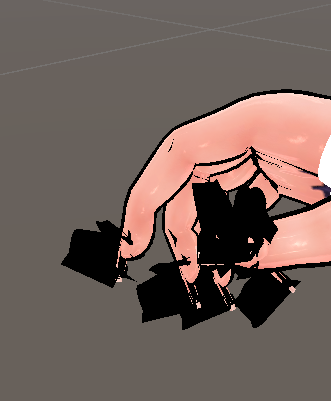
is there any fix for this? thankss!!
-
switch the outline space from local > world. it will render it in a different way to where it becomes dependent on the orientation of the world you're in, therefore usually fixing the problem. if that doesn't work, try fine tuning "Fixed Size Over Distance" and see if that does anything to make it look better (im not sure if it will or not, just a suggestion.) hope this fixes your problem

rex 4evr
-
switch the outline space from local > world. it will render it in a different way to where it becomes dependent on the orientation of the world you're in, therefore usually fixing the problem. if that doesn't work, try fine tuning "Fixed Size Over Distance" and see if that does anything to make it look better (im not sure if it will or not, just a suggestion.) hope this fixes your problem
This post is deleted!
Hello! It looks like you're interested in this conversation, but you don't have an account yet.
Getting fed up of having to scroll through the same posts each visit? When you register for an account, you'll always come back to exactly where you were before, and choose to be notified of new replies (either via email, or push notification). You'll also be able to save bookmarks and upvote posts to show your appreciation to other community members.
With your input, this post could be even better 💗
Register Login