Skip to content
  • Categories
  • Recent
  • Tags
  • Popular
Skins
  • Light
  • Brite
  • Cerulean
  • Cosmo
  • Flatly
  • Journal
  • Litera
  • Lumen
  • Lux
  • Materia
  • Minty
  • Morph
  • Pulse
  • Sandstone
  • Simplex
  • Sketchy
  • Spacelab
  • United
  • Yeti
  • Zephyr
  • Dark
  • Cyborg
  • Darkly
  • Quartz
  • Slate
  • Solar
  • Superhero
  • Vapor

  • Default (Zephyr)
  • No Skin
Collapse
RipperStore Logo
  1. Home
  2. Assets
  3. Found Avatars and Assets
  4. LF: GodWhisper by Godfall (V1 FOUND!)

LF: GodWhisper by Godfall (V1 FOUND!)

Scheduled Pinned Locked Moved Solved Found Avatars and Assets
godfallbunnyskeletonwingsfurry
389 Posts 125 Posters 112.9k Views 219 Watching
  • Oldest to Newest
  • Newest to Oldest
  • Most Votes
Reply
  • Reply as topic
Log in to reply
This topic has been deleted. Only users with topic management privileges can see it.
  • H Helgelending

    @HollowPurple What an enlightening comment, it sure did it, answered the persons cry for help perfectly well.
    Scoot, go push your narrative somewhere else thank you very much

    @Atropos, they mean, on the import window, only import the files under the "Animations" and the FBX / prefabs.
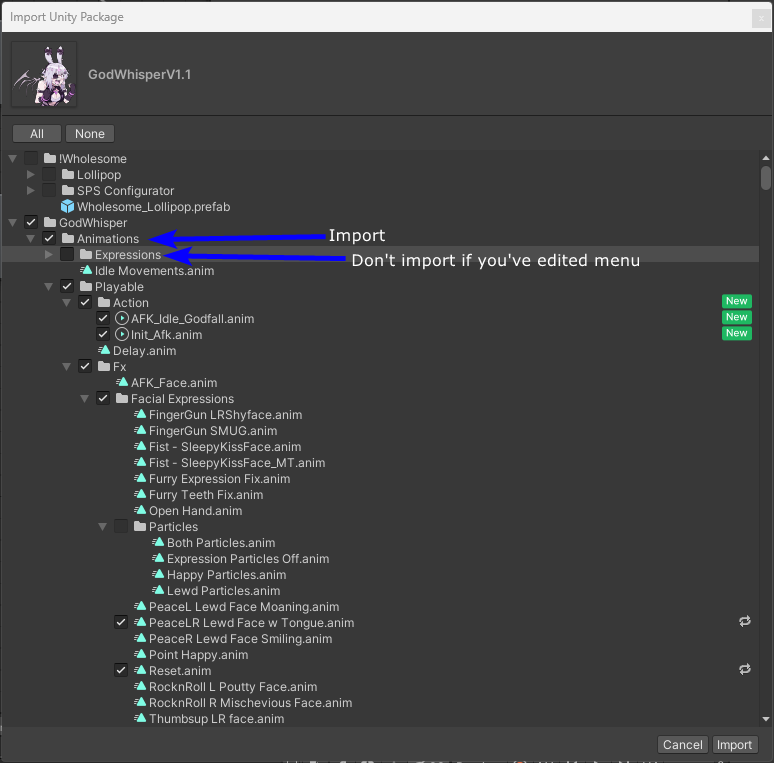
    2ec308da-cd60-4017-a6c5-ca5a55486705-image.png

    Most importantly, DO NOT IMPORT THE CHANGED SCENE. It will overwrite your scene with all hierarchy changes.

    Look at this picture where it wants to import my changes:
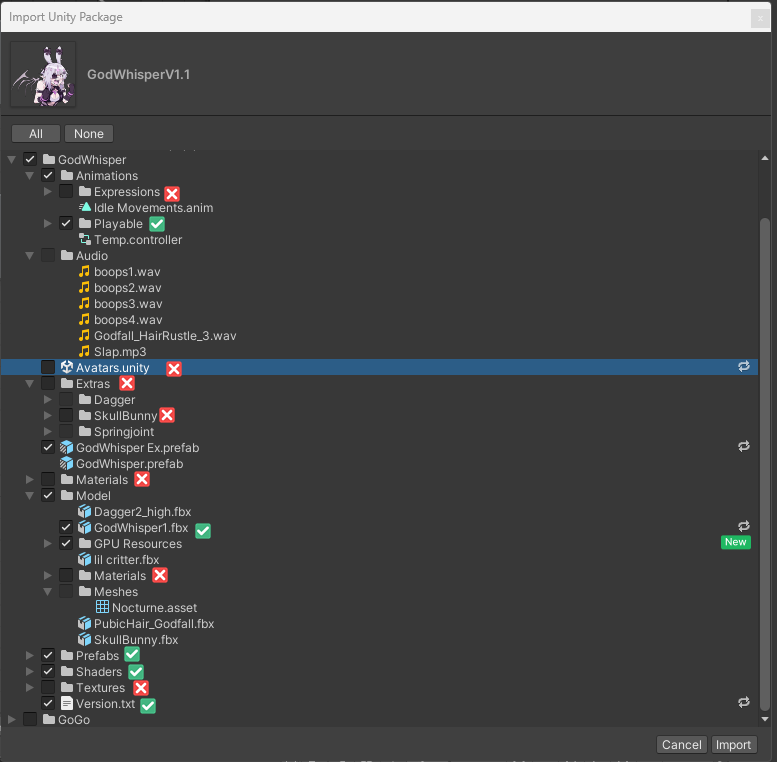
    f73a6311-3a3b-4dee-9602-afb09881d838-image.png

    AFTER importing:
    ada63811-8ed5-4522-813a-0c3f258d232a-image.png
    c08c4163-dac1-4169-86e7-84ea7508b07c-image.png

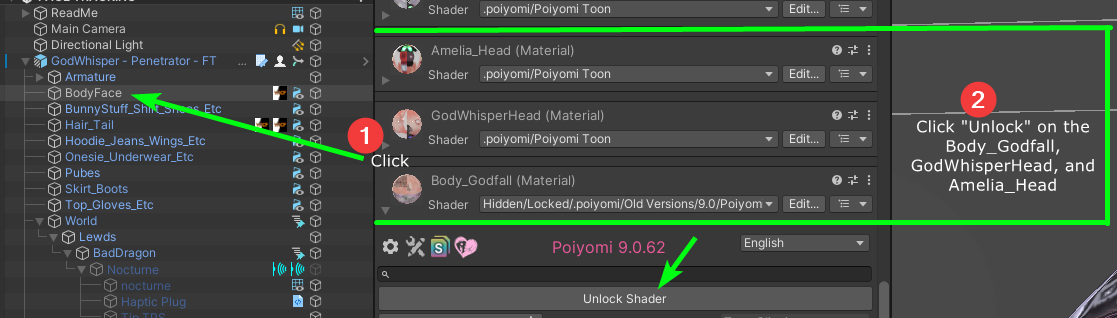
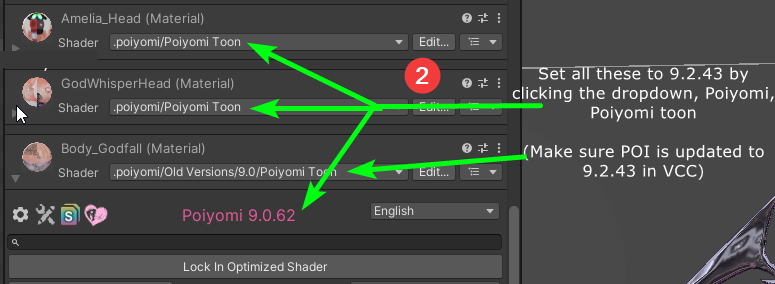
    On the EX, click "BunnyStuff etc.." and then unlock the shader, under "Color & Normals", set the "Alpha Cutoff" to 0.01. If it is already, ignore it.

    Happy pride!

    AtroposA
    AtroposA
    Atropos
    wrote on last edited by
    #355

    @Helgelending
    So question, cause i did this and it kept giving me a error with the gpu particles, kept saying there was an error about it not being defined or w/e
    What do i do with that? Ive been at it for 3-4 hours and i still cant seem to figure it out.

    nonpareilsN 1 Reply Last reply
    0
    • AtroposA Atropos

      @Helgelending
      So question, cause i did this and it kept giving me a error with the gpu particles, kept saying there was an error about it not being defined or w/e
      What do i do with that? Ive been at it for 3-4 hours and i still cant seem to figure it out.

      nonpareilsN
      nonpareilsN
      nonpareils
      wrote on last edited by
      #356

      @Atropos Saaaaaaaaaame, I don't want to get rid of them bc it's one of my fav toys. If anyone has the solution would love to know!

      1 Reply Last reply
      0
      • AtroposA
        AtroposA
        Atropos
        wrote on last edited by
        #357

        And on top of it when i get that to go away, none of the toggles work either, so im literally stuck 😕

        1 Reply Last reply
        0
        • LalondeL
          LalondeL
          Lalonde
          wrote on last edited by
          #358

          BTW does anyone know how to actually get the elf ears to go back to human ears upon upload?

          LemonyAsterL 1 Reply Last reply
          0
          • LalondeL Lalonde

            BTW does anyone know how to actually get the elf ears to go back to human ears upon upload?

            LemonyAsterL
            LemonyAsterL
            LemonyAster
            wrote on last edited by
            #359

            @whisperwhiskers All I did was put the blend shape to 0 I think it was, and that worked for me, I don't remember if the blend shape said human ears or elf ears but it's either 1 or 100 depending which it said.

            AtroposA LalondeL 2 Replies Last reply
            0
            • LemonyAsterL LemonyAster

              @whisperwhiskers All I did was put the blend shape to 0 I think it was, and that worked for me, I don't remember if the blend shape said human ears or elf ears but it's either 1 or 100 depending which it said.

              AtroposA
              AtroposA
              Atropos
              wrote on last edited by
              #360

              @Plush-Aster For some reason it doesnt apply it in game, still trying to figure that out myself on top of all the other things i cant figure out 😛

              1 Reply Last reply
              0
              • LemonyAsterL LemonyAster

                @whisperwhiskers All I did was put the blend shape to 0 I think it was, and that worked for me, I don't remember if the blend shape said human ears or elf ears but it's either 1 or 100 depending which it said.

                LalondeL
                LalondeL
                Lalonde
                wrote on last edited by
                #361

                @Plush-Aster I did it with the 1.0 version, so if you did it with either 1.1 or 1.2 like I'm about to try, then I guess it could be fixed now! In any case thank you for trying to help ❤

                1 Reply Last reply
                0
                • I
                  I
                  inactivr
                  wrote on last edited by
                  #362

                  question, since the godfall avis all use the same base, you can put the same tattoos on them.
                  but, they look really faded despite if i put them onto the avi or not and can't get the decal to work, how do I fix that so the tats are replaced on the model? I normally am pretty good at figuring it out but with this one i'm not too sure...

                  1 Reply Last reply
                  0
                  • RenulusR
                    RenulusR
                    Renulus
                    wrote on last edited by
                    #363

                    does anyone have anyway to get ahold of the psd texture files for everything
                    the pngs are pretty hard to mess with (im new to the texture editing so i might be doing it wrong

                    D S 2 Replies Last reply
                    0
                    • RenulusR Renulus

                      does anyone have anyway to get ahold of the psd texture files for everything
                      the pngs are pretty hard to mess with (im new to the texture editing so i might be doing it wrong

                      D
                      D
                      dean
                      wrote on last edited by
                      #364

                      @Renulus try gimp

                      RenulusR 1 Reply Last reply
                      0
                      • D dean

                        @Renulus try gimp

                        RenulusR
                        RenulusR
                        Renulus
                        wrote on last edited by
                        #365

                        @dean i use gimp and krita *prefer krita but all the clothing textures are just png files

                        1 Reply Last reply
                        0
                        • StrangerrrrS
                          StrangerrrrS
                          Strangerrrr
                          wrote on last edited by
                          #366

                          does anyone know how to change the skeleton colour on her? ❤

                          I 1 Reply Last reply
                          0
                          • StrangerrrrS Strangerrrr

                            does anyone know how to change the skeleton colour on her? ❤

                            I
                            I
                            inactivr
                            wrote on last edited by
                            #367

                            @BunnyBoyfu depends on which vers, on ex I'd try the emissions and matcaps but on the reg i'm not sure

                            StrangerrrrS 1 Reply Last reply
                            0
                            • I inactivr

                              @BunnyBoyfu depends on which vers, on ex I'd try the emissions and matcaps but on the reg i'm not sure

                              StrangerrrrS
                              StrangerrrrS
                              Strangerrrr
                              wrote on last edited by
                              #368

                              @Sleepybunnzz figured it out thank you! its part of the hoodie texture

                              1 Reply Last reply
                              0
                              • M melia

                                🔗 Download Link (workupload.com)

                                Necroz_XyXN
                                Necroz_XyXN
                                Necroz_XyX
                                wrote on last edited by Necroz_XyX
                                #369

                                am i doing something wrong, its downloading at like < 300 kbs. id rather not wait all day when i could be editing her

                                edit: i needed to make an account, im not to smort sometimes

                                1 Reply Last reply
                                0
                                • LocsTheWitcherL
                                  LocsTheWitcherL
                                  LocsTheWitcher
                                  wrote on last edited by
                                  #370

                                  Anybody got the quest version from the discord?

                                  PEN ManosP 1 Reply Last reply
                                  0
                                  • LocsTheWitcherL LocsTheWitcher

                                    Anybody got the quest version from the discord?

                                    PEN ManosP
                                    PEN ManosP
                                    PEN Manos
                                    wrote on last edited by
                                    #371

                                    @LocsTheWitcher

                                    .
                                    i found this GodWhisperQuestV0.1

                                    💜 ⋅˚₊‧ ୨୧ ‧₊˚ ⋅💜

                                    1 Reply Last reply
                                    ❤
                                    2
                                    • fauxfurF
                                      fauxfurF
                                      fauxfur
                                      wrote on last edited by
                                      #372

                                      Could someone please take her apart for ease of unity editing? I really don’t want to edit her in blender. I wanna be able to delete what I want to remove in unity and create toggles. In other words, could someone please make her assets separate??

                                      🐾

                                      ahri

                                      1 Reply Last reply
                                      ☝ 🤡
                                      0
                                      • M melia

                                        🔗 Download Link (workupload.com)

                                        B
                                        B
                                        Bluelightss
                                        wrote on last edited by
                                        #373

                                        @GoStuffYourself im new to this so am i supposed to use both of the files or one of them to upload?

                                        M 1 Reply Last reply
                                        0
                                        • V
                                          V
                                          VortexFTW
                                          wrote on last edited by
                                          #374

                                          i have a error and cant upload it.. can anyone help me??
                                          "Error while saving Prefab: 'Assets/prefab-id-v1_avtr_2370e421-edaa-41fc-b90f-2257830aefd4_0845107618.prefab'. You are trying to save a Prefab with a missing script. This is not allowed.
                                          Please change the script or remove it from the GameObject 'SPS'."
                                          and a few more. also no scripts are loading at all...
                                          image.png

                                          M 1 Reply Last reply
                                          0

                                          Hello! It looks like you're interested in this conversation, but you don't have an account yet.

                                          Getting fed up of having to scroll through the same posts each visit? When you register for an account, you'll always come back to exactly where you were before, and choose to be notified of new replies (either via email, or push notification). You'll also be able to save bookmarks and upvote posts to show your appreciation to other community members.

                                          With your input, this post could be even better 💗

                                          Register Login
                                          Reply
                                          • Reply as topic
                                          Log in to reply
                                          • Oldest to Newest
                                          • Newest to Oldest
                                          • Most Votes


                                          • Login

                                          • Login or register to search.
                                          • First post
                                            Last post
                                          0
                                          • Categories
                                          • Recent
                                          • Tags
                                          • Popular