
how to delete axis (blender)
-
I'm using FBX Exporter & better importer, the model imports just fine but it comes with an axis I want to delete so I have the armature and fbx but when I do it turns HUGE and flips over, is there something I'm doing wrong?
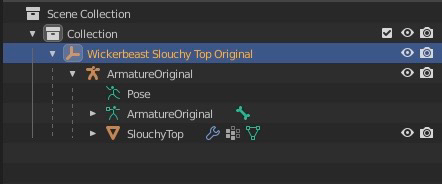
I'm somewhat new but I have blender knowledge. -
Hey there, I'm not new to Blender. HOWEVER, I don't work with Empty Objects a lot, (such as the plain axes in your photo). But you can try unparenting it. ALT+P -> Clear and Keep Transformation. Make sure you have selected what you want to unparent.
Hope this helps! If not, let me know and I'll see what I can do.
-
Hey there, I'm not new to Blender. HOWEVER, I don't work with Empty Objects a lot, (such as the plain axes in your photo). But you can try unparenting it. ALT+P -> Clear and Keep Transformation. Make sure you have selected what you want to unparent.
Hope this helps! If not, let me know and I'll see what I can do.
-

Hello! It looks like you're interested in this conversation, but you don't have an account yet.
Getting fed up of having to scroll through the same posts each visit? When you register for an account, you'll always come back to exactly where you were before, and choose to be notified of new replies (either via email, or push notification). You'll also be able to save bookmarks and upvote posts to show your appreciation to other community members.
With your input, this post could be even better 💗
Register Login