Skip to content
  • Categories
  • Recent
  • Tags
  • Popular
Skins
  • Light
  • Brite
  • Cerulean
  • Cosmo
  • Flatly
  • Journal
  • Litera
  • Lumen
  • Lux
  • Materia
  • Minty
  • Morph
  • Pulse
  • Sandstone
  • Simplex
  • Sketchy
  • Spacelab
  • United
  • Yeti
  • Zephyr
  • Dark
  • Cyborg
  • Darkly
  • Quartz
  • Slate
  • Solar
  • Superhero
  • Vapor

  • Default (Zephyr)
  • No Skin
Collapse
RipperStore Logo
  1. Home
  2. Community
  3. General Questions
  4. Avatar Help!! [Rurune]

Avatar Help!! [Rurune]

Scheduled Pinned Locked Moved General Questions
helpmodelsrurune
7 Posts 5 Posters 8.9k Views
  • Oldest to Newest
  • Newest to Oldest
  • Most Votes
Reply
  • Reply as topic
Log in to reply
This topic has been deleted. Only users with topic management privileges can see it.
  • GummyG
    GummyG
    Gummy
    wrote on last edited by Gummy
    #1

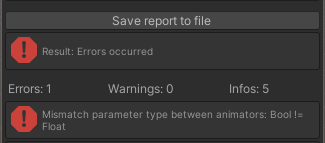
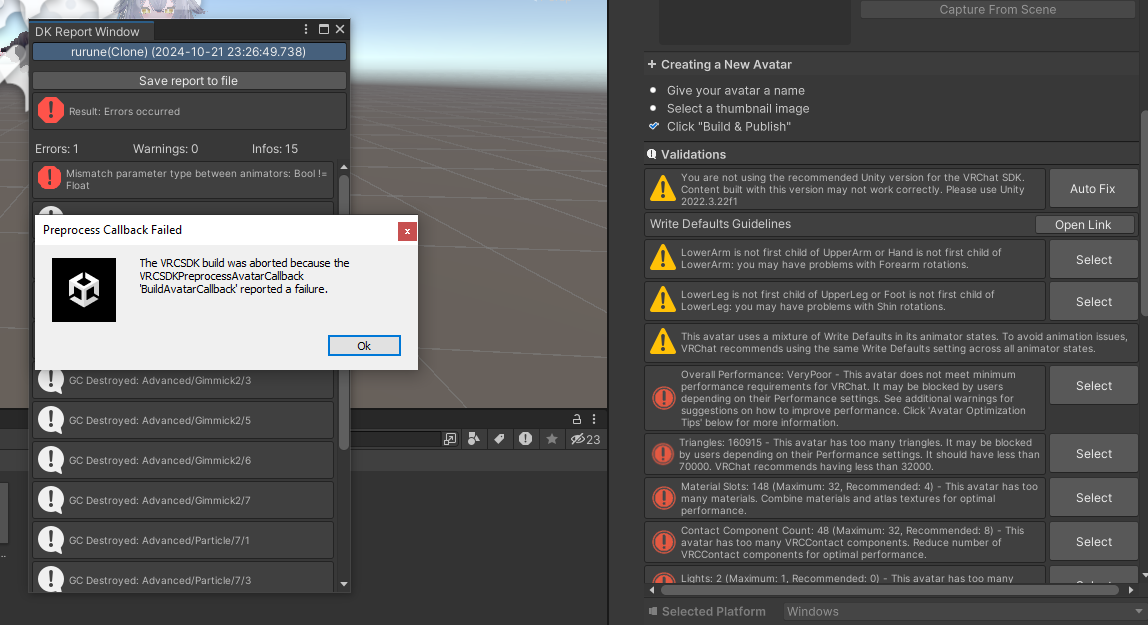
    Hello~~ I am trying to upload the base Rurune model (v1.0.7) no editing but I keep encountering this error. BOOTH
    e2.png

    I saw this thread --> Avatar Help! of someone encountering the same error and I followed what they said in the thread but it is still not working for me.
    e1.png
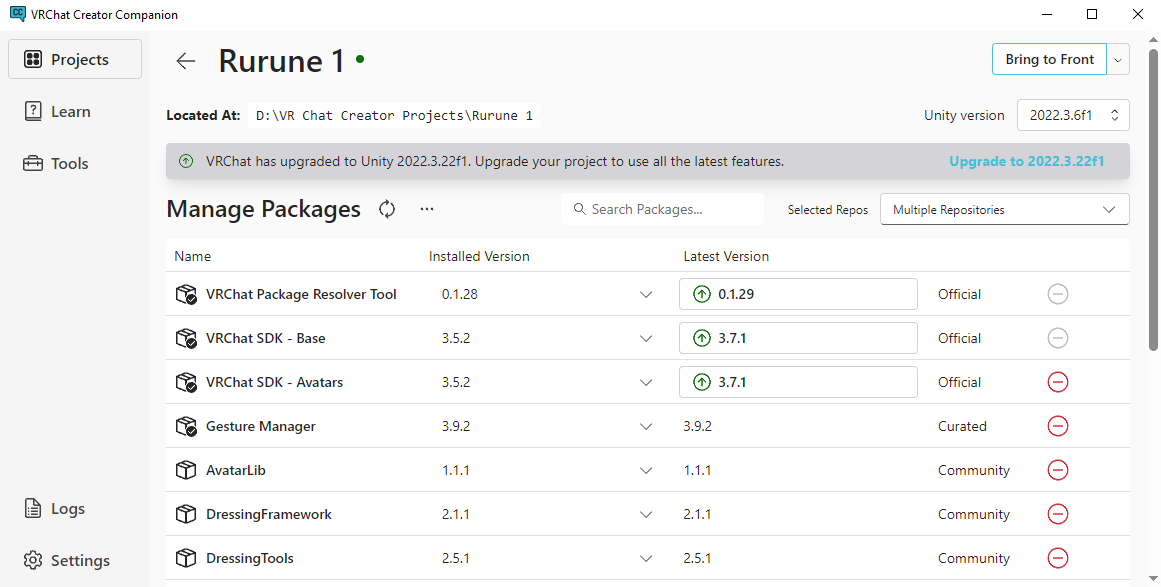
    [Changed SDK to 3.5.2 and changed to Unity 2022.3.6f1]

    Could anyone help me with this issue? Any help would be appreciated T_T Thank you~~!

    1 Reply Last reply
    0
    • Y
      Y
      Yourfellowpirate
      wrote on last edited by Yourfellowpirate
      #2
      This post is deleted!
      1 Reply Last reply
      0
      • BelinaB
        BelinaB
        Belina
        wrote on last edited by
        #3

        image.png
        i encounter the same problem too !
        changed resolver tool 0.1.28
        SDK Base : 3.5.2
        SDK Avatars : 3.5.2
        @Gummy did you find any fix ye ? but smhow i feel its the dressing tool ?

        I Love Mizuki so much, Please Need more Asset For Her !!!!!! D:

        Night_RavenN 1 Reply Last reply
        0
        • BelinaB Belina

          image.png
          i encounter the same problem too !
          changed resolver tool 0.1.28
          SDK Base : 3.5.2
          SDK Avatars : 3.5.2
          @Gummy did you find any fix ye ? but smhow i feel its the dressing tool ?

          Night_RavenN
          Night_RavenN
          Night_Raven
          wrote on last edited by
          #4

          @Belina Hi, it was the dress tool. I had the same issue too and after removing that plugin since I was using the module dresser it fixed it all.

          Brain ant braining

          1 Reply Last reply
          0
          • BelinaB
            BelinaB
            Belina
            wrote on last edited by
            #5

            @Night_Raven yaaa ! it turns out i just know it was the dressing tool too ! which is a shamee 😧 but yaaa, i make a new project and not add the dressing tool, it worked normal too !

            I Love Mizuki so much, Please Need more Asset For Her !!!!!! D:

            1 Reply Last reply
            0
            • RemiliaR
              RemiliaR
              Remilia
              wrote on last edited by
              #6

              umm i just encountered this problem and found this thread.
              what is the dress tool? and how can i disable it if that's what solves the problem?

              1 Reply Last reply
              0
              • RemiliaR
                RemiliaR
                Remilia
                wrote on last edited by
                #7

                I looked at the first screenshot, I don't use the dressing tool - I tried creating a new project and now it just won't let me publish the avatar when I add an outfit, it just says ''You must fix the issues listed above before you can Upload a Build'' (i already auto fix everything).

                1 Reply Last reply
                0

                Hello! It looks like you're interested in this conversation, but you don't have an account yet.

                Getting fed up of having to scroll through the same posts each visit? When you register for an account, you'll always come back to exactly where you were before, and choose to be notified of new replies (either via email, or push notification). You'll also be able to save bookmarks and upvote posts to show your appreciation to other community members.

                With your input, this post could be even better 💗

                Register Login
                Reply
                • Reply as topic
                Log in to reply
                • Oldest to Newest
                • Newest to Oldest
                • Most Votes


                • Login

                • Login or register to search.
                • First post
                  Last post
                0
                • Categories
                • Recent
                • Tags
                • Popular