Skip to content
  • Categories
  • Recent
  • Tags
  • Popular
Skins
  • Light
  • Brite
  • Cerulean
  • Cosmo
  • Flatly
  • Journal
  • Litera
  • Lumen
  • Lux
  • Materia
  • Minty
  • Morph
  • Pulse
  • Sandstone
  • Simplex
  • Sketchy
  • Spacelab
  • United
  • Yeti
  • Zephyr
  • Dark
  • Cyborg
  • Darkly
  • Quartz
  • Slate
  • Solar
  • Superhero
  • Vapor

  • Default (Zephyr)
  • No Skin
Collapse
RipperStore Logo
  1. Home
  2. Support
  3. General Support
  4. Manuka Textures White

Manuka Textures White

Scheduled Pinned Locked Moved General Support
5 Posts 4 Posters 1.2k Views 2 Watching
  • Oldest to Newest
  • Newest to Oldest
  • Most Votes
Reply
  • Reply as topic
Log in to reply
This topic has been deleted. Only users with topic management privileges can see it.
  • ShibaneS
    ShibaneS
    Shibane
    wrote on last edited by Shibane
    #1

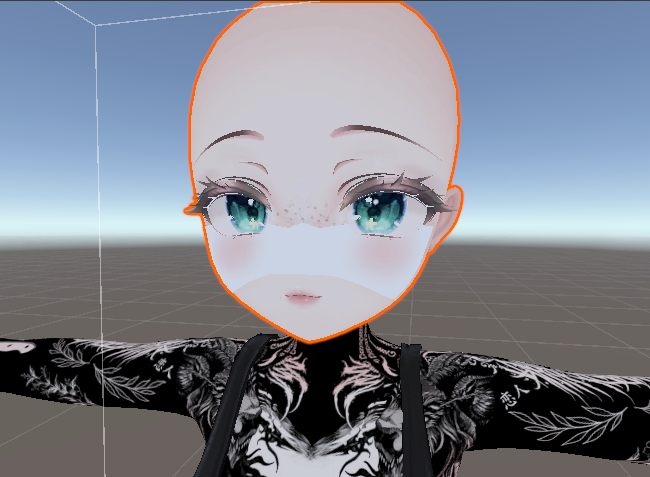
    So i was doing a Manuka Edit, and im not sure exactly where or when did this happen, but Manuka's face textures (blushes, blackface thing, eye expressions) turned white, any way to fix this? thank you in advance tupuuu jaaaaaa.PNG chat soy gayyyy.PNG

    1 Reply Last reply
    0
    • bdawgB
      bdawgB
      bdawg
      wrote on last edited by
      #2

      This is more than likely because the Manuka Face Option material does not have a texture. This happens if you delete the texture associated with that material. You just need to add your current texture on the material. If you don't know how to do this:
      Select the head and it should be the second material along with your normal face material. The "option" material is what is used for things like blush and the alternative things with expressions.
      I can't tell you 100% that this is the problem, but it is more than likely the case.

      [Unity/Blender Support]
      If you need help with anything, please ask.

      P 1 Reply Last reply
      0
      • P
        P
        Pastel
        wrote on last edited by
        #3

        the shader isn't set to be transparent, or your texture doesn't have the alpha is transparency set to true, or both at the same time

        Scientist had issues with observing the earth rotate the first time

        They got tired so they called it a day

        1 Reply Last reply
        1
        • bdawgB bdawg

          This is more than likely because the Manuka Face Option material does not have a texture. This happens if you delete the texture associated with that material. You just need to add your current texture on the material. If you don't know how to do this:
          Select the head and it should be the second material along with your normal face material. The "option" material is what is used for things like blush and the alternative things with expressions.
          I can't tell you 100% that this is the problem, but it is more than likely the case.

          P
          P
          Pastel
          wrote on last edited by
          #4

          @boofbug there's pink in it so it does have the texture, but white shows up when its not set to transparent

          Scientist had issues with observing the earth rotate the first time

          They got tired so they called it a day

          1 Reply Last reply
          0
          • G
            G
            gianmeomeo
            wrote on last edited by
            #5

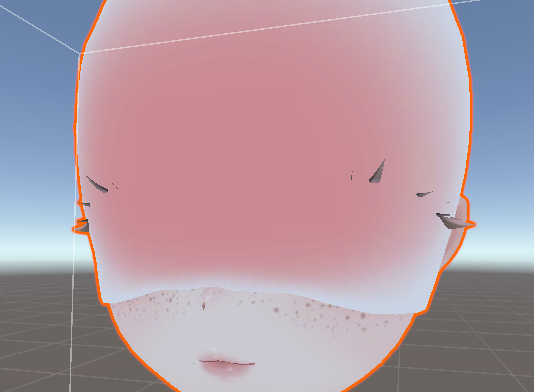
            try to change the "rendering preset" into "cut out" if you use poitoon, on both manuka face and options

            1 Reply Last reply
            0

            Hello! It looks like you're interested in this conversation, but you don't have an account yet.

            Getting fed up of having to scroll through the same posts each visit? When you register for an account, you'll always come back to exactly where you were before, and choose to be notified of new replies (either via email, or push notification). You'll also be able to save bookmarks and upvote posts to show your appreciation to other community members.

            With your input, this post could be even better 💗

            Register Login
            Reply
            • Reply as topic
            Log in to reply
            • Oldest to Newest
            • Newest to Oldest
            • Most Votes


            • Login

            • Login or register to search.
            • First post
              Last post
            0
            • Categories
            • Recent
            • Tags
            • Popular