
Beginner Tutorial
-
Introduction
In this Tutorial you will learn how to convert a pre-compiled vrca into unity friendly assets. It's not possible to edit an Avatar otherwise.
Prerequisites (Optional)
Convert VRCA
You have to convert the VRCA before you continue.
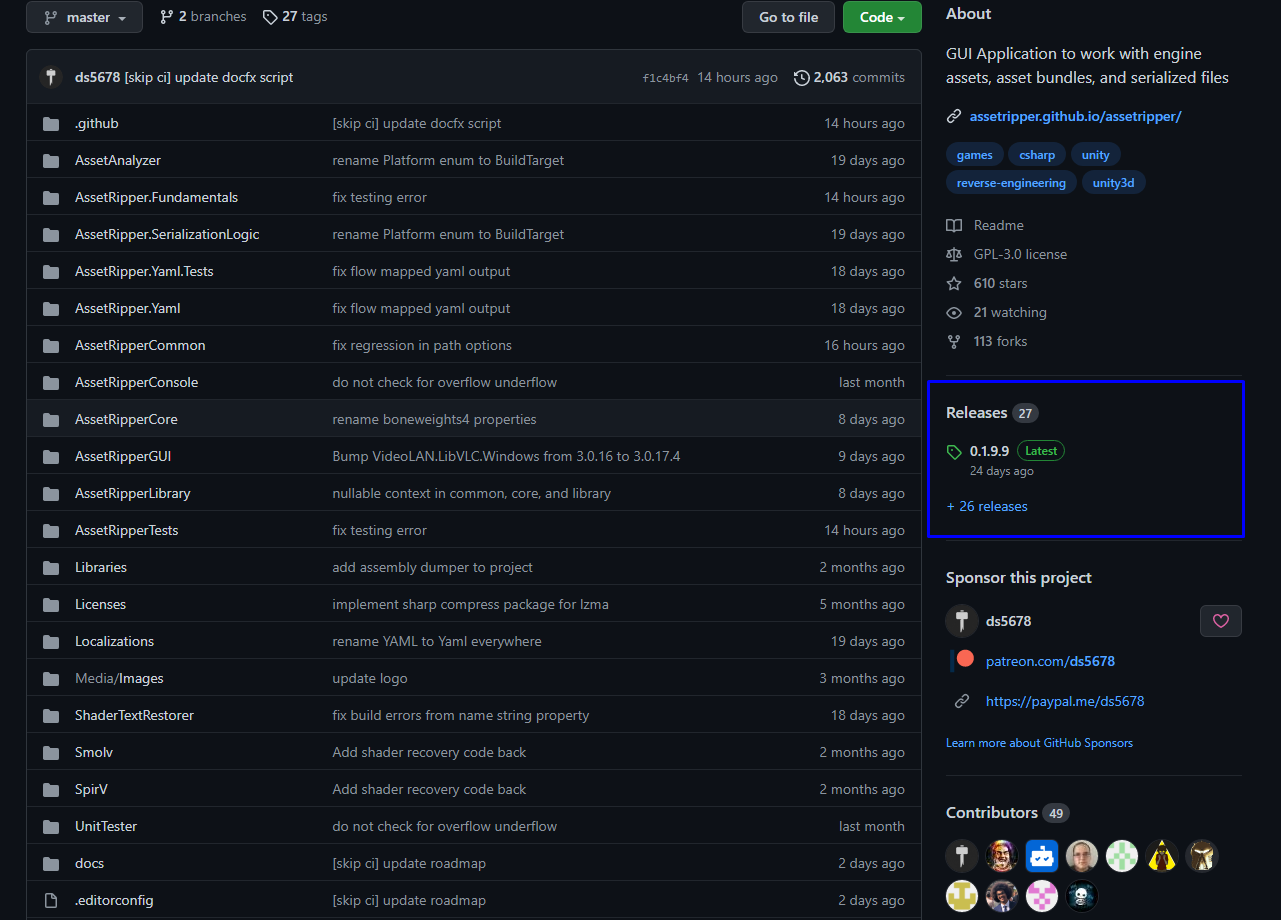
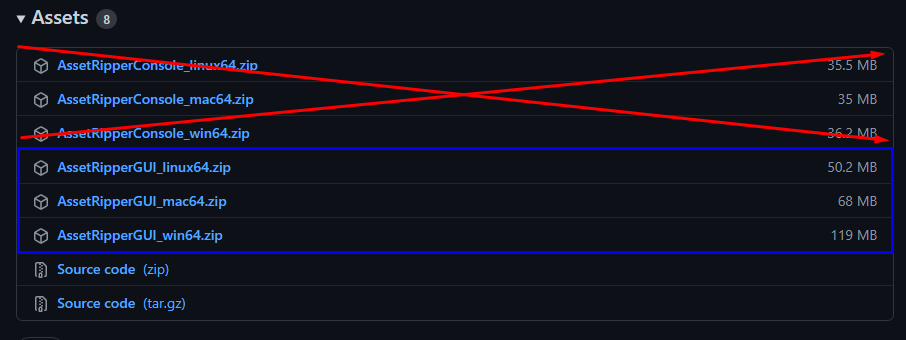
- After getting the VRCA you go to the VRCA converter (https://ripper.store/extractor) or you get a local converter called AssetRipper (https://github.com/AssetRipper/AssetRipper) For AssetRipper You got to Releases and get the GUI for you OS.
(RipperStore is not affiliated with AssetRipper in any way, use at your own risk)
Import into Unity
If the VRCA converter on the website finished you will get a zip file you Unpack it with compression unpacker you have (winrar, 7-Zip etc...). After unpacking the zip you get folders Video. Head over to a new Unity Project and Right Click Assets and select Show in Explorer and drag and drop the folders from the Zip into the Asset Folder that way.
Good to know:
- Animation Layers and Animations will Mostly Break
Tutorials to continue with:
-Following this tutorial you should be able to get Working Unity Files. for questions Join this Discord server Ripperstore Discord Server
-
-
@KumaHotogari https://ripper.store/id-downloader
-
The website wont let me convert, is it bugged out? Is there any other way to convert the vrca to fbx? I've tried some programs but I think they are not working correctly on my pc, probably something I goofed up.
-
The website wont let me convert, is it bugged out? Is there any other way to convert the vrca to fbx? I've tried some programs but I think they are not working correctly on my pc, probably something I goofed up.
@Toritheweeaboo Disregard, it fixed itself.
-
Do you think you could help me with that? Trying to make it an fbx file
-
Do you think you could help me with that? Trying to make it an fbx file
@BunnyBoyDakota mine turns into a prefab instance
-
sir please update this guide, it is very outdated.
each time i import an avatar i get this error: Plugin 'Packages/com.vrchat.base/Runtime/VRCSDK/Plugins/VRC.SDK3.Dynamics.Contact.dll' has the same filename as Assembly Definition File 'Assets/Scripts/VRC.SDK3.Dynamics.Contact/VRC.SDK3.Dynamics.Contact.asmdef'. Rename the assemblies to avoid hard to diagnose issues and crashes. -
hey if one of you can show me how to convert an avatar ID into the actual avatar that would be awesome my discord is FangTheWolf and my telegram is Fang The Wolf so if someone can please hit me because I'm very confused about how I should do this I could really use the help plus if I'm able to get the full model of the Avis I can send the files to yall and make a private DMS section for any of the stuff I have but if you could please hit me up I really need the help
-
sir please update this guide, it is very outdated.
each time i import an avatar i get this error: Plugin 'Packages/com.vrchat.base/Runtime/VRCSDK/Plugins/VRC.SDK3.Dynamics.Contact.dll' has the same filename as Assembly Definition File 'Assets/Scripts/VRC.SDK3.Dynamics.Contact/VRC.SDK3.Dynamics.Contact.asmdef'. Rename the assemblies to avoid hard to diagnose issues and crashes.@theboredperson that happened to me too but i found out you have to delete the script folder when you import it with unity if your using it through vrcc since it tends to clash with the actual sdk
-
@KumaHotogari https://ripper.store/id-downloader
@cammoammo new link maybe?


Hello! It looks like you're interested in this conversation, but you don't have an account yet.
Getting fed up of having to scroll through the same posts each visit? When you register for an account, you'll always come back to exactly where you were before, and choose to be notified of new replies (either via email, or push notification). You'll also be able to save bookmarks and upvote posts to show your appreciation to other community members.
With your input, this post could be even better 💗
Register Login