Skip to content
  • Categories
  • Recent
  • Tags
  • Popular
Skins
  • Light
  • Brite
  • Cerulean
  • Cosmo
  • Flatly
  • Journal
  • Litera
  • Lumen
  • Lux
  • Materia
  • Minty
  • Morph
  • Pulse
  • Sandstone
  • Simplex
  • Sketchy
  • Spacelab
  • United
  • Yeti
  • Zephyr
  • Dark
  • Cyborg
  • Darkly
  • Quartz
  • Slate
  • Solar
  • Superhero
  • Vapor

  • Default (Zephyr)
  • No Skin
Collapse
RipperStore Logo
  1. Home
  2. Guides
  3. New User Help
  4. can somebody please help me with this its for obsi by Kaiylast's i done all the things to add

can somebody please help me with this its for obsi by Kaiylast's i done all the things to add

Scheduled Pinned Locked Moved New User Help
helpproblem
21 Posts 14 Posters 1.0k Views 1 Watching
  • Oldest to Newest
  • Newest to Oldest
  • Most Votes
Reply
  • Reply as topic
Log in to reply
This topic has been deleted. Only users with topic management privileges can see it.
  • puppiP
    puppiP
    puppi
    wrote on last edited by
    #6

    mine did this, set all the textures to 1024 and it will upload just fine

    𝐩𝐥𝐞𝐚𝐬𝐞 𝐜𝐡𝐞𝐜𝐤 𝐦𝐲 𝐩𝐫𝐨𝐟𝐢𝐥𝐞/𝐝𝐦 𝐦𝐞 𝐟𝐨𝐫 𝐢𝐬𝐬𝐮𝐞𝐬 𝐨𝐧 𝐚𝐯𝐢𝐬 - 𝐢𝐧𝐜𝐥𝐮𝐝𝐢𝐧𝐠 𝐛𝐮𝐢𝐥𝐝 𝐟𝐚𝐢𝐥𝐬 𝐚𝐧𝐝 𝐥𝐢𝐧𝐤𝐬 𝐝𝐨𝐰𝐧 !! <33

    1 Reply Last reply
    0
    • Cyn_A7XC
      Cyn_A7XC
      Cyn_A7X
      wrote on last edited by
      #7

      I brought the textures from 1gb to 340mb. It's kinda funny how the model is sold with the textures being over 500mb

      1 Reply Last reply
      0
      • P
        P
        pistachiolover
        wrote on last edited by
        #8

        For me it uploaded just fine I followed the instructions on there website under obsi page they have direct links for everything that needs to be added and the order they need to be done in. 💙

        1 Reply Last reply
        0
        • honeyloveH
          honeyloveH
          honeylove
          wrote on last edited by
          #9

          Make sure you imported Avatar Compressor LAC by Limitex and d4rkAvatarOptimizer into the project before importing the avatar package.
          https://github.com/limitex/avatar-compressor
          https://github.com/d4rkc0d3r/d4rkAvatarOptimizer

          1 Reply Last reply
          0
          • mei meiiM
            mei meiiM
            mei meii
            wrote on last edited by
            #10

            the upload instructions are on her page smh

            1 Reply Last reply
            0
            • cutekittyyC
              cutekittyyC
              cutekittyy
              wrote on last edited by
              #11

              Here is the download link for PC and Quest - https://transfer.it/t/gLALk2hh2ZKJ

              This avatar is a bit of a hassle to get uploaded but, It's possible. I have her PC & Quest side uploaded and I ran into no issues. So, if you need help feel free to reply or dm me! ❤

              Here are the upload instructions for the PC side:
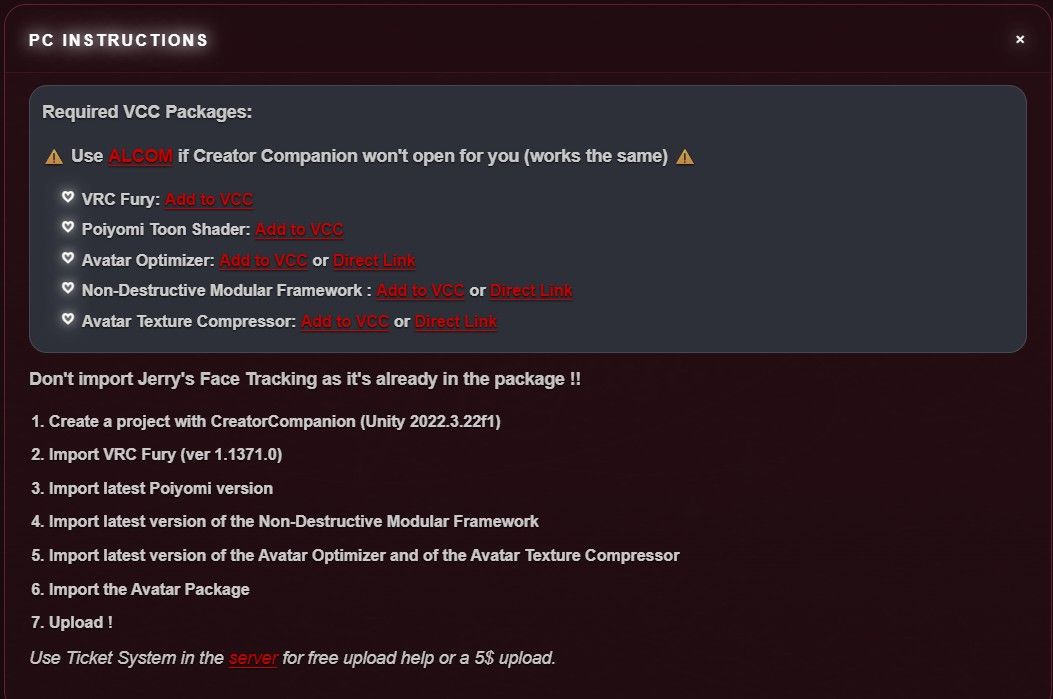
              9bda6606-1e36-4204-99ee-48d7c5a144bb-image.jpeg
              Here are the upload instructions for the Quest side: 5f554120-d014-47d9-872f-000b614a4360-image.jpeg
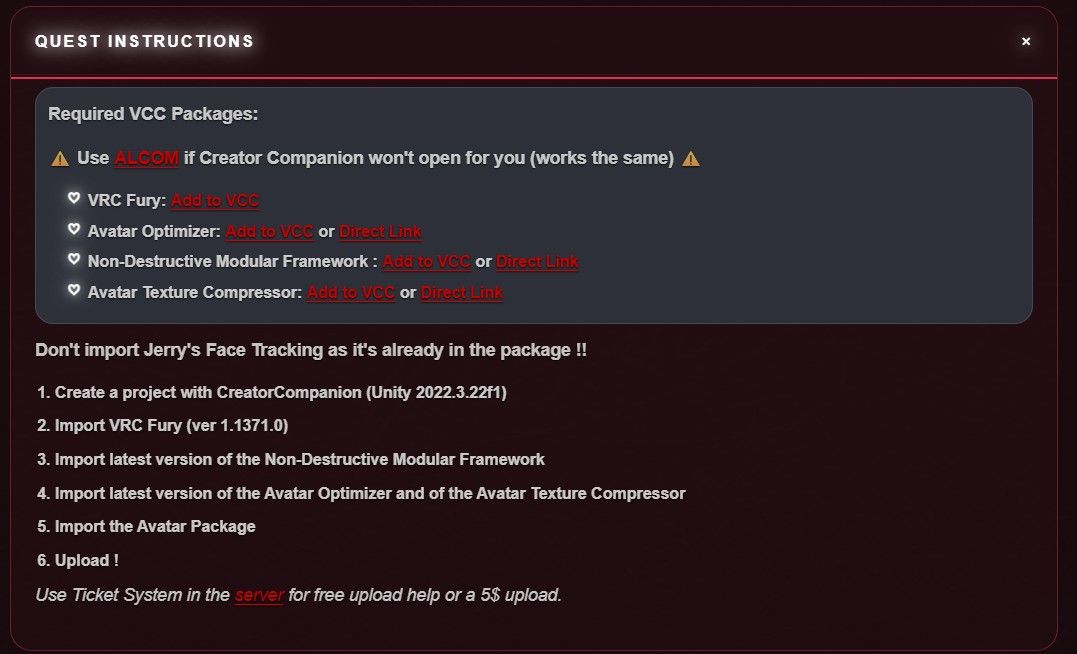
              Here are the links for the Avatar Optimizer, Non-Destructive Modular Framework, and Avatar Texture Compressor:
              Avatar Optimizer: https://github.com/d4rkc0d3r/d4rkAvatarOptimizer
              Non-Destructive Modular Framework: https://modular-avatar.nadena.dev/
              Avatar Texture Compressor:https://lac.limitex.dev/en/docs/installation/

              I HotbxtchH moonlight_M 3 Replies Last reply
              0
              • cutekittyyC cutekittyy

                Here is the download link for PC and Quest - https://transfer.it/t/gLALk2hh2ZKJ

                This avatar is a bit of a hassle to get uploaded but, It's possible. I have her PC & Quest side uploaded and I ran into no issues. So, if you need help feel free to reply or dm me! ❤

                Here are the upload instructions for the PC side:
                9bda6606-1e36-4204-99ee-48d7c5a144bb-image.jpeg
                Here are the upload instructions for the Quest side: 5f554120-d014-47d9-872f-000b614a4360-image.jpeg

                Here are the links for the Avatar Optimizer, Non-Destructive Modular Framework, and Avatar Texture Compressor:
                Avatar Optimizer: https://github.com/d4rkc0d3r/d4rkAvatarOptimizer
                Non-Destructive Modular Framework: https://modular-avatar.nadena.dev/
                Avatar Texture Compressor:https://lac.limitex.dev/en/docs/installation/

                I
                I
                ilanaxl
                wrote on last edited by
                #12
                This post is deleted!
                1 Reply Last reply
                0
                • cutekittyyC cutekittyy

                  Here is the download link for PC and Quest - https://transfer.it/t/gLALk2hh2ZKJ

                  This avatar is a bit of a hassle to get uploaded but, It's possible. I have her PC & Quest side uploaded and I ran into no issues. So, if you need help feel free to reply or dm me! ❤

                  Here are the upload instructions for the PC side:
                  9bda6606-1e36-4204-99ee-48d7c5a144bb-image.jpeg
                  Here are the upload instructions for the Quest side: 5f554120-d014-47d9-872f-000b614a4360-image.jpeg

                  Here are the links for the Avatar Optimizer, Non-Destructive Modular Framework, and Avatar Texture Compressor:
                  Avatar Optimizer: https://github.com/d4rkc0d3r/d4rkAvatarOptimizer
                  Non-Destructive Modular Framework: https://modular-avatar.nadena.dev/
                  Avatar Texture Compressor:https://lac.limitex.dev/en/docs/installation/

                  HotbxtchH
                  HotbxtchH
                  Hotbxtch
                  wrote on last edited by
                  #13

                  @cutekittyy password??

                  cutekittyyC 1 Reply Last reply
                  0
                  • HotbxtchH Hotbxtch

                    @cutekittyy password??

                    cutekittyyC
                    cutekittyyC
                    cutekittyy
                    wrote on last edited by
                    #14

                    @Hotbxtch I'm so sorry, I didn't know it needed a password! Try: ZtWR2TB2yy4wW-!
                    If it doesn't work, I'll reupload.

                    1 Reply Last reply
                    0
                    • cutekittyyC cutekittyy

                      Here is the download link for PC and Quest - https://transfer.it/t/gLALk2hh2ZKJ

                      This avatar is a bit of a hassle to get uploaded but, It's possible. I have her PC & Quest side uploaded and I ran into no issues. So, if you need help feel free to reply or dm me! ❤

                      Here are the upload instructions for the PC side:
                      9bda6606-1e36-4204-99ee-48d7c5a144bb-image.jpeg
                      Here are the upload instructions for the Quest side: 5f554120-d014-47d9-872f-000b614a4360-image.jpeg

                      Here are the links for the Avatar Optimizer, Non-Destructive Modular Framework, and Avatar Texture Compressor:
                      Avatar Optimizer: https://github.com/d4rkc0d3r/d4rkAvatarOptimizer
                      Non-Destructive Modular Framework: https://modular-avatar.nadena.dev/
                      Avatar Texture Compressor:https://lac.limitex.dev/en/docs/installation/

                      moonlight_M
                      moonlight_M
                      moonlight_
                      wrote last edited by
                      #15

                      @cutekittyy
                      ma'am i really need some help it is still saying it is too big

                      cutekittyyC 1 Reply Last reply
                      0
                      • moonlight_M moonlight_

                        @cutekittyy
                        ma'am i really need some help it is still saying it is too big

                        cutekittyyC
                        cutekittyyC
                        cutekittyy
                        wrote last edited by
                        #16

                        @mrs_ducky Hii! This avi is such a pain to upload ugh.. but when you mean to big are you referring to when you are trying to upload the quest or pc too?

                        moonlight_M 1 Reply Last reply
                        0
                        • cutekittyyC cutekittyy

                          @mrs_ducky Hii! This avi is such a pain to upload ugh.. but when you mean to big are you referring to when you are trying to upload the quest or pc too?

                          moonlight_M
                          moonlight_M
                          moonlight_
                          wrote last edited by
                          #17

                          @cutekittyy
                          i got it it was a struggle but i had to shrink all the textures to 1024

                          cutekittyyC 1 Reply Last reply
                          0
                          • moonlight_M moonlight_

                            @cutekittyy
                            i got it it was a struggle but i had to shrink all the textures to 1024

                            cutekittyyC
                            cutekittyyC
                            cutekittyy
                            wrote last edited by
                            #18

                            @mrs_ducky ahh okie! im glad you were able to figure it out!

                            peepooperP 1 Reply Last reply
                            0
                            • cutekittyyC cutekittyy

                              @mrs_ducky ahh okie! im glad you were able to figure it out!

                              peepooperP
                              peepooperP
                              peepooper
                              wrote last edited by
                              #19

                              @cutekittyy hey i am having some issues with uploading her that are quite odd are you able to help with this? ![Screenshot 2026-08-28 204916.png](/assets/uploads/files/17879711Screenshot 2026-08-28 214206.png 62690-screenshot-2026-08-28-204916.png)

                              cutekittyyC 1 Reply Last reply
                              0
                              • peepooperP peepooper

                                @cutekittyy hey i am having some issues with uploading her that are quite odd are you able to help with this? ![Screenshot 2026-08-28 204916.png](/assets/uploads/files/17879711Screenshot 2026-08-28 214206.png 62690-screenshot-2026-08-28-204916.png)

                                cutekittyyC
                                cutekittyyC
                                cutekittyy
                                wrote last edited by
                                #20

                                @peepooper Hmm that is weird, did you try and remove the "Smack That" asset?

                                1 Reply Last reply
                                0
                                • peepooperP
                                  peepooperP
                                  peepooper
                                  wrote last edited by
                                  #21

                                  i just finally saw this it literally uploaded just fine with all the errors so all good here! i saw red and got nervous lol

                                  1 Reply Last reply
                                  0

                                  Hello! It looks like you're interested in this conversation, but you don't have an account yet.

                                  Getting fed up of having to scroll through the same posts each visit? When you register for an account, you'll always come back to exactly where you were before, and choose to be notified of new replies (either via email, or push notification). You'll also be able to save bookmarks and upvote posts to show your appreciation to other community members.

                                  With your input, this post could be even better 💗

                                  Register Login
                                  Reply
                                  • Reply as topic
                                  Log in to reply
                                  • Oldest to Newest
                                  • Newest to Oldest
                                  • Most Votes


                                  • Login

                                  • Login or register to search.
                                  • First post
                                    Last post
                                  0
                                  • Categories
                                  • Recent
                                  • Tags
                                  • Popular