
Help me fix my avatar on Unity?
-
Hii everyone! I need yet again some help with an avatar I love so much!
After having it ripped by cry, fixed by Milk Drinker, and then uploaded by candythemayu, three amazing people who did a lot of work and whom I’m so grateful to, I noticed a few issues that I’d like to try fixing myself if I can, to avoid bothering any of them again!
However, since I’m not exactly a smart-smart person, I might need some advice. If any of you could guide me or point me toward where I should look in Unity to fix these issues, I’d really appreciate it!
Here a small explanation of the issues (with pictures) :
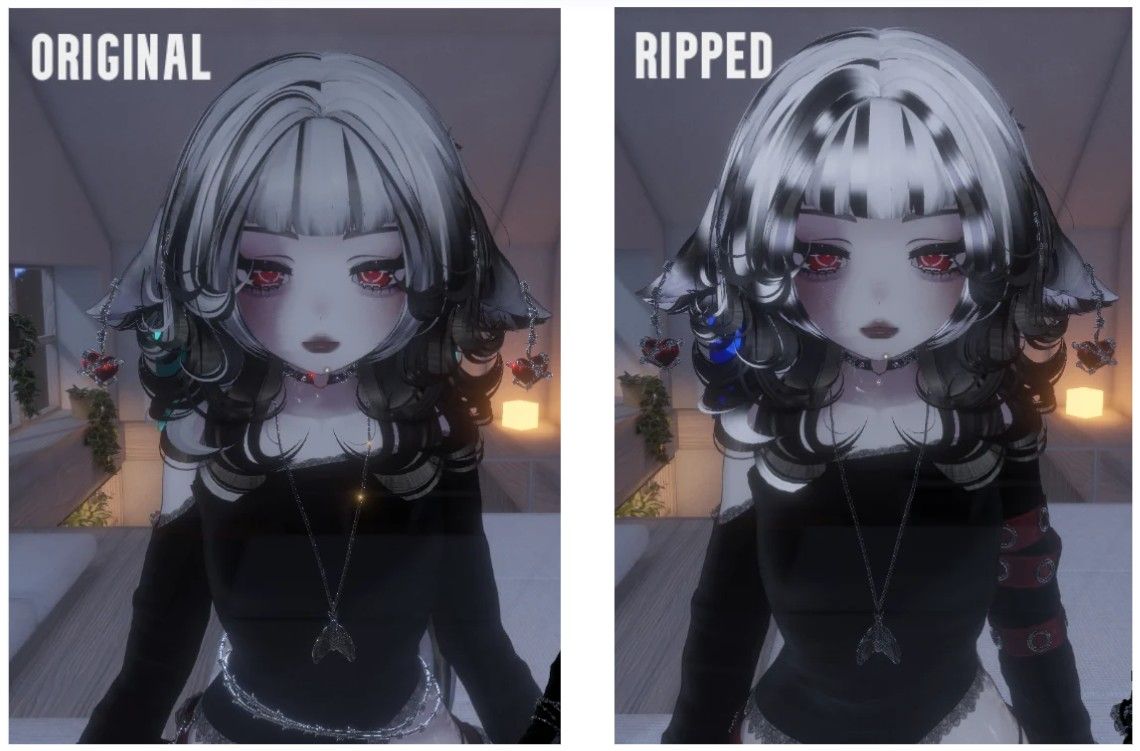
First of all, the first thing you can notice is the hair! For some reason I don’t understand, her hair doesn’t seem to have the same material or color as it should. The same issue appears with her hair and tail. It’s also the issue with her accessories, like her jewelry and nails. They don’t seem to shine at all, and they look like they’re missing their texture or material properties. It’s like I’m only seeing the base color without any shading or details.
If anyone has any idea how I could fix this in Unity, I’d really appreciate the help!
Then for the next issue :
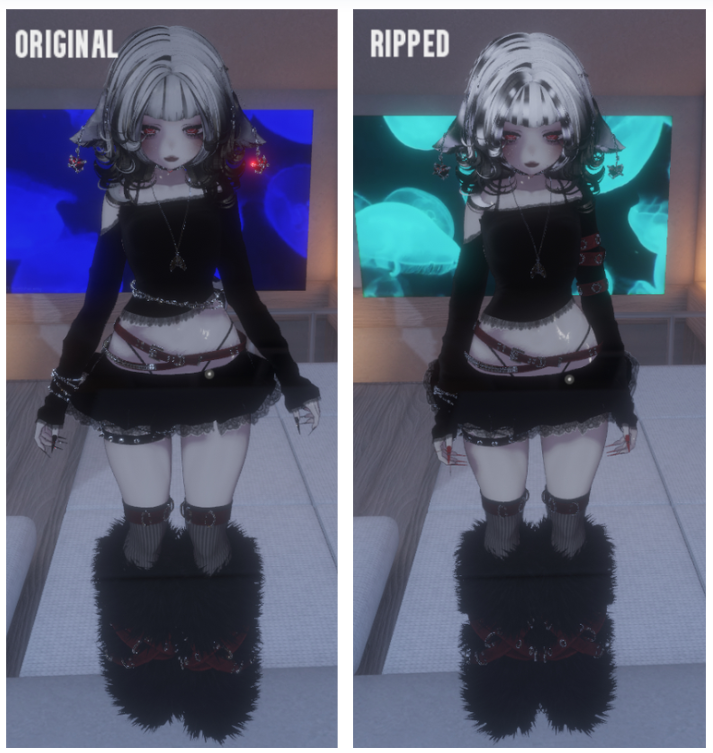
Here, as you can see, her stance doesn’t match. My ripped version doesn’t seem to have any stance, walking animation, or sitting/laying pose at all. She’s completely still and just glides around when I move. Even when I use GoLoco, it doesn’t seem to work. I have no idea how I could fix this or how I could add any kind of animation package to make her walk and move properly again.
Other than that, everything else seems to work peachy, so if anyone knows how I could fix these issues, I’d be incredibly grateful for any guidance!
Thanks in advance!

-
I also noticed these issues and was wondering if you had the VRCA I can try and fix it as well.


Hello! It looks like you're interested in this conversation, but you don't have an account yet.
Getting fed up of having to scroll through the same posts each visit? When you register for an account, you'll always come back to exactly where you were before, and choose to be notified of new replies (either via email, or push notification). You'll also be able to save bookmarks and upvote posts to show your appreciation to other community members.
With your input, this post could be even better 💗
Register Login