
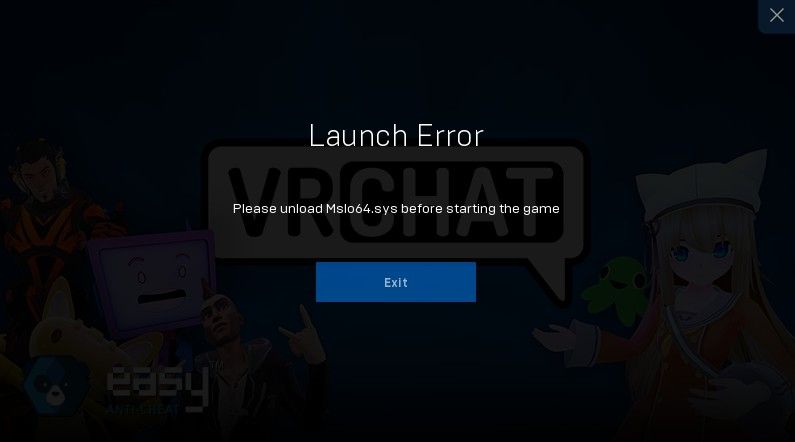
Vrchat issue (dunno where else to ask this)
-
Sounds like a driver issue. Do you have any ASUS apps installed controlling something on your system, or any kind of injections like RTSS and others? Usually those ".sys(tem)" files have logics in them, and Easy Anti Cheat is being a bitch about them.
Disable/shut off those apps before starting VRChat, and it may work. Otherwise, if its not working, try to make an exclusion rule to your firewall allowing that specific file (if its still loaded into the RAM and cannot be shut off entirely). -
Sounds like a driver issue. Do you have any ASUS apps installed controlling something on your system, or any kind of injections like RTSS and others? Usually those ".sys(tem)" files have logics in them, and Easy Anti Cheat is being a bitch about them.
Disable/shut off those apps before starting VRChat, and it may work. Otherwise, if its not working, try to make an exclusion rule to your firewall allowing that specific file (if its still loaded into the RAM and cannot be shut off entirely). -
mslo64.sys — A system driver file, usually associated with third-party security or monitoring software. For example, it can be part of the AURA RGB software from ASUS, which is used to control RGB lighting on ASUS motherboards, GPUs, or peripherals.
That's what I found. Can't help with that lol

Hello! It looks like you're interested in this conversation, but you don't have an account yet.
Getting fed up of having to scroll through the same posts each visit? When you register for an account, you'll always come back to exactly where you were before, and choose to be notified of new replies (either via email, or push notification). You'll also be able to save bookmarks and upvote posts to show your appreciation to other community members.
With your input, this post could be even better 💗
Register Login