
FOUND by @meowy69: RURU by Rhimaru
-
-
 H HextechHamster referenced this topic on
-
 anyone else getting this error?
 -
anyone know how to make her work with MMD worlds? She has MMD Visemes / blendshapes, but isn't lip syncing with MMD world dances
@UsagiiiBun Go into the MMD Compatability addon attached to the Core model (Click RURU in the left of the list... Yknow, where the Avatar descriptor is) And scroll down to find it
Click the arrow to drop down advanced settings and add " [ USER EDIT ] DEFAULT FACE " as a layer to disable.
The MMD visemes should now function correctly.
-
@UsagiiiBun Go into the MMD Compatability addon attached to the Core model (Click RURU in the left of the list... Yknow, where the Avatar descriptor is) And scroll down to find it
Click the arrow to drop down advanced settings and add " [ USER EDIT ] DEFAULT FACE " as a layer to disable.
The MMD visemes should now function correctly.
@AzureLightning2 did what you say and it still isn't working for some reason
-
anyone else getting this error?
-
@Monkeykisser yeah, Ive had the same issue, did you ever find a fix?
@KumiKumi yeah! i just didnt add modular avatar to my avi! just make sure u click the page and have all of the requirements
-
@UsagiiiBun Go into the MMD Compatability addon attached to the Core model (Click RURU in the left of the list... Yknow, where the Avatar descriptor is) And scroll down to find it
Click the arrow to drop down advanced settings and add " [ USER EDIT ] DEFAULT FACE " as a layer to disable.
The MMD visemes should now function correctly.
@AzureLightning2 this worked, tysm!!

-
-
Or if anyone else is willing to...I'd be appreciated
-
Please???
-
@fayy98 Can you please upload it for me too? I need help Q^Q
@SillySkeleboi I don't think it would be wise to have a random person in an asset sharing forum upload the avatar for you.
If you do need help you can follow tutorials for uploading avatars online (they're relatively easy to find online).
And if you find any issues with uploading that you cannot solve yourself, you can post on a helping post on the forums like this oneBlessed be your innocent soul
-
-
-
For those who are curious, this is the poly count per object, written to the right side of the name. I'm using a simple script that shows that for me.
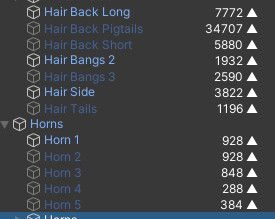
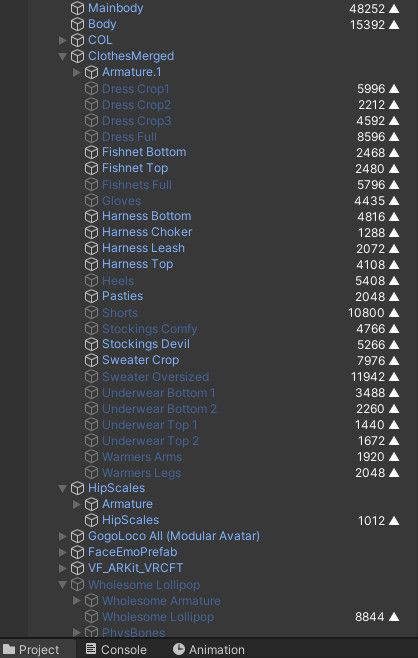
-
@Kleiner I would like to know where you got the poly count script
-
also desperate for a quest version over here ;-;-;
-
-
@lazybunni i got it quest but bones wont transfer over so idk whats wrong with that
@uwahYUMMY you wont mind telling/showing how exactly were you able to convert to quest?
-
-
quest bump















Hello! It looks like you're interested in this conversation, but you don't have an account yet.
Getting fed up of having to scroll through the same posts each visit? When you register for an account, you'll always come back to exactly where you were before, and choose to be notified of new replies (either via email, or push notification). You'll also be able to save bookmarks and upvote posts to show your appreciation to other community members.
With your input, this post could be even better 💗
Register Login