Skip to content
  • Categories
  • Recent
  • Tags
  • Popular
Skins
  • Light
  • Brite
  • Cerulean
  • Cosmo
  • Flatly
  • Journal
  • Litera
  • Lumen
  • Lux
  • Materia
  • Minty
  • Morph
  • Pulse
  • Sandstone
  • Simplex
  • Sketchy
  • Spacelab
  • United
  • Yeti
  • Zephyr
  • Dark
  • Cyborg
  • Darkly
  • Quartz
  • Slate
  • Solar
  • Superhero
  • Vapor

  • Default (Zephyr)
  • No Skin
Collapse
RipperStore Logo
  1. Home
  2. Assets
  3. Looking for...
  4. Gumroad/Payhip Avatars
  5. FOUND by @meowy69: RURU by Rhimaru

FOUND by @meowy69: RURU by Rhimaru

Scheduled Pinned Locked Moved Unsolved Gumroad/Payhip Avatars
femalejinxxy
273 Posts 116 Posters 25.4k Views 123 Watching
  • Oldest to Newest
  • Newest to Oldest
  • Most Votes
Reply
  • Reply as topic
Log in to reply
This topic has been deleted. Only users with topic management privileges can see it.
  • SillySkeleboiS SillySkeleboi

    @fayy98 Can you please upload it for me too? I need help Q^Q

    I Throw BricksI
    I Throw BricksI
    I Throw Bricks
    wrote on last edited by
    #136

    @SillySkeleboi I don't think it would be wise to have a random person in an asset sharing forum upload the avatar for you.
    If you do need help you can follow tutorials for uploading avatars online (they're relatively easy to find online).
    And if you find any issues with uploading that you cannot solve yourself, you can post on a helping post on the forums like this one

    Blessed be your innocent soul

    1 Reply Last reply
    👍
    2
    • MioawM
      MioawM
      Mioaw
      wrote on last edited by
      #137

      Anyone who has made a quest convert of this avi be willing to share their file????
      :333

      MioawM 1 Reply Last reply
      0
      • MioawM Mioaw

        Anyone who has made a quest convert of this avi be willing to share their file????
        :333

        MioawM
        MioawM
        Mioaw
        wrote on last edited by
        #138

        Please guys im so desperate 😭😭😭🙏🙏🙏

        DomokyodaiD 1 Reply Last reply
        0
        • KleinerK Kleiner

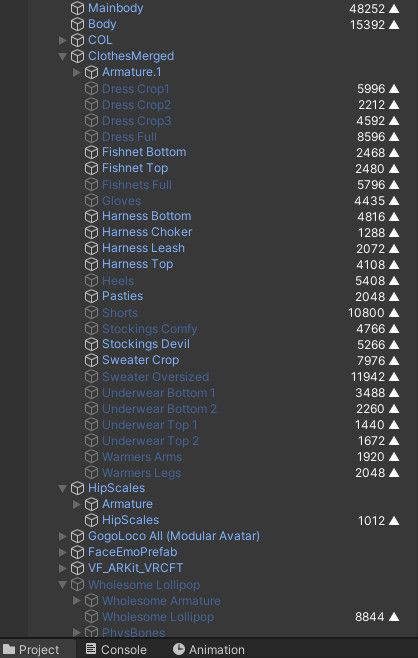
          For those who are curious, this is the poly count per object, written to the right side of the name. I'm using a simple script that shows that for me.
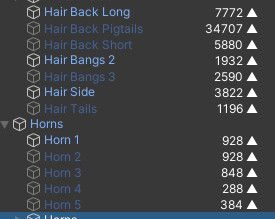
          ec5eb88f-b0ab-4d30-aea6-bd57f0d36f47-image.jpeg
          4001b9d4-036e-4997-ab91-5c03cdb60c80-image.jpeg

          J
          J
          ja_crispy46
          wrote on last edited by
          #139

          @Kleiner I would like to know where you got the poly count script

          KleinerK 1 Reply Last reply
          0
          • J ja_crispy46

            @Kleiner I would like to know where you got the poly count script

            KleinerK
            KleinerK
            Kleiner
            wrote on last edited by Kleiner
            #140

            @ja_crispy46 I found it in a unity forum like here, it is a bit different from what I'm using, but I can no longer find where I originally got mine. You can just download [register or login to view this hidden content]

            1 Reply Last reply
            2
            • MioawM Mioaw

              Please guys im so desperate 😭😭😭🙏🙏🙏

              DomokyodaiD
              DomokyodaiD
              Domokyodai
              wrote on last edited by
              #141

              also desperate for a quest version over here ;-;-;

              1 Reply Last reply
              0
              • wungangiW
                wungangiW
                wungangi
                wrote on last edited by
                #142

                tag me if someone posts a quest ver please

                1 Reply Last reply
                0
                • uwahYUMMYU uwahYUMMY

                  @lazybunni i got it quest but bones wont transfer over so idk whats wrong with that

                  GlommyG
                  GlommyG
                  Glommy
                  wrote on last edited by
                  #143

                  @uwahYUMMY you wont mind telling/showing how exactly were you able to convert to quest?

                  1 Reply Last reply
                  0
                  • GlommyG
                    GlommyG
                    Glommy
                    wrote on last edited by
                    #144

                    bump for Quest ver

                    1 Reply Last reply
                    0
                    • DomokyodaiD
                      DomokyodaiD
                      Domokyodai
                      wrote on last edited by
                      #145

                      quest bump

                      1 Reply Last reply
                      0
                      • DaCatD
                        DaCatD
                        DaCat
                        wrote on last edited by
                        #146

                        holy quest :3c

                        1 Reply Last reply
                        0
                        • KleinerK
                          KleinerK
                          Kleiner
                          wrote on last edited by
                          #147

                          Anyone find any clothing for the base that comes with blendshapes? Skeletib's and Sillytilly's clothing look nice, but they come with only an fbx and textures with no prefabs and no materials, and absolutely no blendshapes, out of the outfits I've managed to get so far.

                          1 Reply Last reply
                          0
                          • G
                            G
                            GokuFDende
                            wrote on last edited by
                            #148

                            so i made me a quest side it looks great but theres a problem bc of vixen the quest avi is pulling from the pc materials bc of fx animations which makes me have to remove every animation by vixen in the fx layer on quest and make new ones and thats something im still learning so idk ill be able to upload it bc in the scene it looks nice with toon standard but when i went to test it in play mode it turned all pink like it had all poi

                            GlommyG MioawM 2 Replies Last reply
                            0
                            • G GokuFDende

                              so i made me a quest side it looks great but theres a problem bc of vixen the quest avi is pulling from the pc materials bc of fx animations which makes me have to remove every animation by vixen in the fx layer on quest and make new ones and thats something im still learning so idk ill be able to upload it bc in the scene it looks nice with toon standard but when i went to test it in play mode it turned all pink like it had all poi

                              GlommyG
                              GlommyG
                              Glommy
                              wrote on last edited by
                              #149

                              @GokuFDende I believe you can do this! Just keep trying and see how it goes 🙂

                              1 Reply Last reply
                              0
                              • KleinerK Kleiner

                                Here are some example prefabs for those who need/curious about it. These are rather barebones without many options from the original avatar.
                                I don't have much motivation to do more work on it at the moment.
                                The 3 objects with scripts inside of the prefabs are somewhat transferable between avatars with minor adjustments needed to them.
                                D4rk's Optimizer on Avatar Descriptor
                                Mesh Cutter
                                Mask Texture Editor
                                Meshia's Mesh Simplification
                                VRCF Toggles
                                SFW Examples download

                                If you switch out the hair, it is possible to get it down to good rating. Physbone transforms are always the limiting factor on this avi.

                                wungangiW
                                wungangiW
                                wungangi
                                wrote on last edited by
                                #150

                                @Kleiner When i try to use your sfw examples thingy, the body is gone, i can only see the horns, scales head and tail

                                KleinerK 1 Reply Last reply
                                0
                                • wungangiW wungangi

                                  @Kleiner When i try to use your sfw examples thingy, the body is gone, i can only see the horns, scales head and tail

                                  KleinerK
                                  KleinerK
                                  Kleiner
                                  wrote on last edited by Kleiner
                                  #151

                                  @neithh Weird. Does that include clothing? Do you have ModularAvatar imported? Either way, it's supposed to be an example, not really usable because all the toggles and fx layers were removed so it leaves only a very basic medium rated avi. It's only sort of an example on the kind of tools that can be used to optimize avatars. Unfortunately anything related to toggles on this avatar is pure trash and requires remaking entirely.
                                  Though, I'm halfway sure it's a Modular Avatar issue. Even the mask I created has an issue near the crotch area because I cut off more than needed.

                                  Edit: I believe the issue is caused by a leftover NDMF script inside avatar descriptor

                                  wungangiW 1 Reply Last reply
                                  0
                                  • GlommyG
                                    GlommyG
                                    Glommy
                                    wrote on last edited by
                                    #152

                                    Bump for Quest

                                    1 Reply Last reply
                                    0
                                    • KleinerK Kleiner

                                      @neithh Weird. Does that include clothing? Do you have ModularAvatar imported? Either way, it's supposed to be an example, not really usable because all the toggles and fx layers were removed so it leaves only a very basic medium rated avi. It's only sort of an example on the kind of tools that can be used to optimize avatars. Unfortunately anything related to toggles on this avatar is pure trash and requires remaking entirely.
                                      Though, I'm halfway sure it's a Modular Avatar issue. Even the mask I created has an issue near the crotch area because I cut off more than needed.

                                      Edit: I believe the issue is caused by a leftover NDMF script inside avatar descriptor

                                      wungangiW
                                      wungangiW
                                      wungangi
                                      wrote on last edited by wungangi
                                      #153

                                      @Kleiner Honestly i just grabbed the tools you mentioned in an earlier post and used them to try and optimize it myself, first time optimizing an avatar and with toggable socks, 1 shirt and the shorts, a few hue sliders and gogoloco managed to get her down to medium which is already good enough for me, theres some clipping but thats normal since the meshes are cut down a lot which doest rly bother me (edit: I also got rid off all the playable layers and just used vrcfury for all the toggles i added, surprised how easy it was to do, usable to just chill with friends without eating 20fps off of their pcs)

                                      KleinerK 2 Replies Last reply
                                      1
                                      • wungangiW wungangi

                                        @Kleiner Honestly i just grabbed the tools you mentioned in an earlier post and used them to try and optimize it myself, first time optimizing an avatar and with toggable socks, 1 shirt and the shorts, a few hue sliders and gogoloco managed to get her down to medium which is already good enough for me, theres some clipping but thats normal since the meshes are cut down a lot which doest rly bother me (edit: I also got rid off all the playable layers and just used vrcfury for all the toggles i added, surprised how easy it was to do, usable to just chill with friends without eating 20fps off of their pcs)

                                        KleinerK
                                        KleinerK
                                        Kleiner
                                        wrote on last edited by
                                        #154

                                        @neithh Yeah, my example was intended just to introduce the people to the tools, glad to see you're having good luck with them.

                                        1 Reply Last reply
                                        ♥
                                        0
                                        • wungangiW wungangi

                                          @Kleiner Honestly i just grabbed the tools you mentioned in an earlier post and used them to try and optimize it myself, first time optimizing an avatar and with toggable socks, 1 shirt and the shorts, a few hue sliders and gogoloco managed to get her down to medium which is already good enough for me, theres some clipping but thats normal since the meshes are cut down a lot which doest rly bother me (edit: I also got rid off all the playable layers and just used vrcfury for all the toggles i added, surprised how easy it was to do, usable to just chill with friends without eating 20fps off of their pcs)

                                          KleinerK
                                          KleinerK
                                          Kleiner
                                          wrote on last edited by Kleiner
                                          #155

                                          @neithh If needed, you can check for additional clothing in this thread. Most clothing I found comes without any blendshapes, and selection is limited because this avatar uses the E-girl Base body.
                                          I've vibecoded myself a tool to add blendshapes to e-girl base clothing via blender. If needed, I can do so and share the clothing here. Does not work with other base's clothing unless you do a bodyswap on your avi. Obviously, there might be clipping issues as well. I'm a blender beginner so fixing those is out of my range of skills.


                                          KleinerK 1 Reply Last reply
                                          0

                                          Hello! It looks like you're interested in this conversation, but you don't have an account yet.

                                          Getting fed up of having to scroll through the same posts each visit? When you register for an account, you'll always come back to exactly where you were before, and choose to be notified of new replies (either via email, or push notification). You'll also be able to save bookmarks and upvote posts to show your appreciation to other community members.

                                          With your input, this post could be even better 💗

                                          Register Login
                                          Reply
                                          • Reply as topic
                                          Log in to reply
                                          • Oldest to Newest
                                          • Newest to Oldest
                                          • Most Votes


                                          • Login

                                          • Login or register to search.
                                          • First post
                                            Last post
                                          0
                                          • Categories
                                          • Recent
                                          • Tags
                                          • Popular