Skip to content
  • Categories
  • Recent
  • Tags
  • Popular
Skins
  • Light
  • Brite
  • Cerulean
  • Cosmo
  • Flatly
  • Journal
  • Litera
  • Lumen
  • Lux
  • Materia
  • Minty
  • Morph
  • Pulse
  • Sandstone
  • Simplex
  • Sketchy
  • Spacelab
  • United
  • Yeti
  • Zephyr
  • Dark
  • Cyborg
  • Darkly
  • Quartz
  • Slate
  • Solar
  • Superhero
  • Vapor

  • Default (Zephyr)
  • No Skin
Collapse
RipperStore Logo
  1. Home
  2. Guides
  3. Tutorials
  4. DCT- Angel eyes fix, help?

DCT- Angel eyes fix, help?

Scheduled Pinned Locked Moved Tutorials
cryptia curvesdcthelpunity
6 Posts 3 Posters 435 Views 1 Watching
  • Oldest to Newest
  • Newest to Oldest
  • Most Votes
Reply
  • Reply as topic
Log in to reply
This topic has been deleted. Only users with topic management privileges can see it.
  • bennywormB
    bennywormB
    bennyworm
    wrote on last edited by
    #1

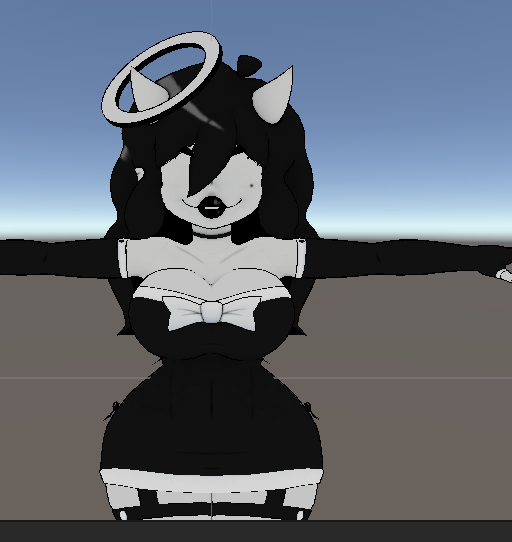
    In a nutshell, I’m working with Angel from Cryptiacurves DCT bundle and I can’t find a answer to fix her eyes for quest, someone said to move her eyes up in the hierarchy, but she has four eye bones and I have no clue where to put them.

    Then I tried to make her particular eye’s mat a additive or a multiply, which is the quest compatible transparent shaders but that didn’t do it either

    Then I tried to do the front, back and off culling(I think that’s what that’s called) for Toon Standard and that didn’t do it either and now I’m kinda stuck 😭

    How do get her eyes to show? Thanks

    746d723e-2ff3-407d-9a38-4097c1853c31-image.png

    <3

    1 Reply Last reply
    0
    • bennywormB
      bennywormB
      bennyworm
      wrote on last edited by
      #2

      Bloop

      <3

      1 Reply Last reply
      0
      • FemboyHunterF
        FemboyHunterF
        FemboyHunter
        wrote on last edited by
        #3

        just push the eyes out the face

        bennywormB 1 Reply Last reply
        1
        • SadakoS
          SadakoS
          Sadako
          wrote on last edited by
          #4

          use the vrc outline shader the version without the outline set the back face calling to off it'll most likely fix it

          1 Reply Last reply
          0
          • FemboyHunterF FemboyHunter

            just push the eyes out the face

            bennywormB
            bennywormB
            bennyworm
            wrote on last edited by
            #5

            @FemboyHunter this ended up fixing it!

            <3

            FemboyHunterF 1 Reply Last reply
            0
            • bennywormB bennyworm

              @FemboyHunter this ended up fixing it!

              FemboyHunterF
              FemboyHunterF
              FemboyHunter
              wrote on last edited by
              #6

              @bennyworm np 👍

              1 Reply Last reply
              0

              Hello! It looks like you're interested in this conversation, but you don't have an account yet.

              Getting fed up of having to scroll through the same posts each visit? When you register for an account, you'll always come back to exactly where you were before, and choose to be notified of new replies (either via email, or push notification). You'll also be able to save bookmarks and upvote posts to show your appreciation to other community members.

              With your input, this post could be even better 💗

              Register Login
              Reply
              • Reply as topic
              Log in to reply
              • Oldest to Newest
              • Newest to Oldest
              • Most Votes


              • Login

              • Login or register to search.
              • First post
                Last post
              0
              • Categories
              • Recent
              • Tags
              • Popular