
GIFT: VRCEmoteManager 💃 Addon 💃
-
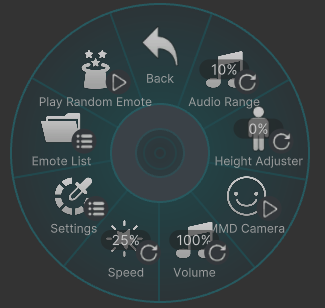
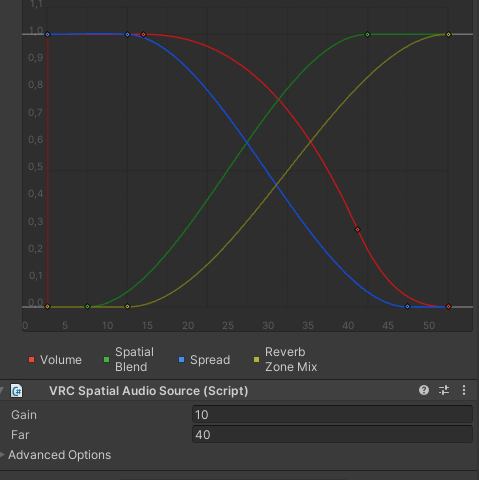
- Audio Range Adjuster – allows you to change the audible range of sounds. The maximum range is 50 meters. When adjusted, the distance at which the sound can be heard is visually indicated. Can be used as a headphone mode if the range is set to 0.
- Height Adjuster – allows you to change the avatar's height relative to the feet during animations.
- MMD Camera – Now you can come to any world you like and dance MMD there with camera support just like in MMD worlds!
The audio source are automatically synchronized with the avatar's view position.
Requirements: VRCFury, Modular Avatar, VRC Emote Manager v2.1.4+
Addon non-destructive, you can revert all by click unpatch and delete prefab after.
For animations and camera to work correctly, Write Defaults must be ON.VRCEmoteManager Addon 2.1.5.20
VRCEmoteManager v2.1.5 (Thanks @dehaven)
MMD Packs:
https://forum.ripper.store/topic/85754/gift-mmd-animation-packOriginal topic:
https://forum.ripper.store/topic/56550/gift-vrcemotemanager-v2.1.5Disclaimer: This add-on is not official and is supported by me.
ChangeLog:
Version 2.1.5.20 Changed logic of Height Adjuster Version 2.1.5.19 The parameter check has been removed, and the vrcfury compressor is functioning normally. AudioSource automatically integrates. Version 2.1.4.18 Fixed spatial sound bug, now the transition from 2D stereo to 3D mono works correctly. Version 2.1.4.17 Removed spatial blend, due to a VRC bug, sound becomes global for the world. Version 2.1.4.16 Initial stable release -
Incredible! I can't believe this is actually possible!!!
Thank you for generously sharing such an amazing tool!
Happy New Year!
Corrupted File After Extraction?💻 Virus Detected?👾
of easy fixes you can try right away. I hope you’ll give it a read!🛠Is Booth avatar's default body type a bit too slender for your taste?
Worry not! You can use Unity alone to transform her into a voluptuous, alluring Venus—plump and perfectly curved! 🥰I eagerly await the benevolent deity who will bless us with the latest version, including the profile picture costume!
I would be delighted if you could take a look at my Profile & Topic List💖 -
Incredible! I can't believe this is actually possible!!!
Thank you for generously sharing such an amazing tool!
Happy New Year!Happy New Year!
I am preparing an update that will add the ability to change the height of the avatar during animation playback (same as goloco but not interrupt animation)
-
Added new cool stuff:
- Height Adjuster, during animation, you can change the height relative to the feet. (People involved in enterprise resource planning will appreciate)
- POV camera (very alpha).
- The camera position and audio source are automatically synchronized with the avatar's view position.
-
-
Updated
If you have used the addon before, delete the old folder with Addon before import
- Added MMD Camera, POV camera removed.
- Added animation merger (camera + motions).
Now you can come to any world you like and dance MMD there with camera support just like in MMD worlds!
MMD Packs here: https://forum.ripper.store/topic/85754/gift-mmd-animation-pack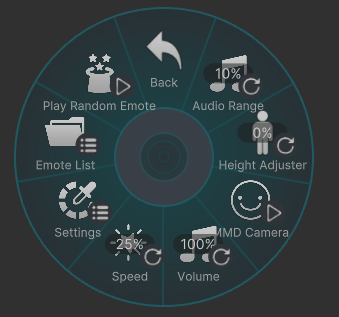
-
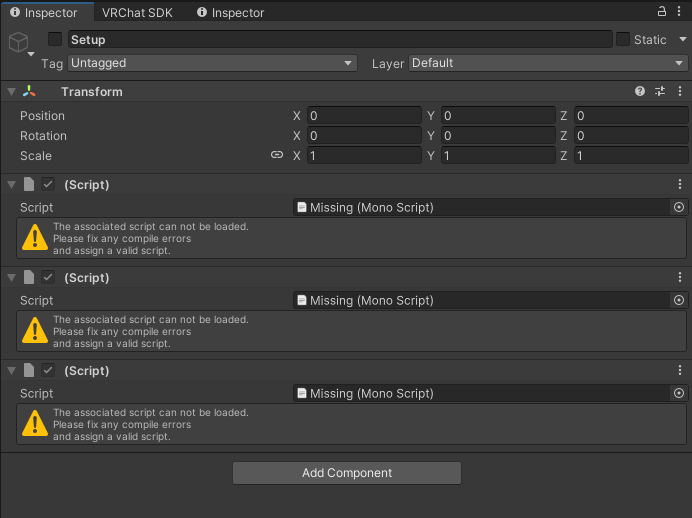
i'm having a issue with getting the addon to work , I'm not sure if I'm missing something extra, I have to download somewhere or maybe I don't have something turned on/enabled but when I import the files into a project it's telling me (prefab has missing scripts. open prefab to fix the issue.) but when I open it to see, all the scripts in the setup area it says (the associated script cannot be loaded. please fix any compile errors and assign a valid script). If I ignore everything and still try to follow the read me and images main stuff is completely missing that is being shown in the readme's images sadly
-
i'm having a issue with getting the addon to work , I'm not sure if I'm missing something extra, I have to download somewhere or maybe I don't have something turned on/enabled but when I import the files into a project it's telling me (prefab has missing scripts. open prefab to fix the issue.) but when I open it to see, all the scripts in the setup area it says (the associated script cannot be loaded. please fix any compile errors and assign a valid script). If I ignore everything and still try to follow the read me and images main stuff is completely missing that is being shown in the readme's images sadly
@octavia110
Hello, you need to install VRCfury, Modular Avatar, and VRC Emote Manager, as this addon does not provide VRC Emote Manager on its own -
Hi! I’m having an issue with the VRCEmoteManager Addon during avatar build.
When I try to build, the following errors appear:
- "HeightAdjusterTarget not found inside addon!"
- "failed to create HeightAdjuster VRCParentConstraint. Build cancelled."
- "The VRCSDK build was aborted because the VRCSDKPreprocessAvatarCallback 'VRCEmoteManagerAddonBuildHook' reported a failure."
It seems like the addon is expecting a "HeightAdjusterTarget" object, but it does not exist in my avatar, and I also cannot find any "Height Adjuster" component in Add Component.
Is the Height Adjuster supposed to be created automatically by the addon, or am I missing a required object in the hierarchy?
Any guidance would be greatly appreciated!
-
Hi! I’m having an issue with the VRCEmoteManager Addon during avatar build.
When I try to build, the following errors appear:
- "HeightAdjusterTarget not found inside addon!"
- "failed to create HeightAdjuster VRCParentConstraint. Build cancelled."
- "The VRCSDK build was aborted because the VRCSDKPreprocessAvatarCallback 'VRCEmoteManagerAddonBuildHook' reported a failure."
It seems like the addon is expecting a "HeightAdjusterTarget" object, but it does not exist in my avatar, and I also cannot find any "Height Adjuster" component in Add Component.
Is the Height Adjuster supposed to be created automatically by the addon, or am I missing a required object in the hierarchy?
Any guidance would be greatly appreciated!
-
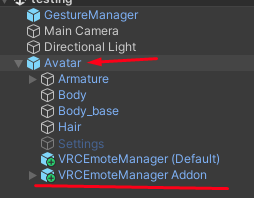
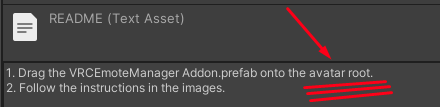
You placed the prefab not in the root of the avatar, or if you have multiple avatars on scene idk, most likely it won't work and everything will break.
Check Assets/Kittenji/VRCEmoteManager/Addon/README
-
Update
Fixed spatial sound bug, now the transition from 2D stereo to 3D mono works correctly.
This means that if your audio file has stereo sound, you will hear it within a certain radius, and if you move further away, the sound will be pointed from the sound source. If the audio file was recorded without using stereo and is fake stereo, you will not notice the difference between mono sound. -
I'm not aware if this can help within the patcher, or if anyone wants to edit the script themselves.
Forewarning, while I have taken some coding in college, I'm by no means an "expert". Please allow the more experienced to review and correct.IF you are receiving an error with the Emote Manager, in the logs stating not enough parameters, there is an easy fix, and doesn't appear to break anything. Why this doesn't "compress" with VRCFury is beyond my scope of knowledge.
Within the (Default) Kittenji/VRCEmoteManager/Runtime is a file called "VRCEmoteManager.cs" with a Person Dancing icon. Note: There is a second file like this, which is actually .cs.bak, which looks like a paper icon. We do NOT want this file.
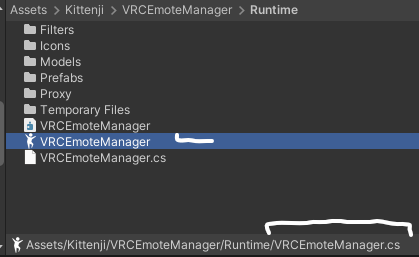
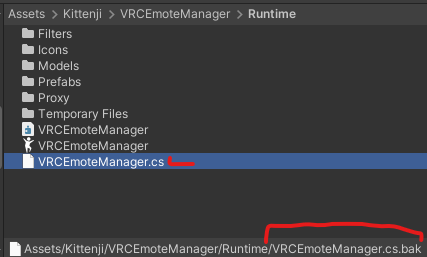
Double click this VRCEmoteManager.cs file with a person dancing icon. Your PC should ask what program to open the text file. Unless you know of a better app for editing text, especially with code editing, Note Pad will do just fine. In my case, I'm using Notepad++.
If you can find the Line Number, generally to the left of the code editor or a number stating the Line Number where the blinking cursor is, scroll down to line 368 (I know, one number off of a Nice number of all things). If you can't find the Line Number, do a Word search (Ctrl+F) for "Out of space for parameters", this is Line Number 371.
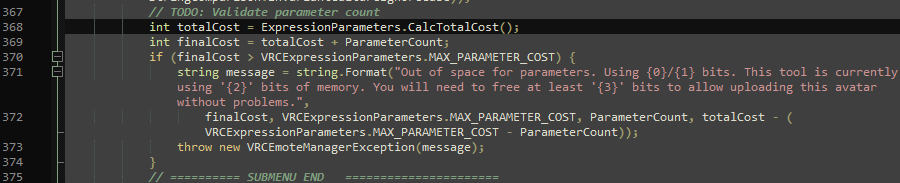
Add a double slash, "//", to the start of each line like so. From line 368 to 374.
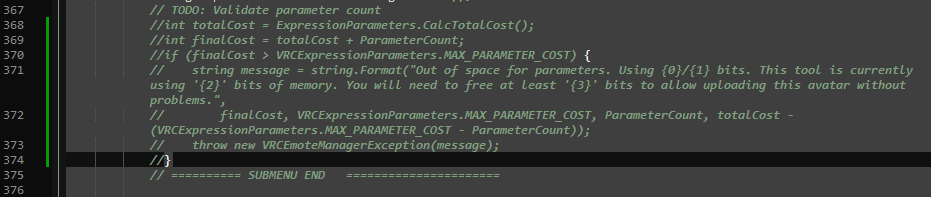
Save. Retry uploading.
Note: Best to change this AFTER Patching with the Addon.
-
-
Also, if you have Emote Manager in a project, but the Prefab (Default or Syn Template) not on the root of an avatar, Emote Manager stops the upload. I'm not sure why. Adding it but blank appears to work.
@striker10
This check is there not because the author wanted to prevent you from uploading an avatar, but because if the parameters are out of space, something in the avatar will most likely break, possibly the toggles, idk need to check -
@striker10
This check is there not because the author wanted to prevent you from uploading an avatar, but because if the parameters are out of space, something in the avatar will most likely break, possibly the toggles, idk need to check -
If you use VRCFury, this shouldn't be an issue, with its Parameter Compressor. I've got a ton of parameters on my lewd avatar, lol.
@Striker10 If you have an avi with overflowing parameters, add vrc emote manager with your patch and run the avi, then go to the temp vrcemotemanager folder and there you will find a file with vrc parameters. You need to make sure that vrcfury has really compressed it, because, as far as I know, during the assembly of the avatar, vrcemotemanager works after vrcfury/ma have done their job. I really haven't looked at proxy classes, maybe there's a hook there.
-
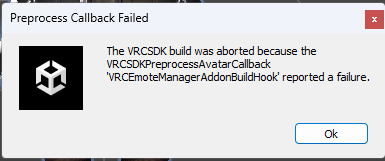
Does anyone know why I get this error when I patch it?
-
Does anyone know why I get this error when I patch it?
-
Does anyone know why I get this error when I patch it?
@GrumpyTanner
Maybe you're the same as me. Check out #10.




Hello! It looks like you're interested in this conversation, but you don't have an account yet.
Getting fed up of having to scroll through the same posts each visit? When you register for an account, you'll always come back to exactly where you were before, and choose to be notified of new replies (either via email, or push notification). You'll also be able to save bookmarks and upvote posts to show your appreciation to other community members.
With your input, this post could be even better 💗
Register Login