
I cant figure out how to edit the color of the text for this asset. Something inside animator/controller?
-
The original asset can be found here
https://solutioms.gumroad.com/l/Solver
The download came from another thread on this site, which can be found here
I have been trying to change the color of the text inside the [null] bubble but have not been able to figure out how it works.
The asset comes with 3 built in color options, and upon trying to just manually change the color in the material, it will stay as the color that the asset originally came with:

However it shows up with the color I want in unity:
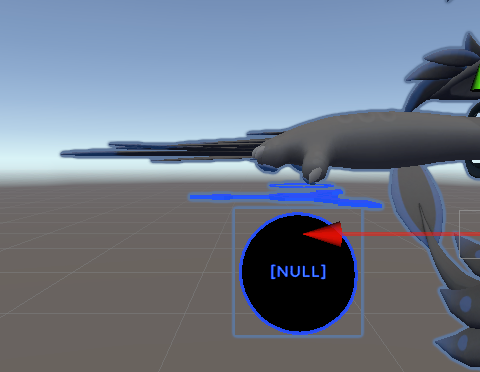
Can someone with more unity knowledge please help me figure this out? Thank you! -
-
That might be an Animation issue dear.
When changing the color of your null, it might have automatically gave you yellow because it was SET to yellow in the animation.
@lordgreed Thats what i've figured, but I can't figure out for the life of me how to change that value in the animation.
-
@lordgreed Thats what i've figured, but I can't figure out for the life of me how to change that value in the animation.
@Banana_rain duplicate the material and change it in the animation? Duplicate it so animation thinks it's a different material and actually updates the value.
If you can't edit the animation, drag it over to an empty object and open the animation tab with object selected.
Obviously make a backup of the animation clip before doing so. And use Gesture Manager to save time on testing.
Edit: Forgot to mention this is a roundabout way of doing it. There are more efficient ways of doing it. -
I have figured it out. It was located inside of animation labeled "SolverColorControl.anim" and each particle system in the animator actually had RGB values that I could adjust, except they were on a scale of 0-1 instead of 0-255.

-
I have figured it out. It was located inside of animation labeled "SolverColorControl.anim" and each particle system in the animator actually had RGB values that I could adjust, except they were on a scale of 0-1 instead of 0-255.
@Banana_rain yeah, that might be your solution. but you can also just play it beside the ACTUAL wheel of colors and record it from there. i wish i could tell you more, however i do not have the assets to play with it
-
@Banana_rain yeah, that might be your solution. but you can also just play it beside the ACTUAL wheel of colors and record it from there. i wish i could tell you more, however i do not have the assets to play with it
@lordgreed The solution that I described worked for my purposes, but if you would still like to see the assets I linked them in my initial post.

Hello! It looks like you're interested in this conversation, but you don't have an account yet.
Getting fed up of having to scroll through the same posts each visit? When you register for an account, you'll always come back to exactly where you were before, and choose to be notified of new replies (either via email, or push notification). You'll also be able to save bookmarks and upvote posts to show your appreciation to other community members.
With your input, this post could be even better 💗
Register Login