Skip to content
  • Categories
  • Recent
  • Tags
  • Popular
Skins
  • Light
  • Brite
  • Cerulean
  • Cosmo
  • Flatly
  • Journal
  • Litera
  • Lumen
  • Lux
  • Materia
  • Minty
  • Morph
  • Pulse
  • Sandstone
  • Simplex
  • Sketchy
  • Spacelab
  • United
  • Yeti
  • Zephyr
  • Dark
  • Cyborg
  • Darkly
  • Quartz
  • Slate
  • Solar
  • Superhero
  • Vapor

  • Default (Zephyr)
  • No Skin
Collapse
RipperStore Logo
  1. Home
  2. Assets
  3. Looking for...
  4. Uncategorized
  5. Most Recent Rindo Package

Most Recent Rindo Package

Scheduled Pinned Locked Moved Uncategorized
17 Posts 12 Posters 9.5k Views 2 Watching
  • Oldest to Newest
  • Newest to Oldest
  • Most Votes
Reply
  • Reply as topic
Log in to reply
This topic has been deleted. Only users with topic management privileges can see it.
  • T
    T
    TalesofArks
    wrote on last edited by
    #3

    Did anyone can reupload it? The link was down.

    1 Reply Last reply
    0
    • T
      T
      tentacleknight
      wrote on last edited by
      #4

      Dangit... I am late for the party..

      1 Reply Last reply
      0
      • S
        S
        Sharksays
        wrote on last edited by
        #5

        damn same

        1 Reply Last reply
        0
        • OwOWhoDisO
          OwOWhoDisO
          OwOWhoDis
          wrote on last edited by
          #6

          Rindo 1.05 reupload: [register or login to view this hidden content]

          My Looking For List ---> https://drive.google.com/drive/folders/1liOHXa8maHkZTjE_qfy7V_MzJ0SsIRRa
          Please let me know if you have something from the list, i have no problem trading multiple things for one.

          T T 2 Replies Last reply
          3
          • OwOWhoDisO OwOWhoDis

            Rindo 1.05 reupload: [register or login to view this hidden content]

            T
            T
            TalesofArks
            wrote on last edited by
            #7

            @OwOWhoDis HERO!!!!

            1 Reply Last reply
            0
            • OwOWhoDisO OwOWhoDis

              Rindo 1.05 reupload: [register or login to view this hidden content]

              T
              T
              tentacleknight
              wrote on last edited by
              #8

              @OwOWhoDis GOLD STAR

              1 Reply Last reply
              0
              • nugsN
                nugsN
                nugs
                wrote on last edited by
                #9

                The fingers didnt move in game with this verison, is anyone else having that issue? is there a way to fix that?

                1 Reply Last reply
                0
                • INF3RN0I
                  INF3RN0I
                  INF3RN0
                  wrote on last edited by INF3RN0
                  #10

                  @nugs Save, backup or have a spare with your file before trying these out.

                  EDIT: Looks like you can jump straight to Fix #3 as it helped most of the users here.

                  Fix #1 - remove RINDO_FX controller, before uploading into VRChat.
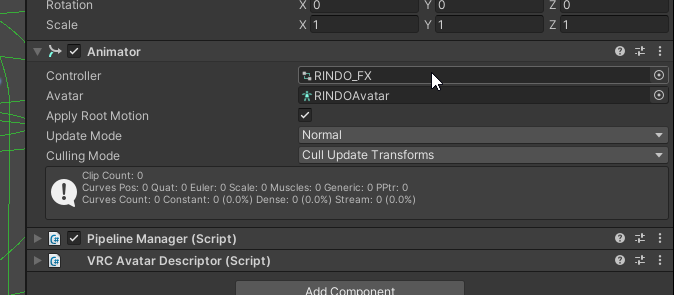
                  3e6d5f9f-a17c-4023-88b5-0ab5e17efec6-image.png

                  Fix #2 - Under Animator > AllParts > Cogwheel > Change Mask to "None"
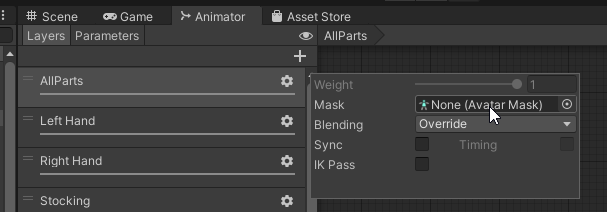
                  52f7f25a-6076-4ab6-93f6-b6d9f462dcca-image.png
                  Also in this, you can delete everything EXCEPT 'Any State', 'Entry & 'Exit". These were added when you added anims into the FX layers.
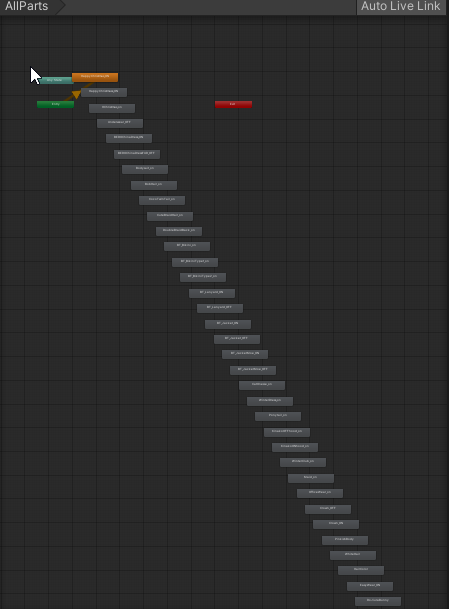
                  95dbf923-bda8-4988-9f46-76034a076d94-image.png

                  Fx #3 - Saw this fix when was having this problem too, but I didn't use it since #2 helped me. Might help you though

                  90ceec57-7527-46f6-a266-00c7ff8a0dc8-image.png
                  Basically check both your Left and Right Hand > Idle > Under Motion, change "proxy_hands_idle" to "None".

                  Big disclaimer: I'm am also new to Avatar creation and Unity. So, these are just my experiences.

                  Anything Rindo, I'll be there.

                  nugsN 1 Reply Last reply
                  3
                  • FinnF
                    FinnF
                    Finn
                    wrote on last edited by
                    #11

                    the Fx #3 also work for kikyo btw
                    don't know what is the "normal" way those anim should work but if you remove this anim all the hands works fine

                    1 Reply Last reply
                    0
                    • INF3RN0I INF3RN0

                      @nugs Save, backup or have a spare with your file before trying these out.

                      EDIT: Looks like you can jump straight to Fix #3 as it helped most of the users here.

                      Fix #1 - remove RINDO_FX controller, before uploading into VRChat.
                      3e6d5f9f-a17c-4023-88b5-0ab5e17efec6-image.png

                      Fix #2 - Under Animator > AllParts > Cogwheel > Change Mask to "None"
                      52f7f25a-6076-4ab6-93f6-b6d9f462dcca-image.png
                      Also in this, you can delete everything EXCEPT 'Any State', 'Entry & 'Exit". These were added when you added anims into the FX layers.
                      95dbf923-bda8-4988-9f46-76034a076d94-image.png

                      Fx #3 - Saw this fix when was having this problem too, but I didn't use it since #2 helped me. Might help you though
                      90ceec57-7527-46f6-a266-00c7ff8a0dc8-image.png
                      Basically check both your Left and Right Hand > Idle > Under Motion, change "proxy_hands_idle" to "None".

                      Big disclaimer: I'm am also new to Avatar creation and Unity. So, these are just my experiences.

                      nugsN
                      nugsN
                      nugs
                      wrote on last edited by
                      #12

                      @INF3RN0 TYSM ❤ the third one worked for me! ahh tysm

                      INF3RN0I 1 Reply Last reply
                      0
                      • nugsN nugs

                        @INF3RN0 TYSM ❤ the third one worked for me! ahh tysm

                        INF3RN0I
                        INF3RN0I
                        INF3RN0
                        wrote on last edited by
                        #13

                        @nugs Love to hear that it fixed your issue!

                        Anything Rindo, I'll be there.

                        1 Reply Last reply
                        0
                        • INF3RN0I INF3RN0 referenced this topic on
                        • S
                          S
                          sylvasea
                          wrote on last edited by
                          #14

                          bumping because it's a life-saver!

                          1 Reply Last reply
                          0
                          • INF3RN0I
                            INF3RN0I
                            INF3RN0
                            wrote on last edited by
                            #15

                            @sylvasea Glad to hear that ^^

                            Anything Rindo, I'll be there.

                            1 Reply Last reply
                            0
                            • System moved this topic from Looking for... on
                            • S
                              S
                              sandedsack
                              wrote on last edited by
                              #16

                              Would this fix shinanos hands closing the whole way when trying to close with grip slowly? Also when I use hand tracking I can't move my fingers unless my hands closed a certain amount

                              1 Reply Last reply
                              0
                              • HiirgaiH
                                HiirgaiH
                                Hiirgai
                                wrote last edited by
                                #17

                                dump

                                1 Reply Last reply
                                0

                                Hello! It looks like you're interested in this conversation, but you don't have an account yet.

                                Getting fed up of having to scroll through the same posts each visit? When you register for an account, you'll always come back to exactly where you were before, and choose to be notified of new replies (either via email, or push notification). You'll also be able to save bookmarks and upvote posts to show your appreciation to other community members.

                                With your input, this post could be even better 💗

                                Register Login
                                Reply
                                • Reply as topic
                                Log in to reply
                                • Oldest to Newest
                                • Newest to Oldest
                                • Most Votes


                                • Login

                                • Login or register to search.
                                • First post
                                  Last post
                                0
                                • Categories
                                • Recent
                                • Tags
                                • Popular