Skip to content
  • Categories
  • Recent
  • Tags
  • Popular
Skins
  • Light
  • Brite
  • Cerulean
  • Cosmo
  • Flatly
  • Journal
  • Litera
  • Lumen
  • Lux
  • Materia
  • Minty
  • Morph
  • Pulse
  • Sandstone
  • Simplex
  • Sketchy
  • Spacelab
  • United
  • Yeti
  • Zephyr
  • Dark
  • Cyborg
  • Darkly
  • Quartz
  • Slate
  • Solar
  • Superhero
  • Vapor

  • Default (Zephyr)
  • No Skin
Collapse
RipperStore Logo
  1. Home
  2. Guides
  3. Tutorials
  4. [Unity] Converting a Prefab to FBX using the FBX Exporter

[Unity] Converting a Prefab to FBX using the FBX Exporter

Scheduled Pinned Locked Moved Tutorials
15 Posts 11 Posters 9.5k Views 7 Watching
  • Oldest to Newest
  • Newest to Oldest
  • Most Votes
Reply
  • Reply as topic
Log in to reply
This topic has been deleted. Only users with topic management privileges can see it.
  • Purple23P
    Purple23P
    Purple23
    wrote on last edited by
    #6

    It wont allow me to export

    1 Reply Last reply
    0
    • wringusW
      wringusW
      wringus
      wrote on last edited by
      #7

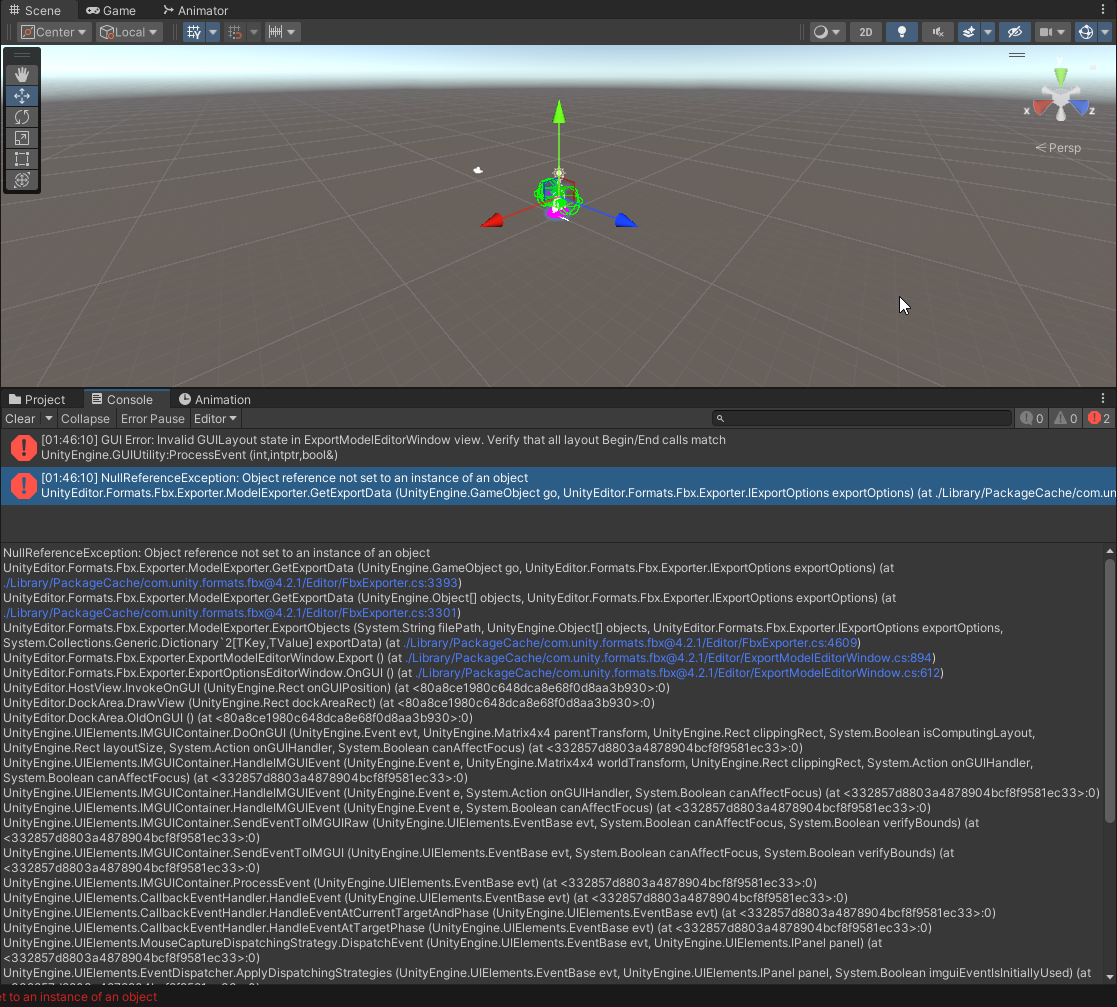
      This method worked once before, but now I'm getting the same error as @FluffPwups.

      image.png

      N 1 Reply Last reply
      0
      • wringusW wringus

        This method worked once before, but now I'm getting the same error as @FluffPwups.

        image.png

        N
        N
        nonohun
        wrote on last edited by
        #8

        @wringus have you figured out how to fix this?

        dyslexic and half asleep when on here ,small text is very hard to read for me

        1 Reply Last reply
        0
        • Daniel.DD
          Daniel.DD
          Daniel.D
          wrote on last edited by Daniel.D
          #9

          Guys, I figured about NullReferenceException error.. Unity will only export the meshes with “Skinned mesh renderer” on inspector..

          It won’t export the parts without it.
          Also idk why some of model parts are kinda messed up when importing into Blender..

          I’m absolute beginner in Unity but i found the solution anyway.. 😛

          “ᴍᴏᴅᴇʟ ᴄᴏʟʟᴇᴄᴛᴏʀ ᴇɴᴛʜᴜꜱɪᴀꜱᴛ / ꜱᴄᴇɴᴇ ᴄʀᴇᴀᴛᴏʀ”

          𝓐𝓵𝔀𝓪𝔂𝓼 𝓵𝓸𝓸𝓴𝓲𝓷𝓰 𝓯𝓸𝓻 𝓬𝓾𝓽𝓮 𝓪𝓷𝓭 𝓰𝓸𝓸𝓭 𝓮𝓭𝓲𝓽𝓮𝓭 𝓫𝓸𝓸𝓽𝓱 𝓪𝓿𝓪𝓽𝓪𝓻𝓼.

          Cerberus.2007C 1 Reply Last reply
          0
          • ElaE
            ElaE
            Ela
            wrote on last edited by
            #10

            Hi which exporter should I use? i dont think that one its still downloadable

            SpiritslostS 1 Reply Last reply
            0
            • ElaE Ela

              Hi which exporter should I use? i dont think that one its still downloadable

              SpiritslostS
              SpiritslostS
              Spiritslost
              wrote on last edited by Spiritslost
              #11

              @Ela Go to "Windows"-> "Package manager" -> top of package manger will say "Package: In Project" click on it -> select "Package: Unity Registry" -> Select "FBX Exporter"

              1 Reply Last reply
              0
              • Daniel.DD Daniel.D

                Guys, I figured about NullReferenceException error.. Unity will only export the meshes with “Skinned mesh renderer” on inspector..

                It won’t export the parts without it.
                Also idk why some of model parts are kinda messed up when importing into Blender..

                I’m absolute beginner in Unity but i found the solution anyway.. 😛

                Cerberus.2007C
                Cerberus.2007C
                Cerberus.2007
                wrote on last edited by
                #12

                @Daniel.D bebcfd37-e1c9-4e82-8b6e-1ec75e8d59ed-image.png

                im still getting this damned error and its getting on my nerves at this point

                Daniel.DD 1 Reply Last reply
                0
                • Cerberus.2007C Cerberus.2007

                  @Daniel.D bebcfd37-e1c9-4e82-8b6e-1ec75e8d59ed-image.png

                  im still getting this damned error and its getting on my nerves at this point

                  Daniel.DD
                  Daniel.DD
                  Daniel.D
                  wrote on last edited by
                  #13

                  @Kitku2007 Only select parts with "Skinned Mesh Renderer". Also, don't select the main part from the top.

                  “ᴍᴏᴅᴇʟ ᴄᴏʟʟᴇᴄᴛᴏʀ ᴇɴᴛʜᴜꜱɪᴀꜱᴛ / ꜱᴄᴇɴᴇ ᴄʀᴇᴀᴛᴏʀ”

                  𝓐𝓵𝔀𝓪𝔂𝓼 𝓵𝓸𝓸𝓴𝓲𝓷𝓰 𝓯𝓸𝓻 𝓬𝓾𝓽𝓮 𝓪𝓷𝓭 𝓰𝓸𝓸𝓭 𝓮𝓭𝓲𝓽𝓮𝓭 𝓫𝓸𝓸𝓽𝓱 𝓪𝓿𝓪𝓽𝓪𝓻𝓼.

                  Cerberus.2007C 1 Reply Last reply
                  0
                  • Daniel.DD Daniel.D

                    @Kitku2007 Only select parts with "Skinned Mesh Renderer". Also, don't select the main part from the top.

                    Cerberus.2007C
                    Cerberus.2007C
                    Cerberus.2007
                    wrote on last edited by
                    #14

                    @Daniel.D i know thats what i did and its still giving me the error

                    Daniel.DD 1 Reply Last reply
                    0
                    • Cerberus.2007C Cerberus.2007

                      @Daniel.D i know thats what i did and its still giving me the error

                      Daniel.DD
                      Daniel.DD
                      Daniel.D
                      wrote on last edited by
                      #15

                      @Kitku2007 Then I don’t know..
                      Maybe come to my Discord. I can help export it.

                      “thegoatdaniel_d” is my username.

                      “ᴍᴏᴅᴇʟ ᴄᴏʟʟᴇᴄᴛᴏʀ ᴇɴᴛʜᴜꜱɪᴀꜱᴛ / ꜱᴄᴇɴᴇ ᴄʀᴇᴀᴛᴏʀ”

                      𝓐𝓵𝔀𝓪𝔂𝓼 𝓵𝓸𝓸𝓴𝓲𝓷𝓰 𝓯𝓸𝓻 𝓬𝓾𝓽𝓮 𝓪𝓷𝓭 𝓰𝓸𝓸𝓭 𝓮𝓭𝓲𝓽𝓮𝓭 𝓫𝓸𝓸𝓽𝓱 𝓪𝓿𝓪𝓽𝓪𝓻𝓼.

                      1 Reply Last reply
                      0

                      Hello! It looks like you're interested in this conversation, but you don't have an account yet.

                      Getting fed up of having to scroll through the same posts each visit? When you register for an account, you'll always come back to exactly where you were before, and choose to be notified of new replies (either via email, or push notification). You'll also be able to save bookmarks and upvote posts to show your appreciation to other community members.

                      With your input, this post could be even better 💗

                      Register Login
                      Reply
                      • Reply as topic
                      Log in to reply
                      • Oldest to Newest
                      • Newest to Oldest
                      • Most Votes


                      • Login

                      • Login or register to search.
                      • First post
                        Last post
                      0
                      • Categories
                      • Recent
                      • Tags
                      • Popular