
How to animate bones without them breaking?
-
Hello!
This is probably a silly question, but whenever I try to animate bones in Unity they end up not looking correct. I believe this has something to do with the fact that they may be rotating relative to the world rather than their original states or something like that?
To be more specific I am currently trying to animate a small ear flick animation for my avatar and when I created the animation it looked perfectly fine, but after uploading the model and viewing it in VRChat the ears are sunken into the head, though they are still moving.
When viewing a tutuorial on Youtube about animating bones the person recording said something about having to have something selected so they rotated correctly but they didn't elaborate at all, and I am honestly super lost.
Does anyone know what I need to do to fix this?
I would really appreciate it if anyone could tell me what I'm doing wrong..
Thank you so much for your time
-
im not 100% for certain but a lot of people bake dummy bones/fake bones before the actual weighted item itself, though if you cannot do that i would say perhaps to look at the animation tab and make sure the position itself isn't being tampered with but only rotation. another thing is also to make sure the physbone settings have enabled "Is Animated" towards the bottom of it all.
its been a hot minute since i've actually tinkered into idle animations like that as much due to the newer ways of doing things is kinda confusing to me still :' )
eating a gamecube as we speak
-
im not 100% for certain but a lot of people bake dummy bones/fake bones before the actual weighted item itself, though if you cannot do that i would say perhaps to look at the animation tab and make sure the position itself isn't being tampered with but only rotation. another thing is also to make sure the physbone settings have enabled "Is Animated" towards the bottom of it all.
its been a hot minute since i've actually tinkered into idle animations like that as much due to the newer ways of doing things is kinda confusing to me still :' )
@lovemail
I appreciate you replying!
I'm not 100% sure how the first thing you said works, but yes I was only rotating the bones and I have 'Is Animated' checked. I was trying to look at videos and that's about all the information I saw from them. I honestly wish people would just make more in depth tutorials lol this stuff doesn't feel obvious[Unity/Blender Support]
If you need help with anything, please ask. -
@lovemail
I appreciate you replying!
I'm not 100% sure how the first thing you said works, but yes I was only rotating the bones and I have 'Is Animated' checked. I was trying to look at videos and that's about all the information I saw from them. I honestly wish people would just make more in depth tutorials lol this stuff doesn't feel obvious@bdawg
while in the animation tab they list the changes done and you can see a separated set of motions you've done for the bone where it will show something kind of like this

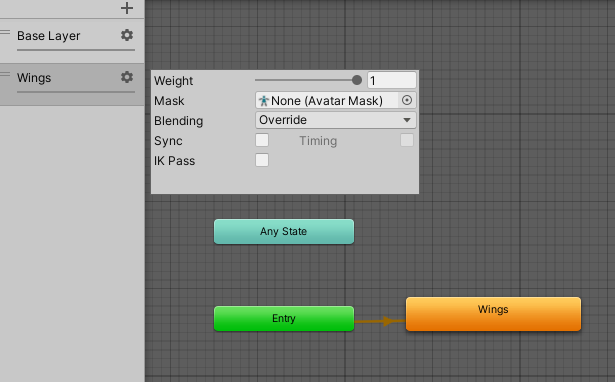
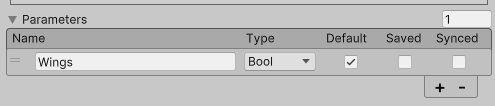
if theres a position change you could easily delete it without issues if you only meant a rotational animation to occur, though im not too sure if thats your issue anymore if the 'is animated' is toggled on, the only other thing id say is to make sure that the movement and stuff is going into the right section of the avatar parameters. with another model i made my wings on the fx layer as on only without any stopping ones as an bool in mine, you could try that
my set up looks like this for that one

eating a gamecube as we speak
-
@bdawg
while in the animation tab they list the changes done and you can see a separated set of motions you've done for the bone where it will show something kind of like this
if theres a position change you could easily delete it without issues if you only meant a rotational animation to occur, though im not too sure if thats your issue anymore if the 'is animated' is toggled on, the only other thing id say is to make sure that the movement and stuff is going into the right section of the avatar parameters. with another model i made my wings on the fx layer as on only without any stopping ones as an bool in mine, you could try thatmy set up looks like this for that one
I have a feeling that the issue may just unfortunately have something to do with the fact that I am trying to animate something with physbones and i honestly don't know how to rectify that. I'll try asking around to people in VRchat itself and see if anyone can give me any other reasons why it may not be working, but I appreciate you very much for taking the time to help me
-
I have a feeling that the issue may just unfortunately have something to do with the fact that I am trying to animate something with physbones and i honestly don't know how to rectify that. I'll try asking around to people in VRchat itself and see if anyone can give me any other reasons why it may not be working, but I appreciate you very much for taking the time to help me


Hello! It looks like you're interested in this conversation, but you don't have an account yet.
Getting fed up of having to scroll through the same posts each visit? When you register for an account, you'll always come back to exactly where you were before, and choose to be notified of new replies (either via email, or push notification). You'll also be able to save bookmarks and upvote posts to show your appreciation to other community members.
With your input, this post could be even better 💗
Register Login