Skip to content
  • Categories
  • Recent
  • Tags
  • Popular
Skins
  • Light
  • Brite
  • Cerulean
  • Cosmo
  • Flatly
  • Journal
  • Litera
  • Lumen
  • Lux
  • Materia
  • Minty
  • Morph
  • Pulse
  • Sandstone
  • Simplex
  • Sketchy
  • Spacelab
  • United
  • Yeti
  • Zephyr
  • Dark
  • Cyborg
  • Darkly
  • Quartz
  • Slate
  • Solar
  • Superhero
  • Vapor

  • Default (Zephyr)
  • No Skin
Collapse
RipperStore Logo
  1. Home
  2. Assets
  3. Gifts / Downloads
  4. GIFT: VRCEmoteManager 💃 Addon 💃

GIFT: VRCEmoteManager 💃 Addon 💃

Scheduled Pinned Locked Moved Gifts / Downloads
toolmusicmmdboothsystem
65 Posts 15 Posters 13.0k Views 43 Watching
  • Oldest to Newest
  • Newest to Oldest
  • Most Votes
Reply
  • Reply as topic
Log in to reply
This topic has been deleted. Only users with topic management privileges can see it.
  • S
    S
    Striker10
    wrote on last edited by
    #14

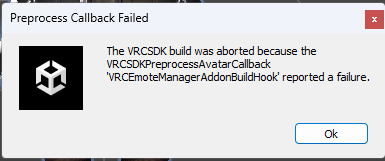
    Also, if you have Emote Manager in a project, but the Prefab (Default or Syn Template) not on the root of an avatar, Emote Manager stops the upload. I'm not sure why. Adding it but blank appears to work.

    kaizokuK B 2 Replies Last reply
    0
    • S Striker10

      Also, if you have Emote Manager in a project, but the Prefab (Default or Syn Template) not on the root of an avatar, Emote Manager stops the upload. I'm not sure why. Adding it but blank appears to work.

      kaizokuK
      kaizokuK
      kaizoku
      wrote on last edited by
      #15

      @striker10
      This check is there not because the author wanted to prevent you from uploading an avatar, but because if the parameters are out of space, something in the avatar will most likely break, possibly the toggles, idk need to check

      S 1 Reply Last reply
      0
      • kaizokuK kaizoku

        @striker10
        This check is there not because the author wanted to prevent you from uploading an avatar, but because if the parameters are out of space, something in the avatar will most likely break, possibly the toggles, idk need to check

        S
        S
        Striker10
        wrote on last edited by
        #16

        @kaizoku

        If you use VRCFury, this shouldn't be an issue, with its Parameter Compressor. I've got a ton of parameters on my lewd avatar, lol.

        kaizokuK 1 Reply Last reply
        0
        • S Striker10

          @kaizoku

          If you use VRCFury, this shouldn't be an issue, with its Parameter Compressor. I've got a ton of parameters on my lewd avatar, lol.

          kaizokuK
          kaizokuK
          kaizoku
          wrote on last edited by
          #17

          @Striker10 If you have an avi with overflowing parameters, add vrc emote manager with your patch and run the avi, then go to the temp vrcemotemanager folder and there you will find a file with vrc parameters. You need to make sure that vrcfury has really compressed it, because, as far as I know, during the assembly of the avatar, vrcemotemanager works after vrcfury/ma have done their job. I really haven't looked at proxy classes, maybe there's a hook there.

          1 Reply Last reply
          0
          • GrumpyTannerG
            GrumpyTannerG
            GrumpyTanner
            wrote on last edited by
            #18

            image.png

            Does anyone know why I get this error when I patch it?

            kaizokuK S 2 Replies Last reply
            0
            • GrumpyTannerG GrumpyTanner

              image.png

              Does anyone know why I get this error when I patch it?

              kaizokuK
              kaizokuK
              kaizoku
              wrote on last edited by
              #19

              @GrumpyTanner hi, can you copy and paste console log

              GrumpyTannerG 1 Reply Last reply
              0
              • GrumpyTannerG GrumpyTanner

                image.png

                Does anyone know why I get this error when I patch it?

                S
                S
                striker
                wrote on last edited by
                #20

                @GrumpyTanner
                Maybe you're the same as me. Check out #10.

                1 Reply Last reply
                1
                • kaizokuK kaizoku

                  @GrumpyTanner hi, can you copy and paste console log

                  GrumpyTannerG
                  GrumpyTannerG
                  GrumpyTanner
                  wrote on last edited by
                  #21

                  @kaizoku it is the same as the other poster, with the height issue. But it doesn't fix even when I follow the pictures. And for some reason, the emote thing messes up my menu and I can only see it in the menu and nothing else. I don't know what I did wrong.

                  kaizokuK 1 Reply Last reply
                  0
                  • GrumpyTannerG GrumpyTanner

                    @kaizoku it is the same as the other poster, with the height issue. But it doesn't fix even when I follow the pictures. And for some reason, the emote thing messes up my menu and I can only see it in the menu and nothing else. I don't know what I did wrong.

                    kaizokuK
                    kaizokuK
                    kaizoku
                    wrote on last edited by
                    #22

                    @GrumpyTanner As I wrote earlier, copy the console log, it details the cause of the error.

                    GrumpyTannerG 1 Reply Last reply
                    0
                    • kaizokuK kaizoku

                      @GrumpyTanner As I wrote earlier, copy the console log, it details the cause of the error.

                      GrumpyTannerG
                      GrumpyTannerG
                      GrumpyTanner
                      wrote on last edited by
                      #23

                      @kaizoku 5192ec97-e662-468d-a32c-142d25f53b19-image.png

                      heres mine

                      kaizokuK 1 Reply Last reply
                      0
                      • GrumpyTannerG GrumpyTanner

                        @kaizoku 5192ec97-e662-468d-a32c-142d25f53b19-image.png

                        heres mine

                        kaizokuK
                        kaizokuK
                        kaizoku
                        wrote on last edited by
                        #24

                        @GrumpyTanner are you placed like this?

                        d70e6539-dd8e-43fd-8fc2-7ec80fef35f7-изображение.png

                        GrumpyTannerG 2 Replies Last reply
                        0
                        • kaizokuK kaizoku

                          @GrumpyTanner are you placed like this?

                          d70e6539-dd8e-43fd-8fc2-7ec80fef35f7-изображение.png

                          GrumpyTannerG
                          GrumpyTannerG
                          GrumpyTanner
                          wrote on last edited by
                          #25

                          @kaizoku yes. It's placed directly in my avatars prefab. I use Milltina.

                          1 Reply Last reply
                          0
                          • kaizokuK kaizoku

                            @GrumpyTanner are you placed like this?

                            d70e6539-dd8e-43fd-8fc2-7ec80fef35f7-изображение.png

                            GrumpyTannerG
                            GrumpyTannerG
                            GrumpyTanner
                            wrote on last edited by
                            #26
                            This post is deleted!
                            1 Reply Last reply
                            0
                            • kaizokuK
                              kaizokuK
                              kaizoku
                              wrote on last edited by kaizoku
                              #27

                              @GrumpyTanner I don't know, the probable reason is that some optimizer removes HeightAdjusterTarget during compilation, even though it shouldn't. Check out which scripts you added to the project. Or if you used the addon from earlier versions, then you need to delete the Addon folder and install the addon again.

                              Milltina works fine, tested.

                              1 Reply Last reply
                              0
                              • kaizokuK
                                kaizokuK
                                kaizoku
                                wrote on last edited by
                                #28

                                updated,

                                1. Unpatch.
                                2. Add unitypackages
                                3. Patch.
                                4. You are best!
                                1 Reply Last reply
                                😳
                                0
                                • GrumpyTannerG
                                  GrumpyTannerG
                                  GrumpyTanner
                                  wrote on last edited by
                                  #29

                                  I figured it out, im just dumb lol

                                  1 Reply Last reply
                                  0
                                  • 粉雪粉
                                    粉雪粉
                                    粉雪
                                    wrote on last edited by
                                    #30

                                    ₍₍⚞(˶˃ ꒳ ˂˶)⚟⁾⁾ Thank you so much, this selection is very nice!! ₍₍⚞(˶˃ ꒳ ˂˶)⚟⁾⁾
                                    I hope you get all the yummy food and sleep that you deserve!!

                                    1 Reply Last reply
                                    0
                                    • GrumpyTannerG
                                      GrumpyTannerG
                                      GrumpyTanner
                                      wrote on last edited by
                                      #31

                                      Does anyone know how to add the camera data to the emotes??

                                      1 Reply Last reply
                                      0
                                      • GrumpyTannerG
                                        GrumpyTannerG
                                        GrumpyTanner
                                        wrote on last edited by
                                        #32

                                        And how to get the audio to work, i feel dumb lol

                                        kaizokuK 1 Reply Last reply
                                        0
                                        • GrumpyTannerG GrumpyTanner

                                          And how to get the audio to work, i feel dumb lol

                                          kaizokuK
                                          kaizokuK
                                          kaizoku
                                          wrote on last edited by kaizoku
                                          #33

                                          @GrumpyTanner Open \Kittenji\VRCEmoteManager\Addon\README and read

                                          2nd For animations and camera to work correctly, Write Defaults must be ON.

                                          GrumpyTannerG 1 Reply Last reply
                                          0

                                          Hello! It looks like you're interested in this conversation, but you don't have an account yet.

                                          Getting fed up of having to scroll through the same posts each visit? When you register for an account, you'll always come back to exactly where you were before, and choose to be notified of new replies (either via email, or push notification). You'll also be able to save bookmarks and upvote posts to show your appreciation to other community members.

                                          With your input, this post could be even better 💗

                                          Register Login
                                          Reply
                                          • Reply as topic
                                          Log in to reply
                                          • Oldest to Newest
                                          • Newest to Oldest
                                          • Most Votes


                                          • Login

                                          • Login or register to search.
                                          • First post
                                            Last post
                                          0
                                          • Categories
                                          • Recent
                                          • Tags
                                          • Popular