
how to make a vrc port (BLEND/ANIMATION RIG)
-
hi! so i have plenty of models built for animation on blender, however some of them i want to port into vrc. how can i do this? i cant find any help/tutorials to do this and i need help doing this because i can make fully custom models from blender, but i cant apply the same methods here. i use cats to help rig and export, i rig and weight paint myself, but its always broken. how can i fix this?
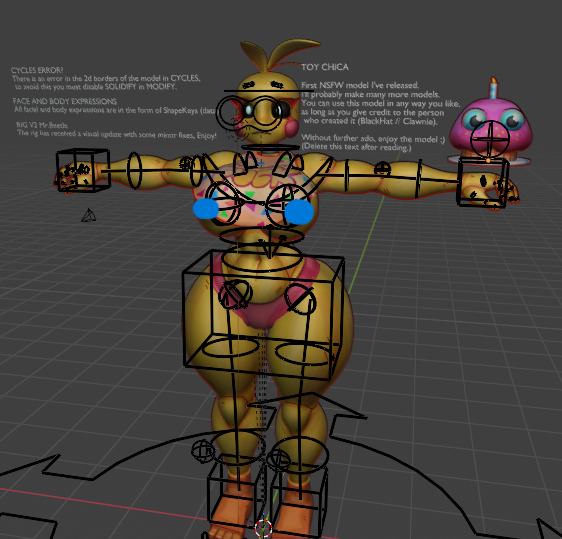
THIS IS THE RIG TO REFERENCE, IF YOU CAN HELP ME FIGURE THIS OUT IT WOULD BE GREATLY APPRECIATED!!
-
I can help with that. What exactly is your main problem?
If you just only want to know how, the process is rather simple.You export your model as an FBX in blender. Be sure to have COPY on otherwise it will remove your shape keys if any.
Then you get VRC Creator Companion (if you don't already have it).
Get the latest Unity version.
You can download other things for Unity if you wish like shaders, scripts, GoLoco, etc if you want to.
In the CC (Creator Companion) you make a new project, select "Avatar" (The latest one), give it any name you want.
Be sure to add VRC Package Resolver Tool, VRChat SDK - Base, VRChat SDK - Avatars, EasyQuestSwitch, Av3Emulator, VRCQuestTools, and Avatars 3.0 Manager.
I reccomend getting an addon for Unity called: "Hai ~ Blendshape Viewer"
Because its makes finding the shapekeys in Unity much easier.(Everything but Hai that I listed will be found automatically when using CC, so you won't need to download them)
Then after Unity opens up and does its thing (if it asks if you want to enter safe mode, just click "ignore"). You can drag and drop your FBX into Unity. Be sure you put the textures in it before hand otherwise you will have to go through each material and put on its textures again.
There is a whole Youtube video about setting your model up for Unity somewhere.
Video Link: https://www.youtube.com/watch?v=rZuAuNGwJu8
You can find a BUNCH out there. You don't have to follow them all exactly. Just the parts you want to know.
- I rig up models
- I add clothing/assets to premade models
- Learning how to make models
- Can make VRC ports
- I teach people via YT
[I do NOT do trades]
:Feel free to message me, just don't be demanding.:
-
I can help with that. What exactly is your main problem?
If you just only want to know how, the process is rather simple.You export your model as an FBX in blender. Be sure to have COPY on otherwise it will remove your shape keys if any.
Then you get VRC Creator Companion (if you don't already have it).
Get the latest Unity version.
You can download other things for Unity if you wish like shaders, scripts, GoLoco, etc if you want to.
In the CC (Creator Companion) you make a new project, select "Avatar" (The latest one), give it any name you want.
Be sure to add VRC Package Resolver Tool, VRChat SDK - Base, VRChat SDK - Avatars, EasyQuestSwitch, Av3Emulator, VRCQuestTools, and Avatars 3.0 Manager.
I reccomend getting an addon for Unity called: "Hai ~ Blendshape Viewer"
Because its makes finding the shapekeys in Unity much easier.(Everything but Hai that I listed will be found automatically when using CC, so you won't need to download them)
Then after Unity opens up and does its thing (if it asks if you want to enter safe mode, just click "ignore"). You can drag and drop your FBX into Unity. Be sure you put the textures in it before hand otherwise you will have to go through each material and put on its textures again.
There is a whole Youtube video about setting your model up for Unity somewhere.
Video Link: https://www.youtube.com/watch?v=rZuAuNGwJu8
You can find a BUNCH out there. You don't have to follow them all exactly. Just the parts you want to know.
@ALilRotten hii, sorry for the late reply!!
this is the type of rig im trying to remove/fix for vrchat, i have rigify, i know how to rig, i know how to weightpaint, and i know everything else i need to know. but i do not know how to work with these types of rigs/models, i cannot for the life of me find any advice/videos for these rigs/models and i've seen them be ported into vrc before

-
So, this is what I personally do. Open Blender like normal with the model inside, then just export it as an FBX (that way we can see the bones we're working with), be sure to select the path type as copy so your model will retain any weights or shape keys it has. Always make back ups.
Shove that FBX into a new Blender project. It SHOULD appear as bones now (the rig) and its gonna look VERY weird and very intense.What you want to find is the MAIN bones, Pelvis, Spine, Neck, Head, Eyes, Arms, Legs, etc and be SURE they are properly parented to one another, not just drifting without a parent or accidentally parented to the wrong bone.
The whole process is really hard to explain.
I just made a video to help explain better, but I doubt it will.
I hope it helps.
Link: https://www.youtube.com/watch?v=pD5ypf3iMVY


Hello! It looks like you're interested in this conversation, but you don't have an account yet.
Getting fed up of having to scroll through the same posts each visit? When you register for an account, you'll always come back to exactly where you were before, and choose to be notified of new replies (either via email, or push notification). You'll also be able to save bookmarks and upvote posts to show your appreciation to other community members.
With your input, this post could be even better 💗
Register Login