
Ear animation problem
-
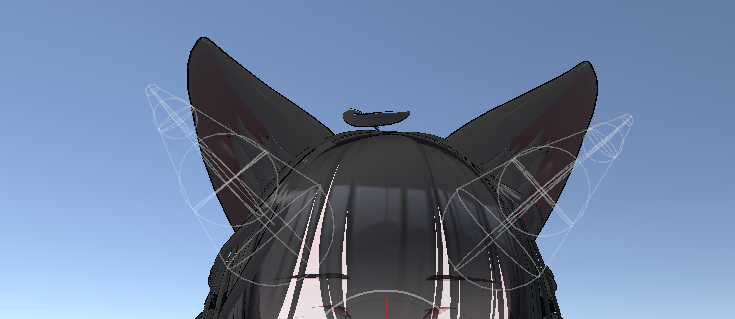
Heyy,im having trouble with ears. I got a new model and i wanted to modify it a lil bit(sio),so i changed the position of the ears and streched them so it looks like foxes. The 1st image is original ears, 2nd is my placement and 3rd is whats broken in play mode. I wanna mention the ears have a twitching animation. When i go into playmode they keep the shape but not the position for some reason

and when i turn off the animation in gesture manager they go back to the correct spot. But i do wanna keep the animation,how is the position tied to it and how can i change it?- original

- my position
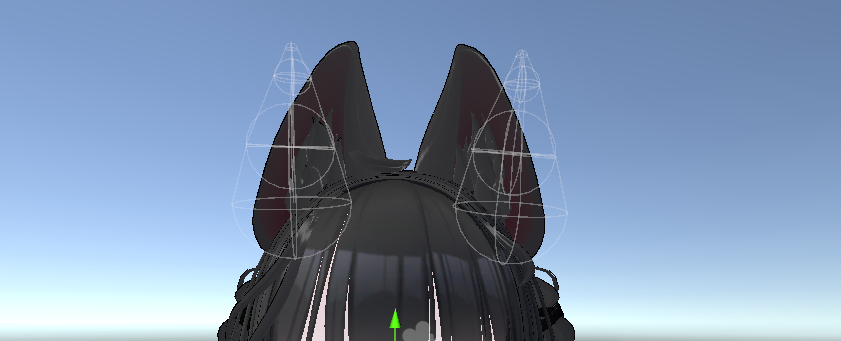
- broken :
i went and looked inside the anim itself and it has properties u can change,so i input the new position and rotation but the ears are still on the sides in playmode
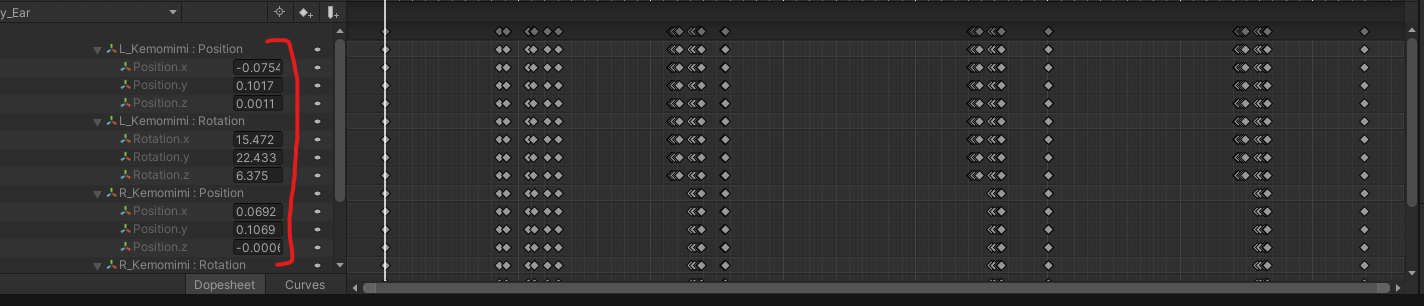
please helpp T_T
- original
-
-
Replace the size number with each animation key. You said you made it look like fox ears, yes?
The animation follows the original ears. All you have to do is either replace the size they have in the animation keys, or add it.
I will make my words easier...(Be sure to dupe the animation first though in case you mess up)
Animation doesn't have fox shape ears. Has normal ears.
Add animation key for the fox shape ears you have IN the animation.
You only need TWO animations typically to keep the shape. One at the start, one at the end.
It SHOULD work.
If not then just remake the animation with screenshots of every key that's needed with the fox ears you did.



Hello! It looks like you're interested in this conversation, but you don't have an account yet.
Getting fed up of having to scroll through the same posts each visit? When you register for an account, you'll always come back to exactly where you were before, and choose to be notified of new replies (either via email, or push notification). You'll also be able to save bookmarks and upvote posts to show your appreciation to other community members.
With your input, this post could be even better 💗
Register Login