Skip to content
  • Categories
  • Recent
  • Tags
  • Popular
Skins
  • Light
  • Brite
  • Cerulean
  • Cosmo
  • Flatly
  • Journal
  • Litera
  • Lumen
  • Lux
  • Materia
  • Minty
  • Morph
  • Pulse
  • Sandstone
  • Simplex
  • Sketchy
  • Spacelab
  • United
  • Yeti
  • Zephyr
  • Dark
  • Cyborg
  • Darkly
  • Quartz
  • Slate
  • Solar
  • Superhero
  • Vapor

  • Default (Zephyr)
  • No Skin
Collapse
RipperStore Logo
  1. Home
  2. Assets
  3. Gifts / Downloads
  4. 【シャロ専用】キラキラアイテクスチャ (Chalo sparkling eye texture)

【シャロ専用】キラキラアイテクスチャ (Chalo sparkling eye texture)

Scheduled Pinned Locked Moved Gifts / Downloads
chalofurryfurry texturebootheye texturegift-booth
6 Posts 3 Posters 2.6k Views 3 Watching
  • Oldest to Newest
  • Newest to Oldest
  • Most Votes
Reply
  • Reply as topic
Log in to reply
This topic has been deleted. Only users with topic management privileges can see it.
  • blayzahB
    blayzahB
    blayzah
    wrote on last edited by
    #1

    https://booth.pm/en/items/6075449

    [register or login to view this hidden content]

    enjoyyy~ :3

    sometimes i buy stuff !! every upvote is so appreciated ^^

    1 Reply Last reply
    👍 🦐
    4
    • O
      O
      oregayno
      wrote on last edited by
      #2

      How do you add these to your chalo i am so confused

      blayzahB 1 Reply Last reply
      0
      • OneShotaVRCO
        OneShotaVRCO
        OneShotaVRC
        wrote on last edited by
        #3

        Thanks so much!!💖

        Corrupted File After Extraction?💻 Virus Detected?👾
        of easy fixes you can try right away. I hope you’ll give it a read!🛠

        Is Booth avatar's default body type a bit too slender for your taste?
        Worry not! You can use Unity alone to transform her into a voluptuous, alluring Venus—plump and perfectly curved! 🥰

        I eagerly await the benevolent deity who will bless us with the latest version, including the profile picture costume!
        I would be delighted if you could take a look at my Profile & Topic List💖

        1 Reply Last reply
        0
        • O oregayno

          How do you add these to your chalo i am so confused

          blayzahB
          blayzahB
          blayzah
          wrote on last edited by
          #4

          @oregayno

          if you dont already have a photo editing software (photoshop, gimp, paint. net) i suggest you get paint. net due to how easy it is to learn and simple it is to use :3

          if you cant install a photo editing software, you can use an online one. its a different process though, so if you or anyone needs that covered also just shoot me a reply 🙂

          i wrote this for chalo but the process can be used with almost any booth avatar 💝

          please let me know if you need anything explained more in-depth or you got any sort of error!

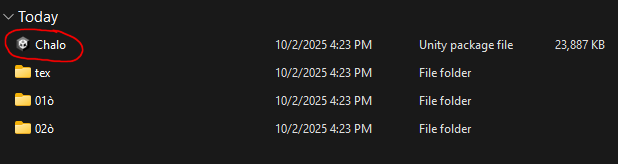
          1. import chalo's unity package file into unity (Assets > Import package > Custom package...)

          29cbbead-2d67-4dca-873d-ed90f7b038eb-image.png

          dfb3b684-b834-428a-8677-f47db4b29c58-image.png

          1. after the avatar is successfully imported, a folder should appear in your project window, containing all of chalo's textures, materials, meshes, etc.

          147fa88e-49fa-46cf-9053-1018903a56c2-image.png

          1. in chalo's folders, look for the "Chalo" folder. there will be three avatar variants.

          17102942-7cb2-4e56-bb35-53b19166097a-image.png

          i will be using the Chalo2 variant. select then drag and drop the avatar into your project hierarchy.

          https://www.youtube.com/watch?v=bMmkBt6aylY

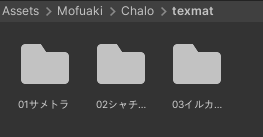
          1. now in chalo's folders, look for the "textmat" folder. inside there will be 3 folders. each folder has a different fur color style.
            (for example, the first folder has chalo's "default" textures and materials. however, if you want chalo's fur to be darker instead, you would use the second folder's textures and materials.)
          550a2df6-14e5-4ad2-85fd-55f7148d40a6-image.png

          1. in whichever folder you decide to use, find the image texture Body, Body2, or Body3
            (the number corresponds to the folder. e.g. the first folder has Body, the second folder has Body2, the third folder has Body3)

          2e14460c-8414-4f5c-b31a-b0123215c534-image.png 1cfbf78a-428d-45ca-b1c1-bc5e17e63fef-image.png 9afbd397-106f-4932-8ac0-76e96a5cb9ed-image.png

          1. select the image and right click it. from the popup, select "Show in Explorer"

          2. your file explorer should open with the body texture selected. right click the image in your file explorer, choose "open with", then choose your photo editor (i'm using paint. net, so i'll select paint. net)

          5dab2cd8-3c9f-4bd1-8fa2-6e411846f043-image.png

          if you're not using windows 11, it may look a little different. for windows 10 or below, it will look like this: 18211fb6-43a8-48b7-a246-aca3c8cd0aa8-image.png
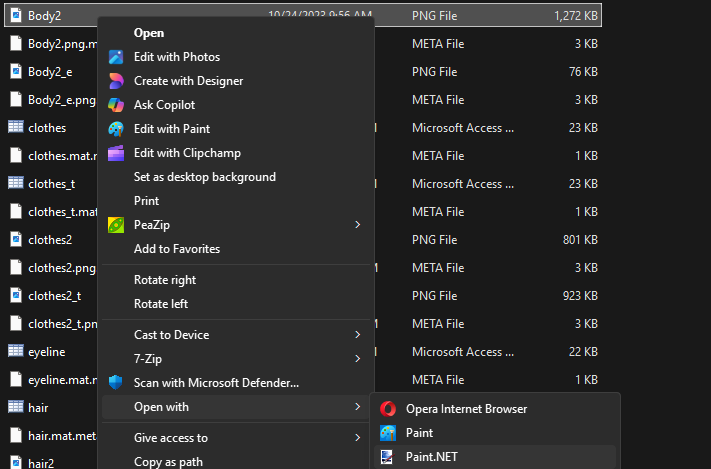
          the same applies, though. right click image and choose "open with > (your photo editing software)"

          1. in paint .net (or whatever photo editing software you're using), follow the steps in the short video i provided below:

          https://www.youtube.com/watch?v=y7u1Mv-_6LE

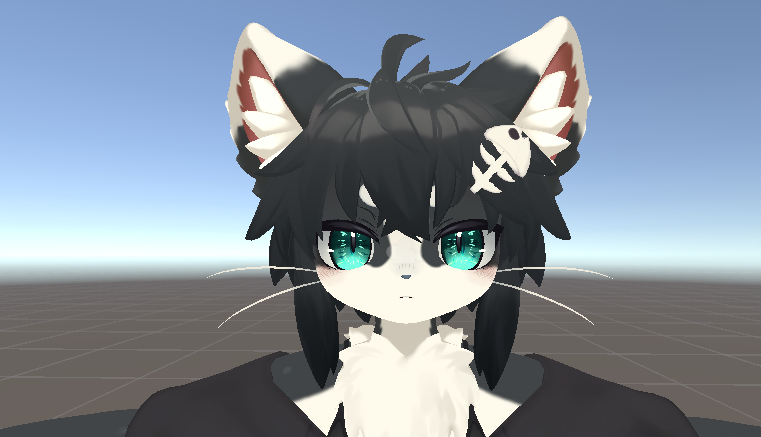
          now if you go back to unity, your chalo avatar should look like this! great job!!! :333
          cfcc8ed7-1d03-4b78-aa64-f3bf1992a8dd-image.png

          i have way too much time on my hands... :')

          sometimes i buy stuff !! every upvote is so appreciated ^^

          1 Reply Last reply
          0
          • O
            O
            oregayno
            wrote on last edited by
            #5

            thank you!!!, i am so sorry to come back here to inform you we were able to do it before you answered us but thank you for teaching ;;;;
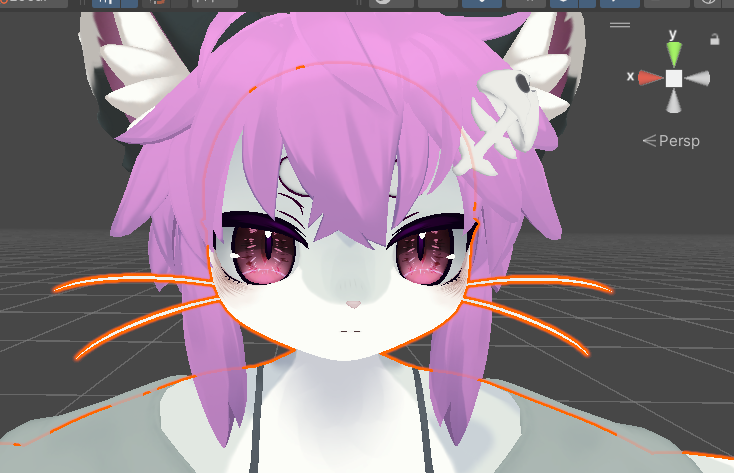
            Screenshot 2025-10-01 170018.png

            blayzahB 1 Reply Last reply
            ❤
            0
            • O oregayno

              thank you!!!, i am so sorry to come back here to inform you we were able to do it before you answered us but thank you for teaching ;;;;

              Screenshot 2025-10-01 170018.png

              blayzahB
              blayzahB
              blayzah
              wrote on last edited by
              #6

              @oregayno of course 🙂

              sometimes i buy stuff !! every upvote is so appreciated ^^

              1 Reply Last reply
              0

              Hello! It looks like you're interested in this conversation, but you don't have an account yet.

              Getting fed up of having to scroll through the same posts each visit? When you register for an account, you'll always come back to exactly where you were before, and choose to be notified of new replies (either via email, or push notification). You'll also be able to save bookmarks and upvote posts to show your appreciation to other community members.

              With your input, this post could be even better 💗

              Register Login
              Reply
              • Reply as topic
              Log in to reply
              • Oldest to Newest
              • Newest to Oldest
              • Most Votes


              • Login

              • Login or register to search.
              • First post
                Last post
              0
              • Categories
              • Recent
              • Tags
              • Popular