
Skip to content
  • Categories
  • Recent
  • Tags
  • Popular
Skins
  • Light
  • Brite
  • Cerulean
  • Cosmo
  • Flatly
  • Journal
  • Litera
  • Lumen
  • Lux
  • Materia
  • Minty
  • Morph
  • Pulse
  • Sandstone
  • Simplex
  • Sketchy
  • Spacelab
  • United
  • Yeti
  • Zephyr
  • Dark
  • Cyborg
  • Darkly
  • Quartz
  • Slate
  • Solar
  • Superhero
  • Vapor

  • Default (Zephyr)
  • No Skin
Collapse
RipperStore Logo
  1. Home
  2. Community
  3. General Questions
  4. How to fix black scleras in PCSS?

How to fix black scleras in PCSS?

Scheduled Pinned Locked Moved General Questions
shaderliltoonpcss shader
8 Posts 3 Posters 2.2k Views
  • Oldest to Newest
  • Newest to Oldest
  • Most Votes
Reply
  • Reply as topic
Log in to reply
This topic has been deleted. Only users with topic management privileges can see it.
  • EmilyUwU777E
    EmilyUwU777E
    EmilyUwU777
    wrote on last edited by
    #1

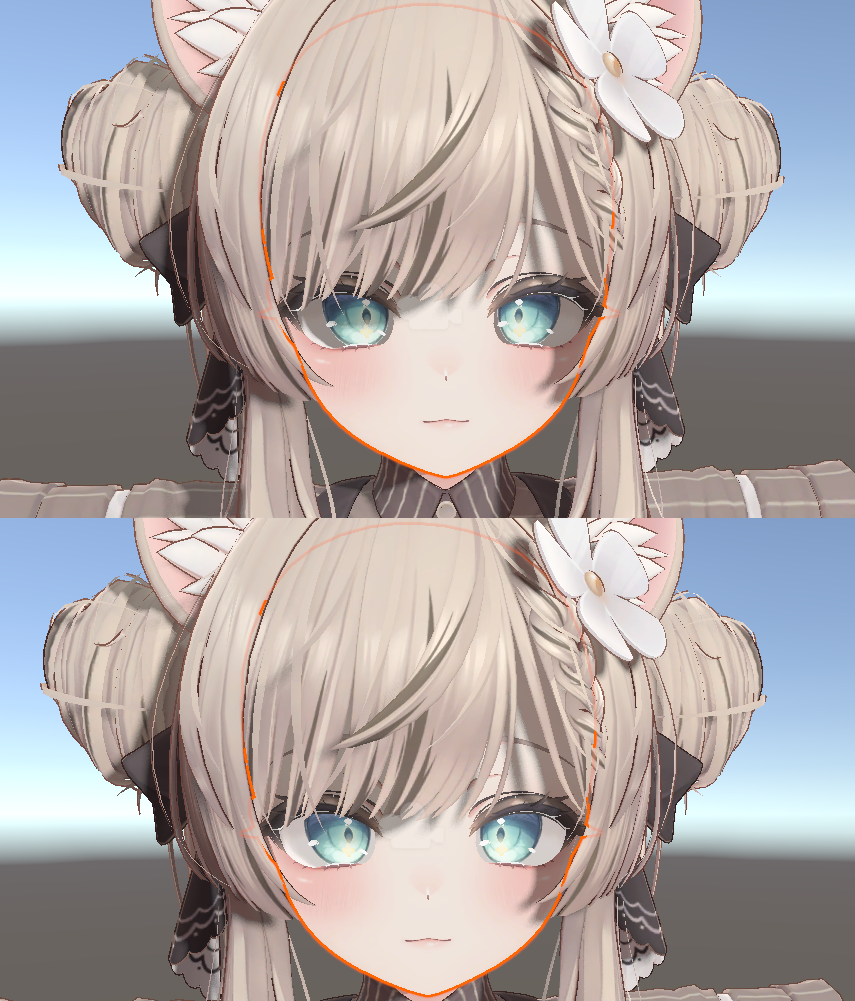
    I need help. When I install PCSS, I get this error where the sclerae turn black.

    I would like to know how to fix it, or at least if this is normal.

    ed3c5466-f85e-412d-8832-ed0736b935d6-image.png

    f3c32e3f-d130-4a31-92b6-823d13952df0-image.png

    1 Reply Last reply
    0
    • T
      T
      tontontan
      wrote on last edited by
      #2

      This is normal. As written on the booth, you must put a mask in the ReceiveMask section of your character. Regarding masks, volunteers are distributing masks for avatars that correspond to the seller's Discord group.

      1 Reply Last reply
      0
      • T
        T
        tontontan
        wrote on last edited by
        #3

        If that's difficult, there should be instructions on how to make a mask in an official location at the booth.

        EmilyUwU777E 1 Reply Last reply
        0
        • T tontontan

          If that's difficult, there should be instructions on how to make a mask in an official location at the booth.

          EmilyUwU777E
          EmilyUwU777E
          EmilyUwU777
          wrote on last edited by
          #4

          @tontontan I already checked the official Discord and found the masks, but I don't know where to put them.
          example:

          ・アバター名:MANUKA
          ・CastMask/ReceiveMask:ReceiveMask
          ・テクスチャの部位(顔/身体等):顔(Manuka_face)
          ・補足:ReceiveMaskStrangth 0.6くらい

          981ccee7-2792-46ee-93ae-145a9f58af89-image.png 7637a660-a1b7-4ff5-acbc-0029823ed960-image.png

          1 Reply Last reply
          0
          • T
            T
            tontontan
            wrote on last edited by
            #5

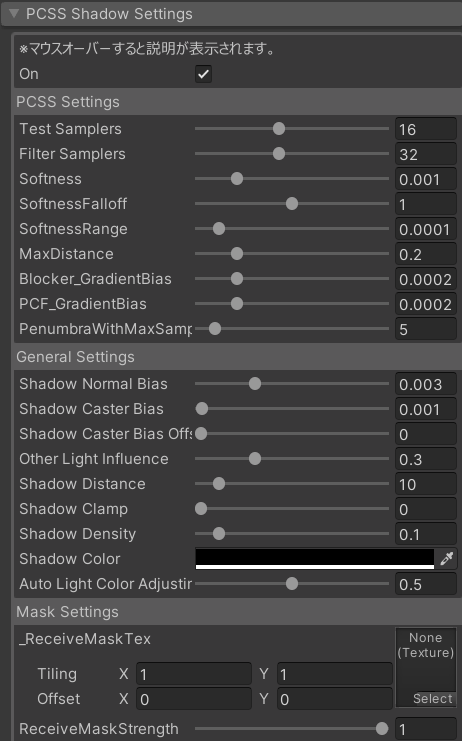
            It depends on the version of PCSS you are using, but a PCSS setting field should have been added to the face body inspector. There should be a list of masks to enter, so just enter the mask in the ReceiveMask field there.
            スクリーンショット 2025-08-17 165056.png

            M 1 Reply Last reply
            1
            • EmilyUwU777E
              EmilyUwU777E
              EmilyUwU777
              wrote on last edited by EmilyUwU777
              #6
              This post is deleted!
              1 Reply Last reply
              0
              • T tontontan

                It depends on the version of PCSS you are using, but a PCSS setting field should have been added to the face body inspector. There should be a list of masks to enter, so just enter the mask in the ReceiveMask field there.
                スクリーンショット 2025-08-17 165056.png

                M
                M
                memies
                wrote on last edited by
                #7

                @tontontan i am trying this and it's not working for me. i do not see the mask applied to the model. is there any other fixes for this issue?

                T 1 Reply Last reply
                0
                • M memies

                  @tontontan i am trying this and it's not working for me. i do not see the mask applied to the model. is there any other fixes for this issue?

                  T
                  T
                  tontontan
                  wrote on last edited by
                  #8

                  @memies Perhaps the mask of the character you are using is different, or you have placed it in the wrong place? Also, the mask may be masking the wrong place. Could you please provide a screenshot or something?

                  1 Reply Last reply
                  0
                  • KaguyaK Kaguya referenced this topic on

                  Hello! It looks like you're interested in this conversation, but you don't have an account yet.

                  Getting fed up of having to scroll through the same posts each visit? When you register for an account, you'll always come back to exactly where you were before, and choose to be notified of new replies (either via email, or push notification). You'll also be able to save bookmarks and upvote posts to show your appreciation to other community members.

                  With your input, this post could be even better 💗

                  Register Login
                  Reply
                  • Reply as topic
                  Log in to reply
                  • Oldest to Newest
                  • Newest to Oldest
                  • Most Votes


                  • Login

                  • Login or register to search.
                  • First post
                    Last post
                  0
                  • Categories
                  • Recent
                  • Tags
                  • Popular