
✔ (FOUND by ghoulin & swagger.pants) Cash by Palace & Money by Luhv
-
-
Here you guys go, money by luhv
-
Here you guys go, money by luhv
-
 A avicollector moved this topic from Gumroad/Payhip Avatars on
-
-
-
@Clara_ i uploaded him fine
-
@Clara_ make sure your using creator companion, add vrcfury, add poi toon shader, but the way palace makes his packages are different, u wanna unzip the package, go into the asset folder and drag the folder that says cash or whatever on it and drag him into unity, he uploaded perfectly fine for me. If you need help just message me and we can figure out a solution
-
@swagger.pants will you drop the quest version too?
@destinie i never got the quest verison
-
-
-
-
-
Here you guys go, money by luhv
-
@swagger.pants can i ask did you have any toggle issues? where if you change world or calibrate some of the cloth are not save and sometimes it untoggles it then u have to toggle it back urself , if u know how to fix it can u tell me
@LunaRaLy Go to the Parameters and make sure the boxes are checked under Saved and Synched for those assets. It sounds like the Saved box isn't checked on those things at least if the changes aren't saving when you change worlds, and if they aren't synched, then others won't see what you're changing.
-
@LunaRaLy Go to the Parameters and make sure the boxes are checked under Saved and Synched for those assets. It sounds like the Saved box isn't checked on those things at least if the changes aren't saving when you change worlds, and if they aren't synched, then others won't see what you're changing.
-
@SweetSangria they're all synced and checked for me
@LunaRaLy Then it might be something they added toggles for via VRCFury instead. If you find that, you can also add "Saved Between Worlds" to those toggle settings.
-
@LunaRaLy Then it might be something they added toggles for via VRCFury instead. If you find that, you can also add "Saved Between Worlds" to those toggle settings.
-
@SweetSangria they re using av3 toggles instead of vrcfury or the manual ones..idk where to fix tht at all
-
@Clara_ make sure your using creator companion, add vrcfury, add poi toon shader, but the way palace makes his packages are different, u wanna unzip the package, go into the asset folder and drag the folder that says cash or whatever on it and drag him into unity, he uploaded perfectly fine for me. If you need help just message me and we can figure out a solution
@swagger.pants I tried everything you said. I've tried EVERYTHING me and several people can think of and still cant upload the avatar I have no idea why... Unity is just throwing an error code saying "Attempted to load the data for an avatar we do not own, clearing blueprint ID". There was no blueprint ID attached.
Please I have been at this for literally 6 days now... Thinking that a missing script was the issue.... a firewall was an issue... importing the 7 zip file into unity rather than dragging the unzipped file... doing what you mentioned with dragging the cash folder, (however the "Cash" folder doesn't have the Unity package in it. The "Asset" folder does. I dragging everything several times.
-
@swagger.pants I tried everything you said. I've tried EVERYTHING me and several people can think of and still cant upload the avatar I have no idea why... Unity is just throwing an error code saying "Attempted to load the data for an avatar we do not own, clearing blueprint ID". There was no blueprint ID attached.
Please I have been at this for literally 6 days now... Thinking that a missing script was the issue.... a firewall was an issue... importing the 7 zip file into unity rather than dragging the unzipped file... doing what you mentioned with dragging the cash folder, (however the "Cash" folder doesn't have the Unity package in it. The "Asset" folder does. I dragging everything several times.
@Shochain I would suggest removing that proyect and create a different one, then import all the stuff and try to see if u can








 (FOUND by ghoulin & swagger.pants) Cash by Palace & Money by Luhv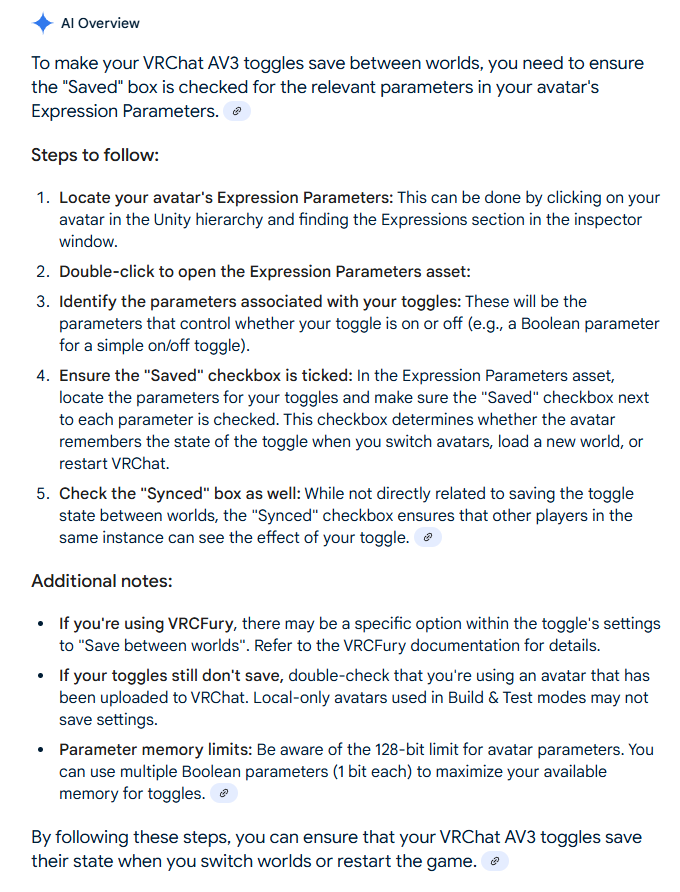

Hello! It looks like you're interested in this conversation, but you don't have an account yet.
Getting fed up of having to scroll through the same posts each visit? When you register for an account, you'll always come back to exactly where you were before, and choose to be notified of new replies (either via email, or push notification). You'll also be able to save bookmarks and upvote posts to show your appreciation to other community members.
With your input, this post could be even better 💗
Register Login