Skip to content
  • Categories
  • Recent
  • Tags
  • Popular
Skins
  • Light
  • Brite
  • Cerulean
  • Cosmo
  • Flatly
  • Journal
  • Litera
  • Lumen
  • Lux
  • Materia
  • Minty
  • Morph
  • Pulse
  • Sandstone
  • Simplex
  • Sketchy
  • Spacelab
  • United
  • Yeti
  • Zephyr
  • Dark
  • Cyborg
  • Darkly
  • Quartz
  • Slate
  • Solar
  • Superhero
  • Vapor

  • Default (Zephyr)
  • No Skin
Collapse
RipperStore Logo
  1. Home
  2. Assets
  3. Found Avatars and Assets
  4. ✔ (FOUND by ghoulin & swagger.pants) Cash by Palace & Money by Luhv

✔ (FOUND by ghoulin & swagger.pants) Cash by Palace & Money by Luhv

Scheduled Pinned Locked Moved Found Avatars and Assets
couplematching
51 Posts 31 Posters 8.7k Views 27 Watching
  • Oldest to Newest
  • Newest to Oldest
  • Most Votes
Reply
  • Reply as topic
Log in to reply
This topic has been deleted. Only users with topic management privileges can see it.
  • IllyaaI
    IllyaaI
    Illyaa
    wrote on last edited by
    #30

    quest fem version please

    1 Reply Last reply
    0
    • S4miraaS S4miraa

      It's impossible to upload cash, i tried everything..

      angelcutmywingsA
      angelcutmywingsA
      angelcutmywings
      wrote on last edited by
      #31

      @Clara_ i uploaded him fine

      1 Reply Last reply
      0
      • S4miraaS S4miraa

        It's impossible to upload cash, i tried everything..

        swagger.pantsS
        swagger.pantsS
        swagger.pants
        wrote on last edited by
        #32

        @Clara_ make sure your using creator companion, add vrcfury, add poi toon shader, but the way palace makes his packages are different, u wanna unzip the package, go into the asset folder and drag the folder that says cash or whatever on it and drag him into unity, he uploaded perfectly fine for me. If you need help just message me and we can figure out a solution

        S 1 Reply Last reply
        1
        • destinieD destinie

          @swagger.pants will you drop the quest version too?

          swagger.pantsS
          swagger.pantsS
          swagger.pants
          wrote on last edited by
          #33

          @destinie i never got the quest verison

          1 Reply Last reply
          0
          • ZenteshinZ
            ZenteshinZ
            Zenteshin
            wrote on last edited by
            #34

            cant download cash from pixel drain for some reason, can somebody put the file in work upload or a google drive tyvm if anybody can

            1 Reply Last reply
            0
            • kebab1K
              kebab1K
              kebab1
              wrote on last edited by
              #35

              new cash file?

              1 Reply Last reply
              0
              • kita_ioK
                kita_ioK
                kita_io
                wrote on last edited by
                #36

                New files bump

                1 Reply Last reply
                0
                • P
                  P
                  Pixelgra
                  wrote on last edited by
                  #37

                  Someone have te file of cash with ft?

                  1 Reply Last reply
                  0
                  • swagger.pantsS swagger.pants

                    Here you guys go, money by luhv 🔗 Download Link (drive.google.com)

                    L
                    L
                    LunaRaLy
                    wrote on last edited by
                    #38

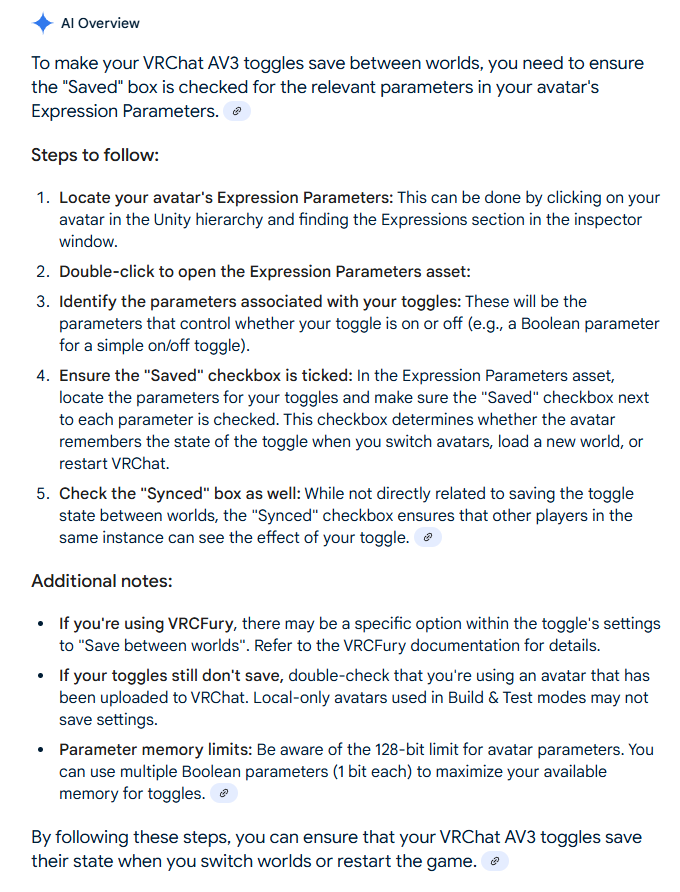
                    @swagger.pants can i ask did you have any toggle issues? where if you change world or calibrate some of the cloth are not save and sometimes it untoggles it then u have to toggle it back urself , if u know how to fix it can u tell me

                    SweetSangriaS 1 Reply Last reply
                    0
                    • L LunaRaLy

                      @swagger.pants can i ask did you have any toggle issues? where if you change world or calibrate some of the cloth are not save and sometimes it untoggles it then u have to toggle it back urself , if u know how to fix it can u tell me

                      SweetSangriaS
                      SweetSangriaS
                      SweetSangria
                      wrote on last edited by
                      #39

                      @LunaRaLy Go to the Parameters and make sure the boxes are checked under Saved and Synched for those assets. It sounds like the Saved box isn't checked on those things at least if the changes aren't saving when you change worlds, and if they aren't synched, then others won't see what you're changing.

                      Upvotes always appreciated! <3

                      L 1 Reply Last reply
                      0
                      • SweetSangriaS SweetSangria

                        @LunaRaLy Go to the Parameters and make sure the boxes are checked under Saved and Synched for those assets. It sounds like the Saved box isn't checked on those things at least if the changes aren't saving when you change worlds, and if they aren't synched, then others won't see what you're changing.

                        L
                        L
                        LunaRaLy
                        wrote on last edited by
                        #40

                        @SweetSangria they're all synced and checked for me

                        SweetSangriaS 1 Reply Last reply
                        0
                        • L LunaRaLy

                          @SweetSangria they're all synced and checked for me

                          SweetSangriaS
                          SweetSangriaS
                          SweetSangria
                          wrote on last edited by
                          #41

                          @LunaRaLy Then it might be something they added toggles for via VRCFury instead. If you find that, you can also add "Saved Between Worlds" to those toggle settings.

                          Upvotes always appreciated! <3

                          L 1 Reply Last reply
                          0
                          • SweetSangriaS SweetSangria

                            @LunaRaLy Then it might be something they added toggles for via VRCFury instead. If you find that, you can also add "Saved Between Worlds" to those toggle settings.

                            L
                            L
                            LunaRaLy
                            wrote on last edited by
                            #42

                            @SweetSangria they re using av3 toggles instead of vrcfury or the manual ones..idk where to fix tht at all

                            SweetSangriaS 1 Reply Last reply
                            0
                            • L LunaRaLy

                              @SweetSangria they re using av3 toggles instead of vrcfury or the manual ones..idk where to fix tht at all

                              SweetSangriaS
                              SweetSangriaS
                              SweetSangria
                              wrote on last edited by
                              #43

                              @LunaRaLy said in ✔ (FOUND by ghoulin & swagger.pants) Cash by Palace & Money by Luhv:

                              ec2a4737-df16-4bf9-bdd9-c59a123a7ada-image.png

                              Upvotes always appreciated! <3

                              1 Reply Last reply
                              0
                              • swagger.pantsS swagger.pants

                                @Clara_ make sure your using creator companion, add vrcfury, add poi toon shader, but the way palace makes his packages are different, u wanna unzip the package, go into the asset folder and drag the folder that says cash or whatever on it and drag him into unity, he uploaded perfectly fine for me. If you need help just message me and we can figure out a solution

                                S
                                S
                                Shochain
                                wrote on last edited by
                                #44

                                @swagger.pants I tried everything you said. I've tried EVERYTHING me and several people can think of and still cant upload the avatar I have no idea why... Unity is just throwing an error code saying "Attempted to load the data for an avatar we do not own, clearing blueprint ID". There was no blueprint ID attached.

                                Please I have been at this for literally 6 days now... Thinking that a missing script was the issue.... a firewall was an issue... importing the 7 zip file into unity rather than dragging the unzipped file... doing what you mentioned with dragging the cash folder, (however the "Cash" folder doesn't have the Unity package in it. The "Asset" folder does. I dragging everything several times.

                                Rare_Kind_R 1 Reply Last reply
                                0
                                • S Shochain

                                  @swagger.pants I tried everything you said. I've tried EVERYTHING me and several people can think of and still cant upload the avatar I have no idea why... Unity is just throwing an error code saying "Attempted to load the data for an avatar we do not own, clearing blueprint ID". There was no blueprint ID attached.

                                  Please I have been at this for literally 6 days now... Thinking that a missing script was the issue.... a firewall was an issue... importing the 7 zip file into unity rather than dragging the unzipped file... doing what you mentioned with dragging the cash folder, (however the "Cash" folder doesn't have the Unity package in it. The "Asset" folder does. I dragging everything several times.

                                  Rare_Kind_R
                                  Rare_Kind_R
                                  Rare_Kind_
                                  wrote on last edited by
                                  #45

                                  @Shochain I would suggest removing that proyect and create a different one, then import all the stuff and try to see if u can

                                  S 1 Reply Last reply
                                  0
                                  • Rare_Kind_R Rare_Kind_

                                    @Shochain I would suggest removing that proyect and create a different one, then import all the stuff and try to see if u can

                                    S
                                    S
                                    Shochain
                                    wrote on last edited by
                                    #46

                                    @Rare_Kind_ yeahh I have done it like 4 times already and still getting the same issue D:. So sad...

                                    I am creating a new project, adding VRCFury, Poiyomi, and the FCT Jerry's Templates. Then dragging the "Asset" Folder from "Cash by Palace" folder I unzipped from the download into Unity and opening up the Unity Package. Touching nothing else the upload still fails.

                                    I tried doing the same as what Swaggerpants said with dragging just the "Cash" Folder that is inside the "Asset" folder but there was no unity package doing it that way.

                                    SweetSangriaS 2 Replies Last reply
                                    0
                                    • S Shochain

                                      @Rare_Kind_ yeahh I have done it like 4 times already and still getting the same issue D:. So sad...

                                      I am creating a new project, adding VRCFury, Poiyomi, and the FCT Jerry's Templates. Then dragging the "Asset" Folder from "Cash by Palace" folder I unzipped from the download into Unity and opening up the Unity Package. Touching nothing else the upload still fails.

                                      I tried doing the same as what Swaggerpants said with dragging just the "Cash" Folder that is inside the "Asset" folder but there was no unity package doing it that way.

                                      SweetSangriaS
                                      SweetSangriaS
                                      SweetSangria
                                      wrote on last edited by
                                      #47

                                      @Shochain You shouldn't be dragging an asset folder, so that gave me an indicator of what's going wrong. I just downloaded the zip file to double check and confirmed. What's going wrong is that this is the whole project, not the unitypackage. Scrap your new projects and everything you've been doing. When the zip file contains file folders like this, you don't create a new project in VCC. You "Add Existing Project" and then select the "Cash by Palace [PC]" file folder. It should already have the VCC packages you need, but you can still manage those if you need to. Open the project and then upload it as normal.

                                      Upvotes always appreciated! <3

                                      1 Reply Last reply
                                      0
                                      • S Shochain

                                        @Rare_Kind_ yeahh I have done it like 4 times already and still getting the same issue D:. So sad...

                                        I am creating a new project, adding VRCFury, Poiyomi, and the FCT Jerry's Templates. Then dragging the "Asset" Folder from "Cash by Palace" folder I unzipped from the download into Unity and opening up the Unity Package. Touching nothing else the upload still fails.

                                        I tried doing the same as what Swaggerpants said with dragging just the "Cash" Folder that is inside the "Asset" folder but there was no unity package doing it that way.

                                        SweetSangriaS
                                        SweetSangriaS
                                        SweetSangria
                                        wrote on last edited by
                                        #48

                                        @Shochain For reference, this shows where you select "Add Existing Project" using the down arrow next to the Create New Project button on the right.

                                        Screenshot 2025-07-15 225600.png

                                        Upvotes always appreciated! <3

                                        1 Reply Last reply
                                        0
                                        • S
                                          S
                                          Shochain
                                          wrote on last edited by
                                          #49

                                          Yeah I've tried it all and it just doesnt want to upload for me. I tried it at the same time with 4 other friends doing the same exact process. For whatever reason I was the only one unable to upload the avatar. I just gave up on cash and uploaded other avatars. Sad cus I really like Cash :c Thanks for all the help.


                                          L 1 Reply Last reply
                                          0

                                          Hello! It looks like you're interested in this conversation, but you don't have an account yet.

                                          Getting fed up of having to scroll through the same posts each visit? When you register for an account, you'll always come back to exactly where you were before, and choose to be notified of new replies (either via email, or push notification). You'll also be able to save bookmarks and upvote posts to show your appreciation to other community members.

                                          With your input, this post could be even better 💗

                                          Register Login
                                          Reply
                                          • Reply as topic
                                          Log in to reply
                                          • Oldest to Newest
                                          • Newest to Oldest
                                          • Most Votes


                                          • Login

                                          • Login or register to search.
                                          • First post
                                            Last post
                                          0
                                          • Categories
                                          • Recent
                                          • Tags
                                          • Popular