Skip to content
  • Categories
  • Recent
  • Tags
  • Popular
Skins
  • Light
  • Brite
  • Cerulean
  • Cosmo
  • Flatly
  • Journal
  • Litera
  • Lumen
  • Lux
  • Materia
  • Minty
  • Morph
  • Pulse
  • Sandstone
  • Simplex
  • Sketchy
  • Spacelab
  • United
  • Yeti
  • Zephyr
  • Dark
  • Cyborg
  • Darkly
  • Quartz
  • Slate
  • Solar
  • Superhero
  • Vapor

  • Default (Zephyr)
  • No Skin
Collapse
RipperStore Logo
  1. Home
  2. Community
  3. General Questions
  4. (SOLVED)Hue/mat change help

(SOLVED)Hue/mat change help

Scheduled Pinned Locked Moved General Questions
hueshifthelp plzunitysolved
3 Posts 2 Posters 335 Views 2 Watching
  • Oldest to Newest
  • Newest to Oldest
  • Most Votes
Reply
  • Reply as topic
Log in to reply
This topic has been deleted. Only users with topic management privileges can see it.
  • I
    I
    inactivr
    wrote on last edited by inactivr
    #1

    My hue shifts works in Gesture manager but not in game? Help???

    Gesture manager

    In Game

    1 Reply Last reply
    0
    • AkiAkiA
      AkiAkiA
      AkiAki
      wrote on last edited by AkiAki
      #2

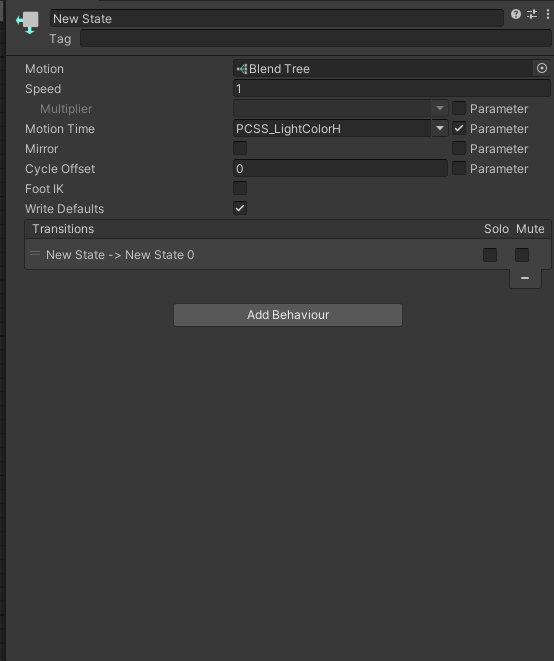
      Im not completely sure how to fix it, it might also be a parameter issue? i had this problem once but i just remade the whole toggles. also in your menu it should be radial it looks like it might also be set up as a button? <33

      it might also need to be set up where the parameter (in the menu is empty and the rotation is the parameter if its already set up as a radial puppet ^^

      also i apologize the only unity i have open currently is one with pcss so im using that as an example ^^

      2376ba9d-66f2-4c83-a72f-3920b54c118e-image.png

      ed0f421e-35b5-4720-b109-392d5c6db0d1-image.png

      52fbd57d-4f59-40c0-8bed-29a9fe1478cc-image.png

      179a6610-eb14-4f7b-937f-c4fd6b122e67-image.png

      ~<33

      I 1 Reply Last reply
      1
      • AkiAkiA AkiAki

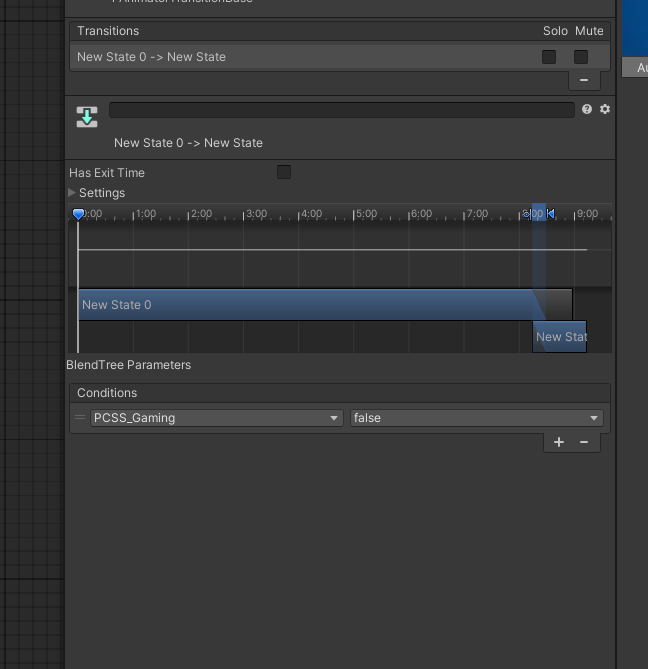
        Im not completely sure how to fix it, it might also be a parameter issue? i had this problem once but i just remade the whole toggles. also in your menu it should be radial it looks like it might also be set up as a button? <33

        it might also need to be set up where the parameter (in the menu is empty and the rotation is the parameter if its already set up as a radial puppet ^^

        also i apologize the only unity i have open currently is one with pcss so im using that as an example ^^
        2376ba9d-66f2-4c83-a72f-3920b54c118e-image.png

        ed0f421e-35b5-4720-b109-392d5c6db0d1-image.png

        52fbd57d-4f59-40c0-8bed-29a9fe1478cc-image.png

        179a6610-eb14-4f7b-937f-c4fd6b122e67-image.png

        I
        I
        inactivr
        wrote on last edited by
        #3

        @AkiAki tyyy this fixed it!!!

        1 Reply Last reply
        0

        Hello! It looks like you're interested in this conversation, but you don't have an account yet.

        Getting fed up of having to scroll through the same posts each visit? When you register for an account, you'll always come back to exactly where you were before, and choose to be notified of new replies (either via email, or push notification). You'll also be able to save bookmarks and upvote posts to show your appreciation to other community members.

        With your input, this post could be even better 💗

        Register Login
        Reply
        • Reply as topic
        Log in to reply
        • Oldest to Newest
        • Newest to Oldest
        • Most Votes


        • Login

        • Login or register to search.
        • First post
          Last post
        0
        • Categories
        • Recent
        • Tags
        • Popular