Skip to content
  • Categories
  • Recent
  • Tags
  • Popular
Skins
  • Light
  • Brite
  • Cerulean
  • Cosmo
  • Flatly
  • Journal
  • Litera
  • Lumen
  • Lux
  • Materia
  • Minty
  • Morph
  • Pulse
  • Sandstone
  • Simplex
  • Sketchy
  • Spacelab
  • United
  • Yeti
  • Zephyr
  • Dark
  • Cyborg
  • Darkly
  • Quartz
  • Slate
  • Solar
  • Superhero
  • Vapor

  • Default (Zephyr)
  • No Skin
Collapse
RipperStore Logo
  1. Home
  2. Community
  3. General Questions
  4. Is there a way to fix chunky eyelashes on quest?

Is there a way to fix chunky eyelashes on quest?

Scheduled Pinned Locked Moved General Questions
10 Posts 7 Posters 2.2k Views
  • Oldest to Newest
  • Newest to Oldest
  • Most Votes
Reply
  • Reply as topic
Log in to reply
This topic has been deleted. Only users with topic management privileges can see it.
  • MasterBaiterM
    MasterBaiterM
    MasterBaiter
    wrote on last edited by
    #1

    I’ve had this problem with a few avatars. Whenever I switch it to quest compatible, the eyelashes get all thick and chunky. I’ve tried to see if anyone else has had this problem, but from what I’ve seen it’s impossible to fix in unity? Please help, any help at all is much appreciated and needed!
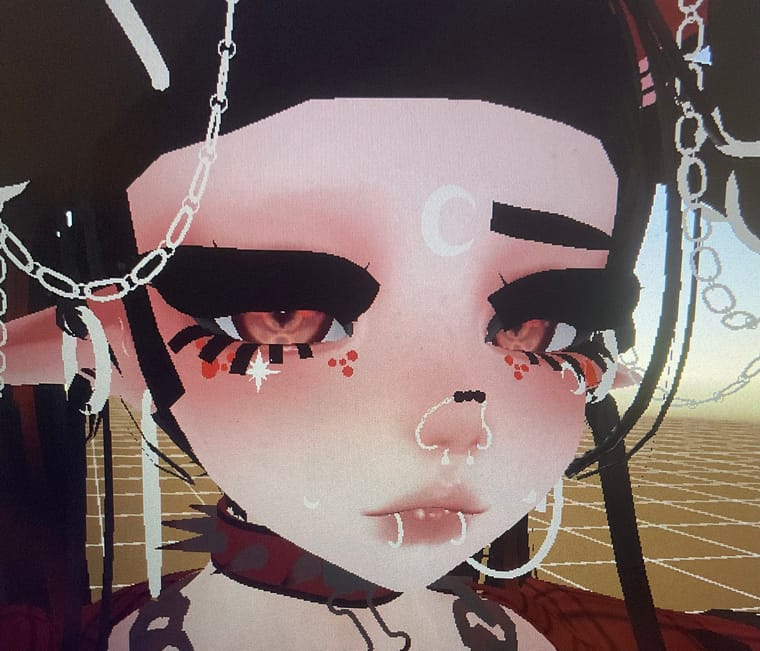
    IMG_5781.jpeg

    1 Reply Last reply
    0
    • pantsyourmomP
      pantsyourmomP
      pantsyourmom
      wrote on last edited by
      #2

      er unfortunately the only fix i find is sometimes switching the material to transclipping on the eyelashes. Doesnt always work though

      MasterBaiterM 1 Reply Last reply
      0
      • ?
        ?
        A Former User
        wrote on last edited by
        #3

        the head might have a blendshape for quest eyelashes

        MasterBaiterM 1 Reply Last reply
        0
        • ? A Former User

          the head might have a blendshape for quest eyelashes

          MasterBaiterM
          MasterBaiterM
          MasterBaiter
          wrote on last edited by
          #4

          @Clown the avatar itself isn’t quest compatible, but I’m trying to switch it to quest

          1 Reply Last reply
          0
          • pantsyourmomP pantsyourmom

            er unfortunately the only fix i find is sometimes switching the material to transclipping on the eyelashes. Doesnt always work though

            MasterBaiterM
            MasterBaiterM
            MasterBaiter
            wrote on last edited by
            #5

            @pantsyourmom do you find that option in the shaders? I’m sorry I’m a bit new to uploading 😭

            pantsyourmomP 1 Reply Last reply
            0
            • MasterBaiterM MasterBaiter

              @pantsyourmom do you find that option in the shaders? I’m sorry I’m a bit new to uploading 😭

              pantsyourmomP
              pantsyourmomP
              pantsyourmom
              wrote on last edited by
              #6

              @BallSweat yeah in the material theres a bar that says "opaque" and you can switch it the transclipping usually, but thats also assuming the eyelashes are seperate from the face mesh

              1 Reply Last reply
              0
              • noirN
                noirN
                noir
                wrote on last edited by
                #7

                if you're using quest shaders, none of the vrchat shaders have the ability to switch to "Trans clipping" or "transparent"
                That mesh is just how most creators do eyelashes bc its easier to do a texture than model the individual eyelashes

                You can't really get around it other than using a modded sdk or using the Vrchat Mobile Particle shaders which im not even sure shows up right on quest LOL

                1 Reply Last reply
                0
                • bluebunnyB
                  bluebunnyB
                  bluebunny
                  wrote on last edited by
                  #8

                  There is no way to fix this for quest unfortunately. The best you can do is try to make it a particle Multiply material, but it will look funny.

                  💙booth lover💙

                  Manuka main

                  1 Reply Last reply
                  0
                  • sub_puppyS
                    sub_puppyS
                    sub_puppy
                    wrote on last edited by sub_puppy
                    #9

                    use vrchat > particle > multiply
                    vrchat recently made it so we can see transparent things if you use the vrchat particle shader. I know this because I am quest and I quest convert avatars VERY often. Also that eyebrow dissapearing is because backface culling, as of I know only can be fixed in blender by solidifying the mesh. (please tell me if theres another way to fix backface culling for quest)

                    Average Chiffon and Manuka User

                    1 Reply Last reply
                    0
                    • KinoStalksK
                      KinoStalksK
                      KinoStalks
                      wrote last edited by KinoStalks
                      #10

                      ^^ Hii, quest uploader and professional here!!

                      Switching a pc model's eyelashes to quest may be difficult depending on the model (obviously), what youd WANNA see first is making the eyelash material into vrchat,mobile,particle and multiply. Most pc models will have a texture of the eyelash shape, if not you can create your own and I'd be glad to help if needed. If it does, perfect!, commonly the eyelashes are white and the background is black, nono we need the lashes black and the background white. I use GIMP editor, a free pc editor with no need of paying for anything!, I suggest looking up "eyelash png" on ur chrome or wtv and using that as the texture instead!, stack and layer however you like and angle them where the lashes would be on the OG texture of them. Some models do have a "quest eyelashes" blendshape, but most PC only ones wont unless its starlight or amelia head :C,

                      If anyone needs a video example or better explaining through anything else, contact me on discord!
                      0_0kino (alt account for saftey reasons), reply to my comment if you added me (up for anyone) if youd want some more help!! ❤ have fun quest converting and creation lovelies

                      (sorry im two years late, traffic was wild, bump pls<3)

                      1 Reply Last reply
                      0

                      Hello! It looks like you're interested in this conversation, but you don't have an account yet.

                      Getting fed up of having to scroll through the same posts each visit? When you register for an account, you'll always come back to exactly where you were before, and choose to be notified of new replies (either via email, or push notification). You'll also be able to save bookmarks and upvote posts to show your appreciation to other community members.

                      With your input, this post could be even better 💗

                      Register Login
                      Reply
                      • Reply as topic
                      Log in to reply
                      • Oldest to Newest
                      • Newest to Oldest
                      • Most Votes


                      • Login

                      • Login or register to search.
                      • First post
                        Last post
                      0
                      • Categories
                      • Recent
                      • Tags
                      • Popular