
anyone knwo how to fix lil Toon shader breaking after exporting an avi from blender back into unity
-
plzzzzzz i don't know what to doooooooo
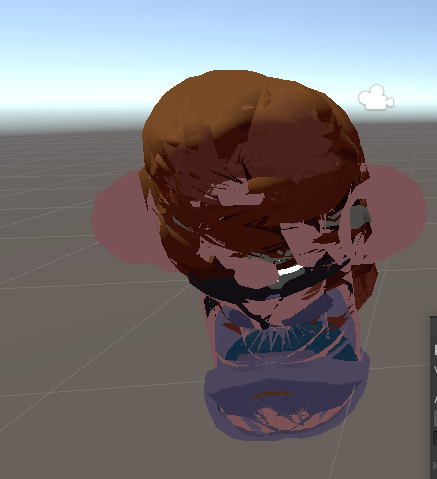
-
what the heck happen there?
it looks like encrypted aviI'm bad at understanding english word
I fix .vrca/.vrcw stuff for free and for fun! Depending on file, every outcome and vary might be different than the original avatar has due to the toggles and much more, send me a pm if you need an avi that need to fix or cracking a password locked avatar or send me .vrca file or through my pms and i will extract/fix them for you!
request is CLOSED, only on unencrypted __data file aka .vrca or .vrcw
-
@Reym no clue it happens every time i try to use lil Toon shades after i put a model in blender
-
Have you tried other shaders?
I'm bad at understanding english word
I fix .vrca/.vrcw stuff for free and for fun! Depending on file, every outcome and vary might be different than the original avatar has due to the toggles and much more, send me a pm if you need an avi that need to fix or cracking a password locked avatar or send me .vrca file or through my pms and i will extract/fix them for you!
request is CLOSED, only on unencrypted __data file aka .vrca or .vrcw
-
@Reym they work its just that its supposed to use that shader so it looks the best with it
-
looks like its the outline on the shader, just go to that in the materials and either turn it down (ie. 0.00003 rather than 0.03) or off
𝘐𝘧 𝘐 𝘩𝘢𝘷𝘦 𝘵𝘩𝘦 𝘧𝘪𝘭𝘦𝘴 𝘧𝘰𝘳 𝘢𝘯 𝘢𝘷𝘢𝘵𝘢𝘳, 𝘐 𝘸𝘪𝘭𝘭 𝘱𝘰𝘴𝘵 𝘵𝘩𝘦𝘮. 𝘐𝘧 𝘐 𝘩𝘢𝘷𝘦 𝘱𝘰𝘴𝘵𝘦𝘥 𝘵𝘩𝘦𝘮 𝘣𝘦𝘧𝘰𝘳𝘦, 𝘫𝘶𝘴𝘵 𝘋𝘔 𝘮𝘦 𝘢𝘯𝘥 𝘐'𝘭𝘭 𝘴𝘦𝘯𝘥 𝘺𝘰𝘶 𝘢 𝘯𝘦𝘸 𝘭𝘪𝘯𝘬 (𝘪𝘧 𝘐 𝘴𝘵𝘪𝘭𝘭 𝘩𝘢𝘷𝘦 𝘵𝘩𝘦 𝘧𝘪𝘭𝘦𝘴).
𝘗𝘭𝘦𝘢𝘴𝘦 𝘰𝘯𝘭𝘺 𝘣𝘶𝘮𝘱 𝘱𝘰𝘴𝘵𝘴 𝘰𝘯𝘤𝘦 𝘢 𝘥𝘢𝘺 𝘪𝘧 𝘴𝘰𝘮𝘦𝘰𝘯𝘦 𝘩𝘢𝘴 𝘢𝘭𝘳𝘦𝘢𝘥𝘺 𝘣𝘶𝘮𝘱𝘦𝘥 𝘪𝘵, 𝘶𝘯𝘭𝘦𝘴𝘴 𝘺𝘰𝘶'𝘳𝘦 𝘴𝘩𝘰𝘸𝘪𝘯𝘨 𝘪𝘯𝘵𝘦𝘳𝘦𝘴𝘵 𝘪𝘯 𝘵𝘩𝘦 𝘱𝘰𝘴𝘵 𝘧𝘰𝘳 𝘵𝘩𝘦 𝘧𝘪𝘳𝘴𝘵 𝘵𝘪𝘮𝘦, 𝘺𝘰𝘶'𝘳𝘦 𝘫𝘶𝘴𝘵 𝘧𝘭𝘰𝘰𝘥𝘪𝘯𝘨 𝘯𝘰𝘵𝘪𝘧𝘪𝘤𝘢𝘵𝘪𝘰𝘯𝘴 𝘰𝘵𝘩𝘦𝘳𝘸𝘪𝘴𝘦.
-
looks like its the outline on the shader, just go to that in the materials and either turn it down (ie. 0.00003 rather than 0.03) or off
@jackalrabbit okay i will try it
-
that was the problem thank you so much
-
no worries! it does that to me occasionally too, not sure the reasoning but at least its an easy fix
-
To prevent this in the future and keep the outline values at their defaults, Aswell as making sure you dont have to resize any physbone radius values the same way, select "FBX All" When you export your avatar from blender

☾✩☽
she/her! / local mom / Have a wonderful day!! (Not interested in trades, lol. Just share to everyone instead.) Don't forget to upvote your local asset providers!
☾✩☽ -
To prevent this in the future and keep the outline values at their defaults, Aswell as making sure you dont have to resize any physbone radius values the same way, select "FBX All" When you export your avatar from blender
@mom Where in blender is this found? I typed in the search key "transform" and mine looks different.
Hello! It looks like you're interested in this conversation, but you don't have an account yet.
Getting fed up of having to scroll through the same posts each visit? When you register for an account, you'll always come back to exactly where you were before, and choose to be notified of new replies (either via email, or push notification). You'll also be able to save bookmarks and upvote posts to show your appreciation to other community members.
With your input, this post could be even better 💗
Register Login