Skip to content
  • Categories
  • Recent
  • Tags
  • Popular
Skins
  • Light
  • Brite
  • Cerulean
  • Cosmo
  • Flatly
  • Journal
  • Litera
  • Lumen
  • Lux
  • Materia
  • Minty
  • Morph
  • Pulse
  • Sandstone
  • Simplex
  • Sketchy
  • Spacelab
  • United
  • Yeti
  • Zephyr
  • Dark
  • Cyborg
  • Darkly
  • Quartz
  • Slate
  • Solar
  • Superhero
  • Vapor

  • Default (Zephyr)
  • No Skin
Collapse
RipperStore Logo
  1. Home
  2. Off-Topic
  3. Modding
  4. [Release] VRChat Cache Decryptor

[Release] VRChat Cache Decryptor

Scheduled Pinned Locked Moved Modding
vrcadecryptorripping
22 Posts 14 Posters 1.1k Views 21 Watching
  • Oldest to Newest
  • Newest to Oldest
  • Most Votes
Reply
  • Reply as topic
Log in to reply
This topic has been deleted. Only users with topic management privileges can see it.
  • Q
    Q
    qmffha
    wrote last edited by
    #8

    tysm!

    1 Reply Last reply
    0
    • A
      A
      ame.iso
      wrote last edited by
      #9

      usage unclear, files in cache directory untouched after following instructions directly. made sure steam wasn't directly overwriting files, too.

      1 Reply Last reply
      0
      • daswdasD
        daswdasD
        daswdas
        wrote last edited by
        #10

        @ame.iso said:

        usage unclear, files in cache directory untouched after following instructions directly. made sure steam wasn't directly overwriting files, too.

        Grab new file from the OP, just updated the build and clarified the usage steps in the main post.

        1 Reply Last reply
        0
        • M I K O S H IM M I K O S H I

          im slow asf what does this do?

          daswdasD
          daswdasD
          daswdas
          wrote last edited by
          #11

          @M-I-K-O-S-H-I said:

          im slow asf what does this do?

          free furry goon virus

          1 Reply Last reply
          😁
          0
          • D
            D
            dedere
            wrote last edited by
            #12
            This post is deleted!
            1 Reply Last reply
            0
            • D
              D
              dedere
              wrote last edited by
              #13

              how do you open a cached file in unity?

              daswdasD Z 2 Replies Last reply
              0
              • D dedere

                how do you open a cached file in unity?

                daswdasD
                daswdasD
                daswdas
                wrote last edited by
                #14

                @dedere said:

                how do you open a cached file in unity?

                https://github.com/FACS01-01/FACS_Utilities

                1 Reply Last reply
                0
                • D dedere

                  how do you open a cached file in unity?

                  Z
                  Z
                  ZeoZax
                  wrote last edited by
                  #15

                  @dedere rename the __data file to anything and put .vrca at the end and then extract the vrca using sars or asset ripper (i recommend sars)

                  D 1 Reply Last reply
                  0
                  • Z ZeoZax

                    @dedere rename the __data file to anything and put .vrca at the end and then extract the vrca using sars or asset ripper (i recommend sars)

                    D
                    D
                    dedere
                    wrote last edited by
                    #16

                    @ZeoZax im getting an error when using asset ripper, what is sars?

                    1 Reply Last reply
                    0
                    • lenkagamine12L
                      lenkagamine12L
                      lenkagamine12
                      wrote last edited by
                      #17

                      sars relats to sars blacklist is the most i know

                      1 Reply Last reply
                      0
                      • BlightedBirbB
                        BlightedBirbB
                        BlightedBirb
                        wrote last edited by
                        #18

                        does anyone know how to sign the dll ?

                        1 Reply Last reply
                        0
                        • daswdasD daswdas

                          Dumps decrypted avatar and world bundles directly into your VRChat cache as they load in-game.

                          What it does

                          • In-Memory Decryption: Strips encryption keys in memory so VRChat writes clean, unencrypted __data files directly to your disk cache.
                          • FACS Ready: Open dumped __data files directly in tools like FACS without running a separate decryptor.
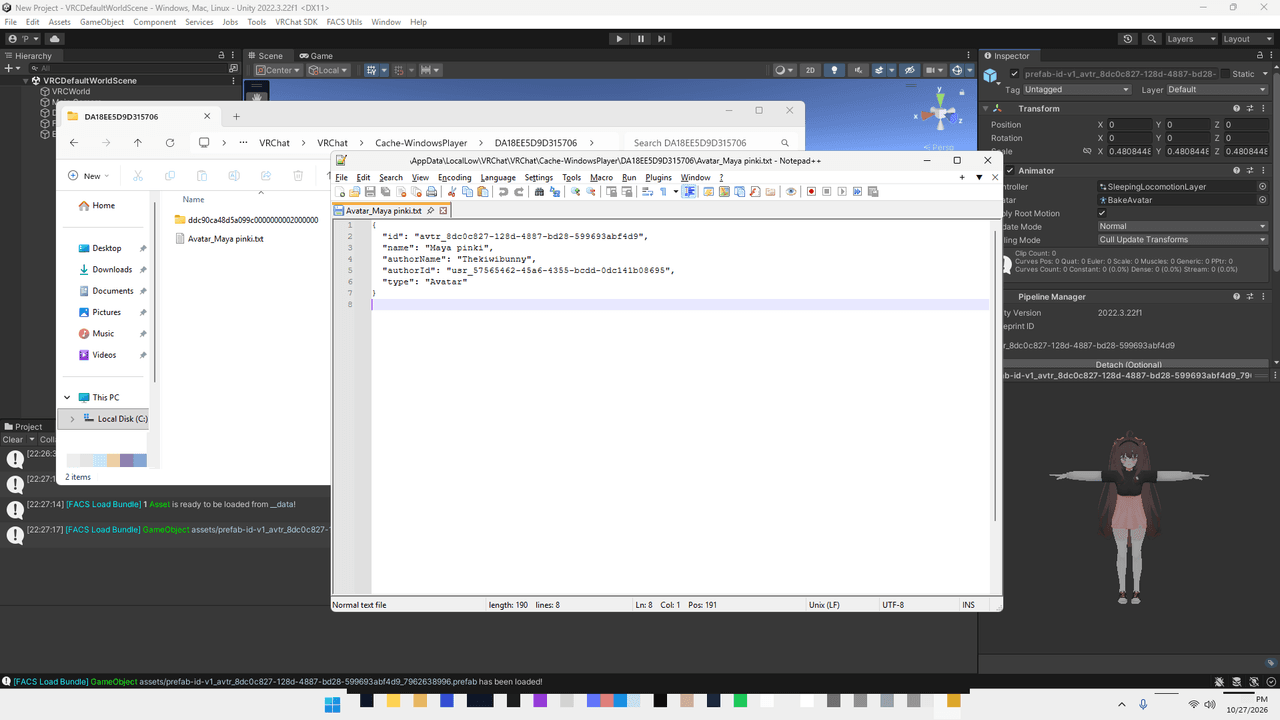
                          • Metadata Sidecar: Drops a companion .json file alongside each bundle containing avatar/world name, author name, IDs, and type.

                          How to use

                          Option 1: Injector (Recommended)
                          Inject killerdaswdas.dll into VRChat.exe with any injector after reaching homeworld.

                          Option 2: Steam overlay swap

                          1. Exit Steam.
                          2. Go to C:\Program Files (x86)\Steam\
                          3. Rename GameOverlayRenderer64.dll to GameOverlayRenderer64.dll.bak.
                          4. Drop killerdaswdas.dll into the folder and rename it to GameOverlayRenderer64.dll.
                          5. If EAC or Windows blocks the unsigned DLL, you'll need to self-sign it yourself.
                          6. Launch Steam, then start VRChat.

                          To revert, delete GameOverlayRenderer64.dll and restore the .bak file.
                          Steam client updates will overwrite this DLL with Valve's original file, so you will need to swap it again after an update.

                          The DLL shuts down automatically if GameAssembly.dll is missing, so it won't touch other Steam games. Use at your own risk regarding EAC.

                          Cache output

                          Location: %LOCALAPPDATA%Low\VRChat\VRChat\Cache-WindowsPlayer\

                          Each loaded bundle creates a cache directory containing:

                          • __data: Unencrypted Unity AssetBundle (open directly in FACS, etc.)
                          • __data.json: Metadata sidecar

                          Avatar Metadata (__data.json)

                          {
                            "id": "avtr_8dc0c827-128d-4887-bd28-599693abf4d9",
                            "name": "Maya pinki",
                            "authorName": "Thekiwibunny",
                            "authorId": "usr_57565462-45a6-4355-bcdd-0dc141b08695",
                            "type": "Avatar"
                          }
                          

                          World Metadata (__data.json)

                          {
                            "id": "wrld_4432ea9b-729c-46e3-8eaf-846aa0a37fdd",
                            "name": "VRChat Home",
                            "authorName": "vrchat",
                            "authorId": "8JoV9XEdpo",
                            "type": "World"
                          }
                          

                          Download

                          Latest Version (v2 - Recommended)

                          Fixes game deadlocks

                          • File: killerdaswdas.dll
                          • Link: Workupload
                          • Password: ripperstore_daswdas1234
                          • Size: 477,184 bytes
                          • SHA-256: 1236D55C0E3C3FBFAC59316F086316C9ECC5B995F5ED3B4504A387B91B6377FA
                          • MD5: 397925898B5C188862EEC1A54E88FCF0

                          Old Version (v1 - Legacy)

                          Initial release (may hang or crash)

                          • File: killerdaswdas.dll
                          • Link: Workupload
                          • Password: ripperstore_daswdas
                          • Size: 486,784 bytes
                          • SHA-256: BB786F322BB354AE2D4809069BCEA97842DBEA021190530CA23D2B38D0CD2D9A
                          • MD5: 104A68AE0CFA800FBC65DBB5C596AFF0

                          gA2r5Tn8iRTy4ejy.png

                          E
                          E
                          EclipseMX
                          wrote last edited by
                          #19

                          @daswdas Dumb question (sorry for my ignorance), but if I have a deleted avatar in my cache, am I still able to get it with the thing?

                          daswdasD 1 Reply Last reply
                          0
                          • E EclipseMX

                            @daswdas Dumb question (sorry for my ignorance), but if I have a deleted avatar in my cache, am I still able to get it with the thing?

                            daswdasD
                            daswdasD
                            daswdas
                            wrote last edited by
                            #20

                            @EclipseMX said:

                            @daswdas Dumb question (sorry for my ignorance), but if I have a deleted avatar in my cache, am I still able to get it with the thing?

                            No, you have to let it download again

                            1 Reply Last reply
                            0
                            • L
                              L
                              LabbitKun
                              wrote last edited by
                              #21

                              The dll seems legit after inspection but unfortunatly, cant bring it to work.
                              Tried several 64 bit injectors but always getting an error (probably due to EAC) when injecting even after self signing the dll.
                              Replacing the steam dll (GameOverlayRenderer64) will make steam update automatically right at start up so it gets overwritten

                              daswdasD 1 Reply Last reply
                              0
                              • L LabbitKun

                                The dll seems legit after inspection but unfortunatly, cant bring it to work.
                                Tried several 64 bit injectors but always getting an error (probably due to EAC) when injecting even after self signing the dll.
                                Replacing the steam dll (GameOverlayRenderer64) will make steam update automatically right at start up so it gets overwritten

                                daswdasD
                                daswdasD
                                daswdas
                                wrote last edited by
                                #22

                                @LabbitKun said:

                                The dll seems legit after inspection but unfortunatly, cant bring it to work.
                                Tried several 64 bit injectors but always getting an error (probably due to EAC) when injecting even after self signing the dll.
                                Replacing the steam dll (GameOverlayRenderer64) will make steam update automatically right at start up so it gets overwritten

                                Tested and working fine on build 1921

                                If you actually have the skills to "inspect" the binary, you should already understand its execution flow and how it works under the hood

                                self-signing won't fool EAC anyway but if you really think your cert is legit, don't swap the file while Steam is closed Launch Steam first, then replace GameOverlayRenderer64.dll Steam only validates files during startup, and the DLL isn't locked yet until you actually boot a game

                                otherwise, build your own loader and bypass EAC properly

                                1 Reply Last reply
                                0

                                Hello! It looks like you're interested in this conversation, but you don't have an account yet.

                                Getting fed up of having to scroll through the same posts each visit? When you register for an account, you'll always come back to exactly where you were before, and choose to be notified of new replies (either via email, or push notification). You'll also be able to save bookmarks and upvote posts to show your appreciation to other community members.

                                With your input, this post could be even better 💗

                                Register Login
                                Reply
                                • Reply as topic
                                Log in to reply
                                • Oldest to Newest
                                • Newest to Oldest
                                • Most Votes


                                • Login

                                • Login or register to search.
                                • First post
                                  Last post
                                0
                                • Categories
                                • Recent
                                • Tags
                                • Popular