
[Release] VRChat Cache Decryptor
-
-
-
-
-
-
-
im slow asf what does this do?
-
-
-
-
-
@dedere rename the __data file to anything and put .vrca at the end and then extract the vrca using sars or asset ripper (i recommend sars)
-
sars relats to sars blacklist is the most i know
-
does anyone know how to sign the dll ?
-
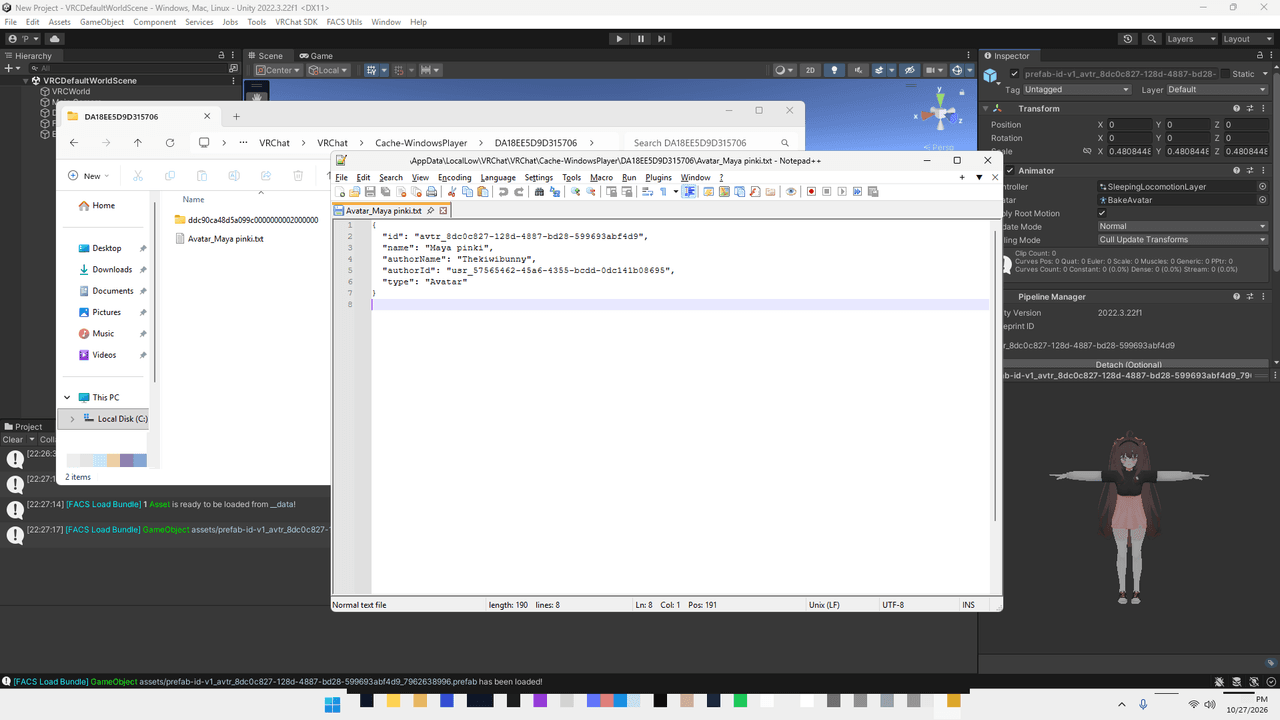
Dumps decrypted avatar and world bundles directly into your VRChat cache as they load in-game.
What it does
- In-Memory Decryption: Strips encryption keys in memory so VRChat writes clean, unencrypted
__datafiles directly to your disk cache. - FACS Ready: Open dumped
__datafiles directly in tools like FACS without running a separate decryptor. - Metadata Sidecar: Drops a companion
.jsonfile alongside each bundle containing avatar/world name, author name, IDs, and type.
How to use
Option 1: Injector (Recommended)
Injectkillerdaswdas.dllintoVRChat.exewith any injector after reaching homeworld.Option 2: Steam overlay swap
- Exit Steam.
- Go to
C:\Program Files (x86)\Steam\ - Rename
GameOverlayRenderer64.dlltoGameOverlayRenderer64.dll.bak. - Drop
killerdaswdas.dllinto the folder and rename it toGameOverlayRenderer64.dll. - If EAC or Windows blocks the unsigned DLL, you'll need to self-sign it yourself.
- Launch Steam, then start VRChat.
To revert, delete
GameOverlayRenderer64.dlland restore the.bakfile.
Steam client updates will overwrite this DLL with Valve's original file, so you will need to swap it again after an update.The DLL shuts down automatically if
GameAssembly.dllis missing, so it won't touch other Steam games. Use at your own risk regarding EAC.Cache output
Location:
%LOCALAPPDATA%Low\VRChat\VRChat\Cache-WindowsPlayer\Each loaded bundle creates a cache directory containing:
__data: Unencrypted Unity AssetBundle (open directly in FACS, etc.)__data.json: Metadata sidecar
Avatar Metadata (
__data.json){ "id": "avtr_8dc0c827-128d-4887-bd28-599693abf4d9", "name": "Maya pinki", "authorName": "Thekiwibunny", "authorId": "usr_57565462-45a6-4355-bcdd-0dc141b08695", "type": "Avatar" }World Metadata (
__data.json){ "id": "wrld_4432ea9b-729c-46e3-8eaf-846aa0a37fdd", "name": "VRChat Home", "authorName": "vrchat", "authorId": "8JoV9XEdpo", "type": "World" }Download
Latest Version (v2 - Recommended)
Fixes game deadlocks
- File:
killerdaswdas.dll - Link: Workupload
- Password:
ripperstore_daswdas1234 - Size: 477,184 bytes
- SHA-256:
1236D55C0E3C3FBFAC59316F086316C9ECC5B995F5ED3B4504A387B91B6377FA - MD5:
397925898B5C188862EEC1A54E88FCF0
Old Version (v1 - Legacy)
Initial release (may hang or crash)
- File:
killerdaswdas.dll - Link: Workupload
- Password:
ripperstore_daswdas - Size: 486,784 bytes
- SHA-256:
BB786F322BB354AE2D4809069BCEA97842DBEA021190530CA23D2B38D0CD2D9A - MD5:
104A68AE0CFA800FBC65DBB5C596AFF0
- In-Memory Decryption: Strips encryption keys in memory so VRChat writes clean, unencrypted
-
@daswdas Dumb question (sorry for my ignorance), but if I have a deleted avatar in my cache, am I still able to get it with the thing?





Hello! It looks like you're interested in this conversation, but you don't have an account yet.
Getting fed up of having to scroll through the same posts each visit? When you register for an account, you'll always come back to exactly where you were before, and choose to be notified of new replies (either via email, or push notification). You'll also be able to save bookmarks and upvote posts to show your appreciation to other community members.
With your input, this post could be even better 💗
Register Login